
Your website may look professional, load correctly on your laptop, and contain useful content. But does that mean search engines can easily discover, understand, and display its pages?
Not necessarily.
A website can have excellent design and still struggle with organic visibility because of indexing problems, slow mobile performance, broken internal links, duplicate pages, or content that doesn't match what people are searching for.
That's where an SEO audit becomes useful.
An SEO audit helps you understand what's working, identify problems that may affect search visibility, and decide which improvements deserve attention first.
The good news? You don't need an expensive software subscription to begin.
In this guide, you'll learn how to do an SEO audit in 2026, which free tools to use, how to identify common technical and content issues, and how to create a practical improvement plan.
Whether you're managing a small business website, an online store, a WordPress blog, or an international service website, these steps will help you make more informed SEO decisions.
1. What Is an SEO Audit?
An SEO audit is a structured review of a website's search engine optimization.
It examines how effectively search engines can access your pages, understand their content, and present them to relevant users.
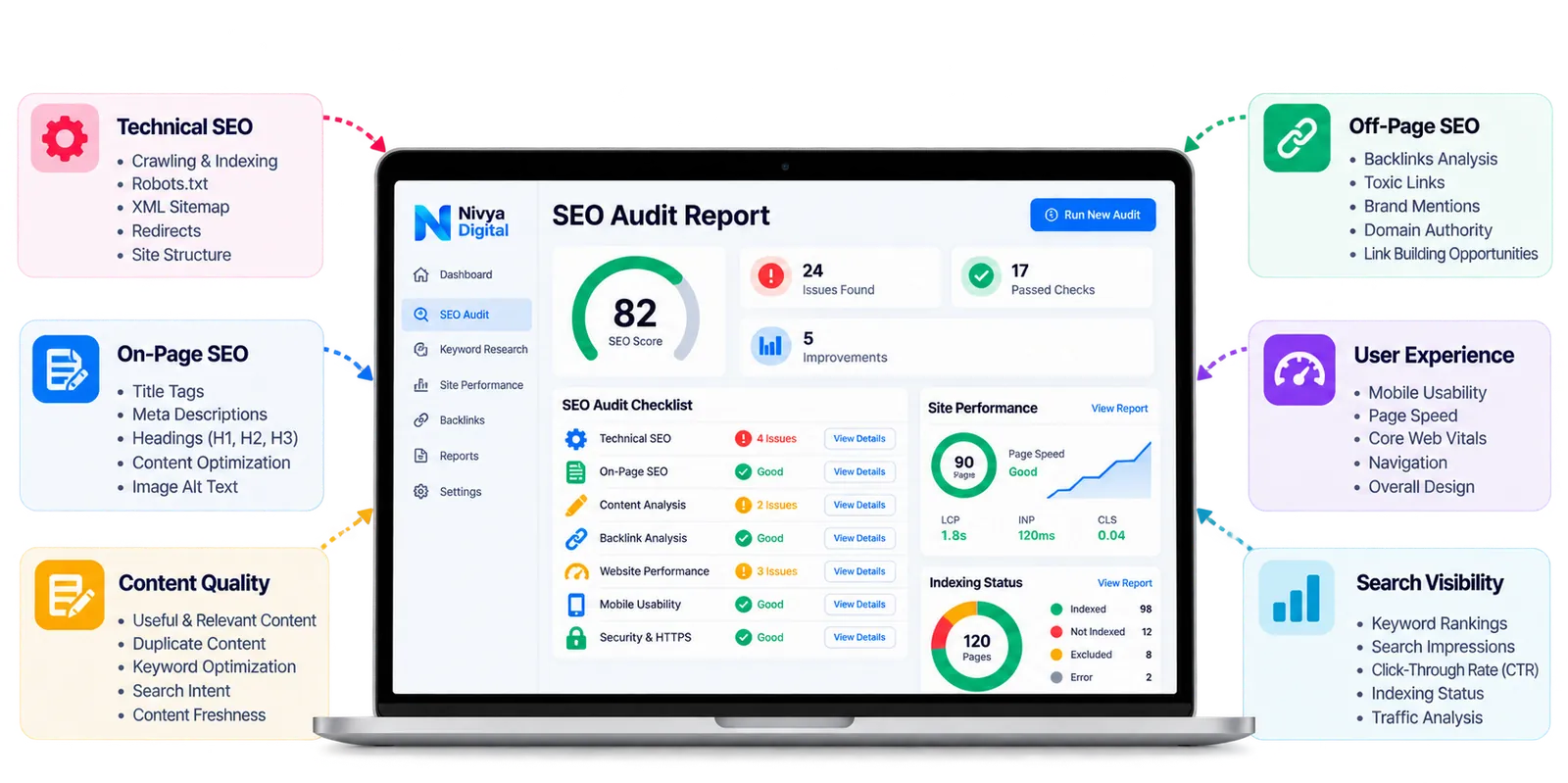
A complete website SEO audit usually covers five areas:
Technical SEO: Crawling, indexing, website structure, redirects, and technical accessibility.
On-page SEO: Titles, headings, content relevance, internal links, and image optimization.
Content quality: Search intent, originality, accuracy, and usefulness.
Off-page SEO: Backlinks, relevant mentions, and potentially harmful link-building practices.
User experience: Mobile usability, loading performance, navigation, and accessibility.
For example, imagine an online clothing store that publishes detailed product pages but receives very little organic traffic.
An audit might reveal that important category pages contain accidental noindex tags, product pages have weak internal links, or the mobile experience is difficult to use.
Instead of guessing why traffic is low, the business can investigate specific issues and prioritize appropriate fixes.
An SEO audit doesn't guarantee better rankings, but it provides evidence for making improvements.
2. Why Is an SEO Audit Important in 2026?
Search behavior continues to evolve, and businesses increasingly need to consider traditional search alongside AI-powered discovery experiences.
However, the fundamentals remain important.
Search engines still need to discover content, access relevant pages, interpret information, and determine whether a result is useful for a particular query.
Regular audits help businesses identify issues before they become larger problems.
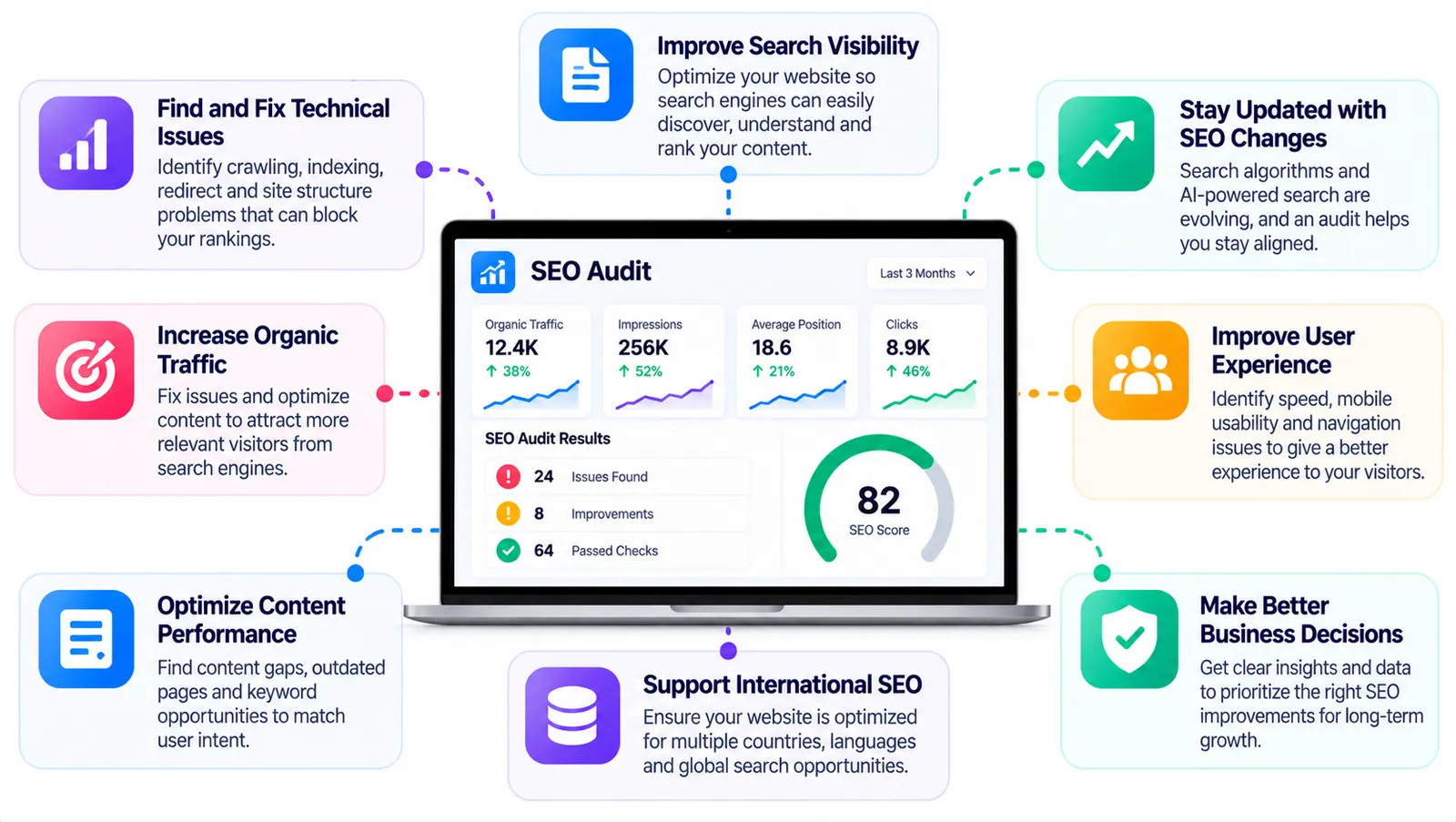
Identify Technical Problems
A broken redirect, inaccessible page, or incorrect robots.txt rule can prevent search engines from accessing important content.
An audit helps uncover these issues.
Improve Content Relevance
Sometimes a page receives impressions but few clicks because its title doesn't communicate what the page offers.
Other pages may attract visitors who are looking for something different from the content provided.
Reviewing search queries and page content helps identify these mismatches.
Improve Website Experience
Visitors expect websites to be readable, accessible, and easy to navigate across devices.
An audit can highlight performance and usability problems that affect those experiences.
Support International SEO
Businesses serving multiple countries should review language targeting, regional content, hreflang implementation where appropriate, and international search performance.
Make Better Marketing Decisions
Instead of investing in random SEO activities, an audit helps prioritize improvements based on potential impact and available resources.
3. Free SEO Audit Tools You Can Use in 2026
You don't need to purchase several SEO platforms before checking your website.
The following tools can help you get started.
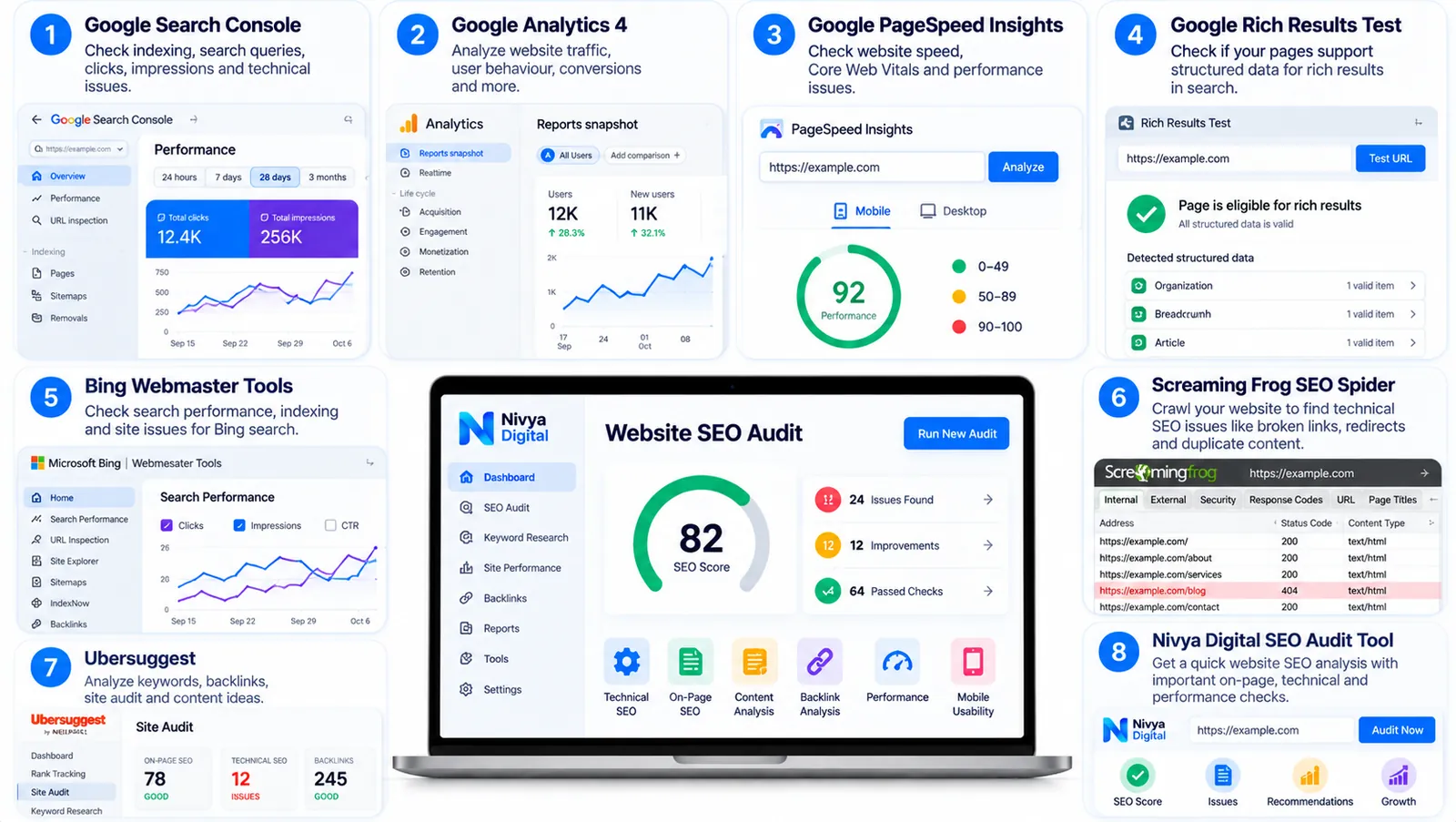
| SEO tool | What it helps you check | Free access |
|---|---|---|
| Google Search Console | Indexing, search queries, clicks, impressions, and technical reports | Free |
| Google Analytics 4 | Website engagement, traffic sources, and conversions | Free standard version |
| Google PageSpeed Insights | Page performance and Core Web Vitals | Free |
| Google Rich Results Test | Supported structured data eligibility | Free |
| Google Trends | Relative search interest and topic trends | Free |
| Bing Webmaster Tools | Bing search performance and site diagnostics | Free |
| Screaming Frog SEO Spider | Website crawling and technical checks | Free tier with limits |
| Nivya Digital SEO Audit Tool | Initial website SEO checks, depending on available features | Check tool availability |
Which SEO Audit Tool Should Beginners Choose?
Start with Google Search Console.
It provides direct information about how Google discovers and indexes your website, as well as which search queries generate impressions and clicks.
Next, use PageSpeed Insights to investigate performance.
For a quick preliminary review, you can also explore the SEO Audit Tool available through Nivya Digital.
Remember that no single automated tool can fully evaluate content quality, business relevance, and every technical SEO issue.
A reliable audit combines tool findings with manual investigation.
4. Step 1: Check Whether Google Can Index Your Website
Before optimizing keywords or rewriting content, confirm that your important pages can appear in Google Search.
A page that cannot be indexed won't receive normal organic visibility in Google's search results.
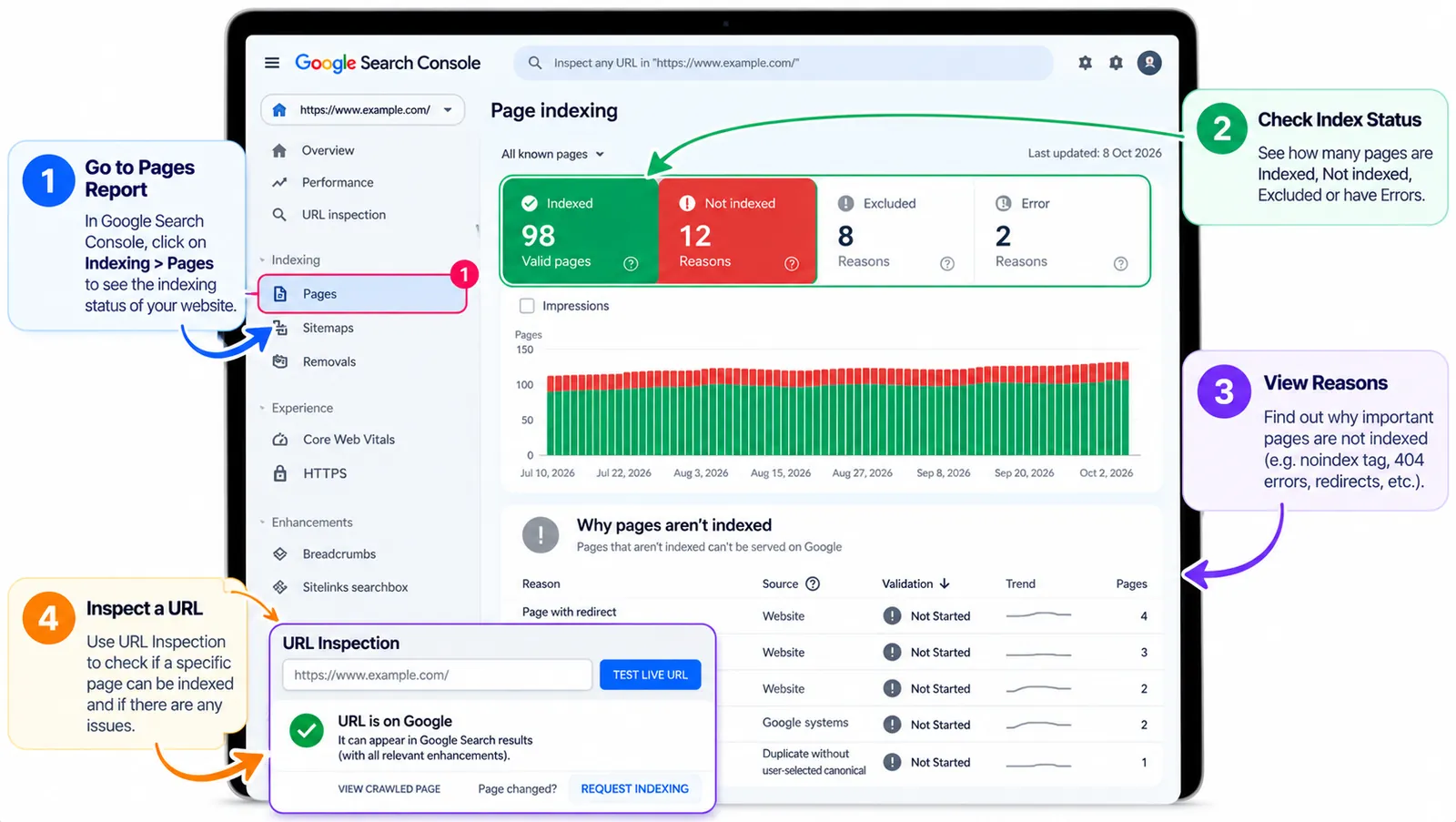
How to Check Indexing in Google Search Console
Open Google Search Console.
Select your verified website property.
Navigate to Indexing → Pages.
Review the indexed and non-indexed URL categories.
Use URL Inspection to investigate important individual pages.
Pay attention to issues such as:
Blocked by robots.txt
Excluded by a noindex directive
Not found (404)
Server errors
Crawled – currently not indexed
Discovered – currently not indexed
Not every non-indexed page represents a problem.
For example, thank-you pages, duplicate URLs, or intentionally private content may not need indexing.
The goal is to ensure that your important public pages are accessible and eligible for indexing.
Practical tip: Create a list of your homepage, main service pages, important categories, and high-value blog articles. Check those URLs individually instead of trying to index every URL on the website.
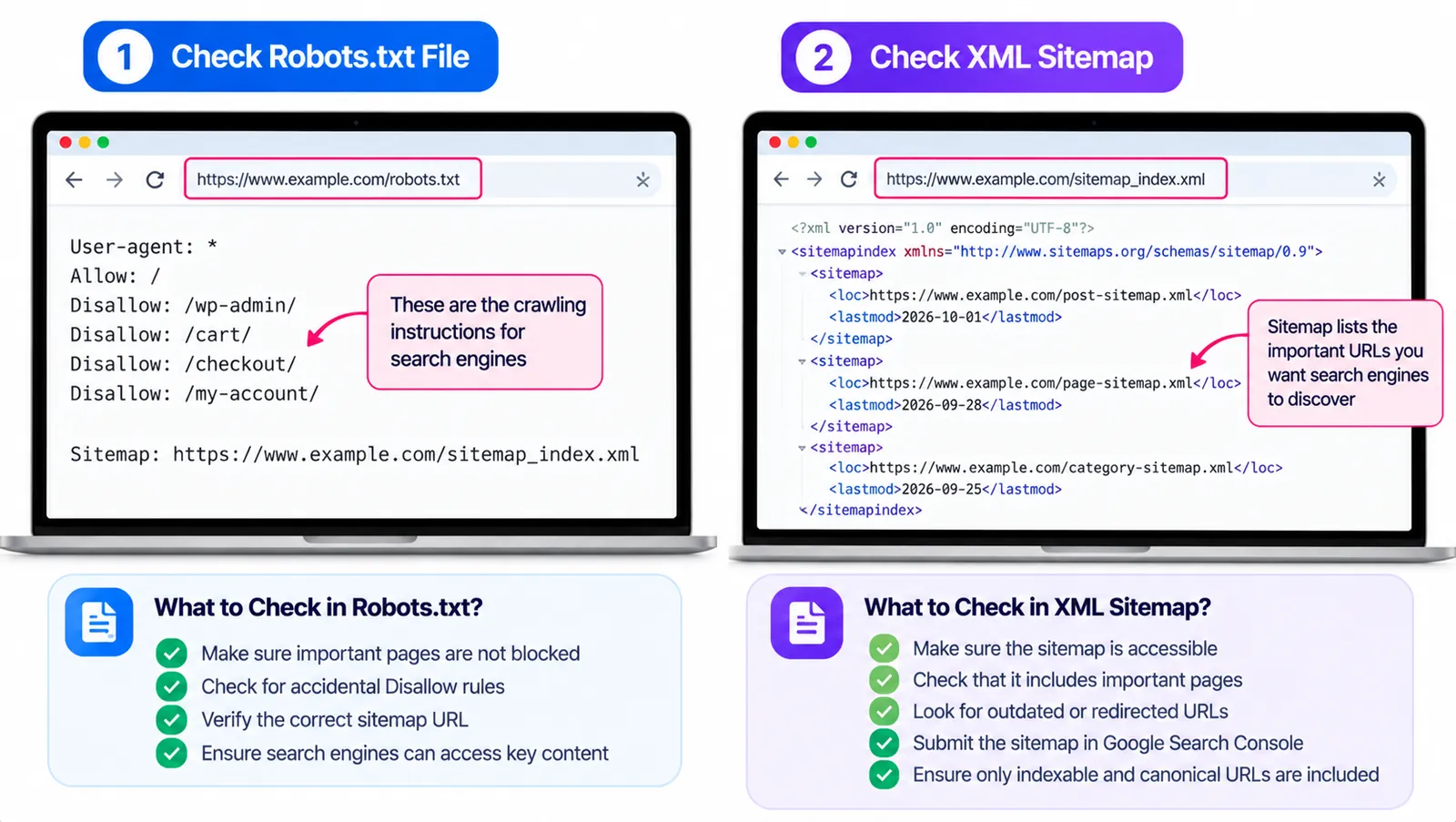
5. Step 2: Review Your Robots.txt and XML Sitemap
Robots.txt and XML sitemaps serve different purposes.
Check Your Robots.txt File
Robots.txt communicates crawling instructions to search engine bots.
You can usually find it at:
https://yourwebsite.com/robots.txt
Review whether any rules accidentally prevent search engines from accessing important content.
For example, a site-wide Disallow: / rule for Googlebot can block crawling across the website.
However, robots.txt isn't a reliable method for keeping sensitive information private, and blocking crawling is different from explicitly requesting no indexing.
Check Your XML Sitemap
An XML sitemap helps search engines discover URLs you want them to know about.
Common WordPress sitemap locations include:
https://yourwebsite.com/sitemap_index.xml
or
https://yourwebsite.com/wp-sitemap.xml
The actual location depends on your website setup.
A useful sitemap should generally contain canonical, indexable URLs that you want search engines to discover.
Review it for outdated redirects, broken pages, and URLs intentionally excluded from search.
You can submit the sitemap through Google Search Console and monitor its processing status.
6. Step 3: Perform a Technical SEO Audit
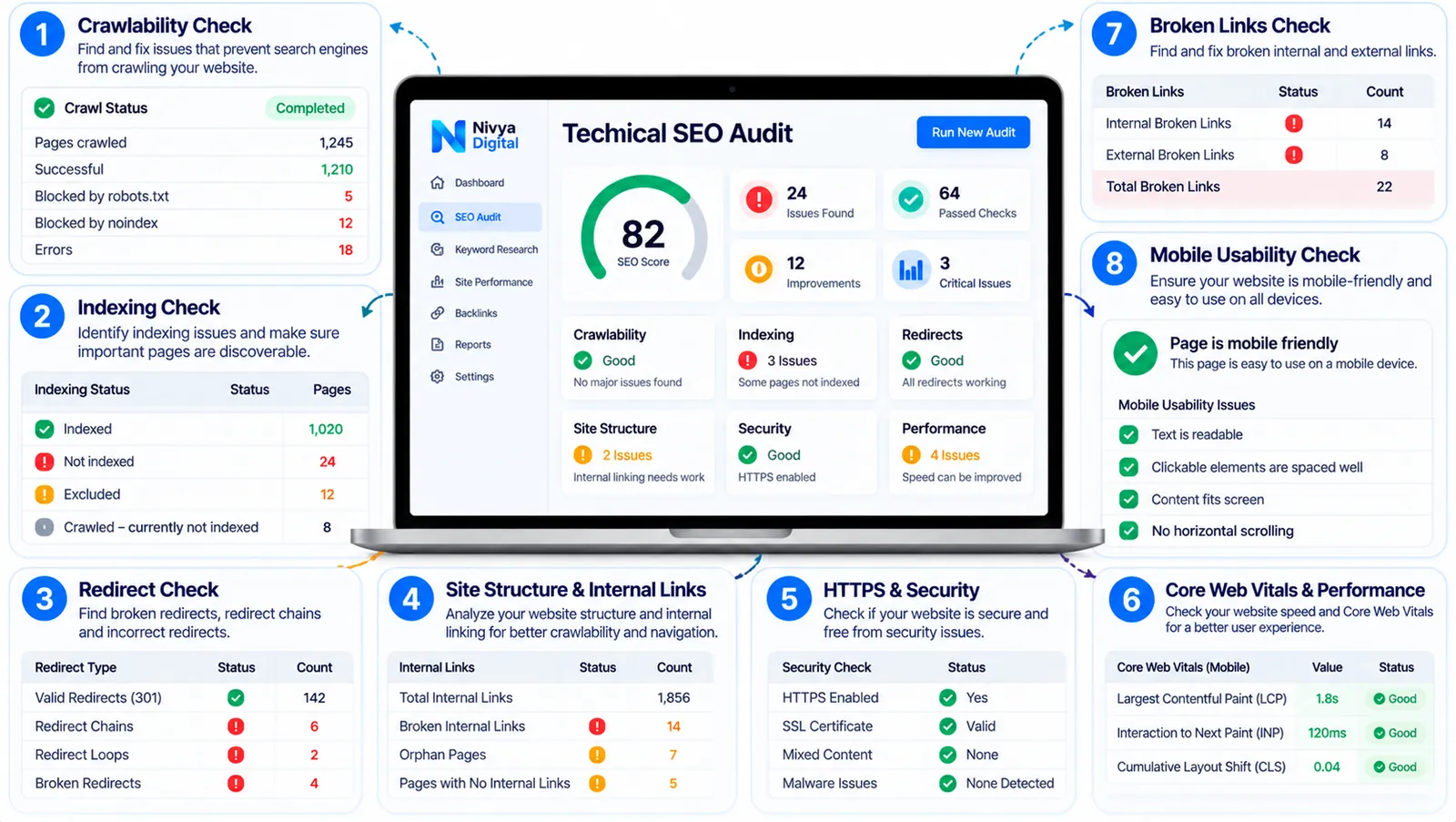
Technical SEO problems can affect crawling, indexing, navigation, and website performance.
Start with the issues most likely to affect important pages.
Check Broken Links
Broken internal links create a frustrating experience and can interfere with navigation.
Use a website crawler or review important pages manually.
When you find a broken link, determine whether the destination should be restored, redirected, or replaced with a relevant working page.
Review Redirects
Redirects help visitors and search engines reach updated URLs.
Check for unnecessary redirect chains, loops, and redirects pointing to irrelevant destinations.
When a page has permanently moved, a suitable permanent redirect is often appropriate.
Check Canonical URLs
A canonical tag indicates your preferred version when similar content is accessible through multiple URLs.
For example, filtering options or tracking parameters may create multiple URLs displaying largely identical content.
Review whether canonical signals are consistent.
Remember that Google can select a different canonical URL if its systems determine another version is more representative.
Review HTTPS and Security
Check that important pages use HTTPS and that visitors aren't encountering certificate warnings.
Also review unexpected redirects, compromised pages, and suspicious injected content.
Check Website Architecture
Important pages should be easy to find through navigation and relevant internal links.
If a valuable service page can only be reached through a complicated series of clicks, consider improving the website structure.
7. Step 4: Analyze Website Speed and Core Web Vitals
A website should work well for real visitors, not just perform well in a testing tool.
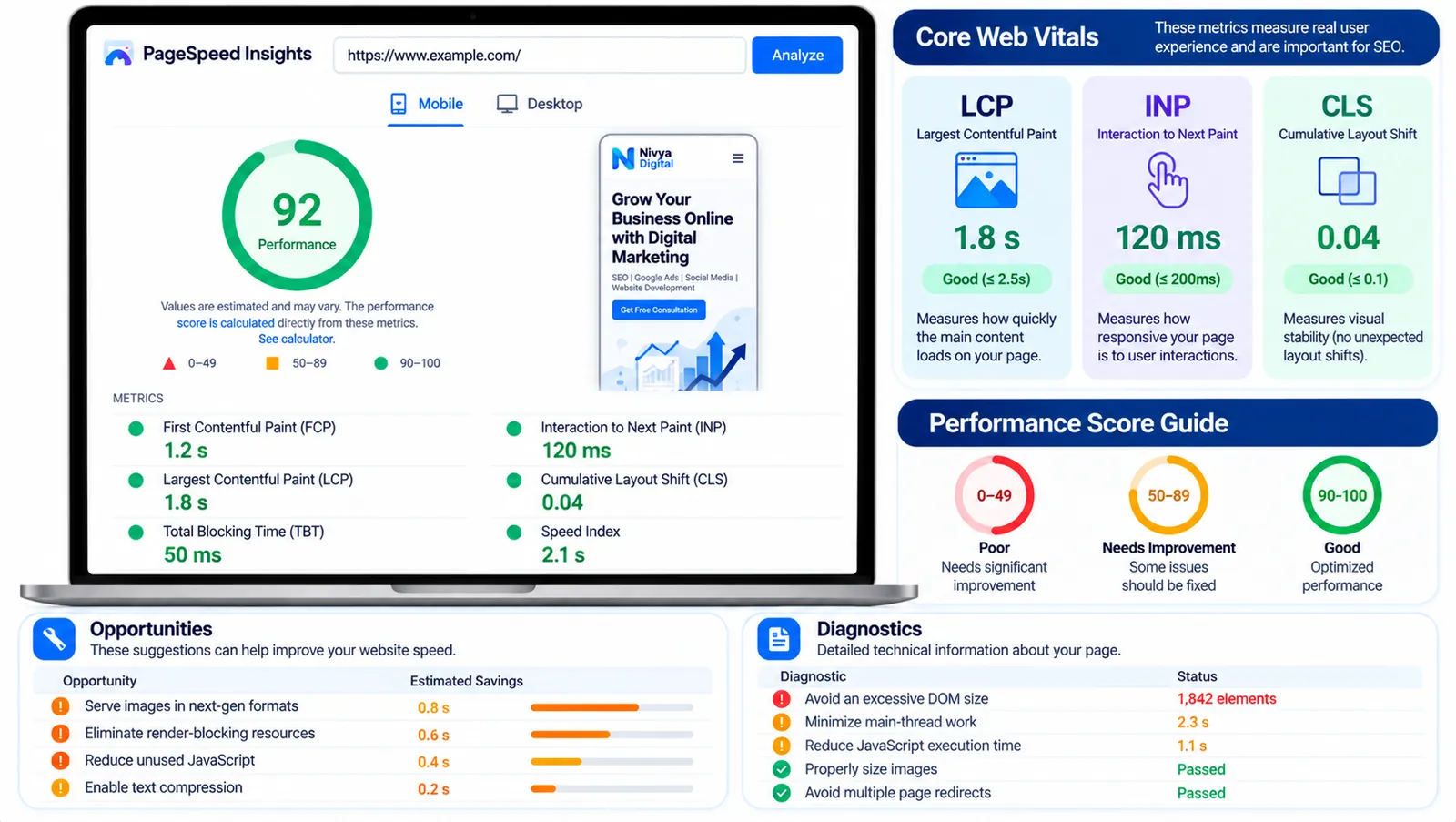
Google PageSpeed Insights helps assess performance on mobile and desktop.
It provides lab diagnostics and, where sufficient information is available, real-user performance data.
Three Core Web Vitals to Review
| Metric | What it measures | Good threshold |
|---|---|---|
| Largest Contentful Paint (LCP) | Main content loading performance | 2.5 seconds or less |
| Interaction to Next Paint (INP) | Responsiveness to user interactions | 200 milliseconds or less |
| Cumulative Layout Shift (CLS) | Unexpected visual movement | 0.1 or less |
These thresholds are evaluated using real-user data at the 75th percentile where available.
Common Website Speed Problems
Oversized images
Unnecessary JavaScript
Excessive third-party scripts
Poor caching
Slow server responses
Render-blocking resources
Heavy page-builder elements
How to Improve Performance
Begin with changes supported by your test results.
Compress and appropriately size images, review unused plugins, improve caching, and reduce unnecessary scripts.
For WordPress websites, avoid installing multiple optimization plugins that perform overlapping tasks without testing compatibility.
Important: A perfect PageSpeed score is not required for SEO success. Focus on meaningful user experience improvements.
8. Step 5: Conduct an On-Page SEO Audit
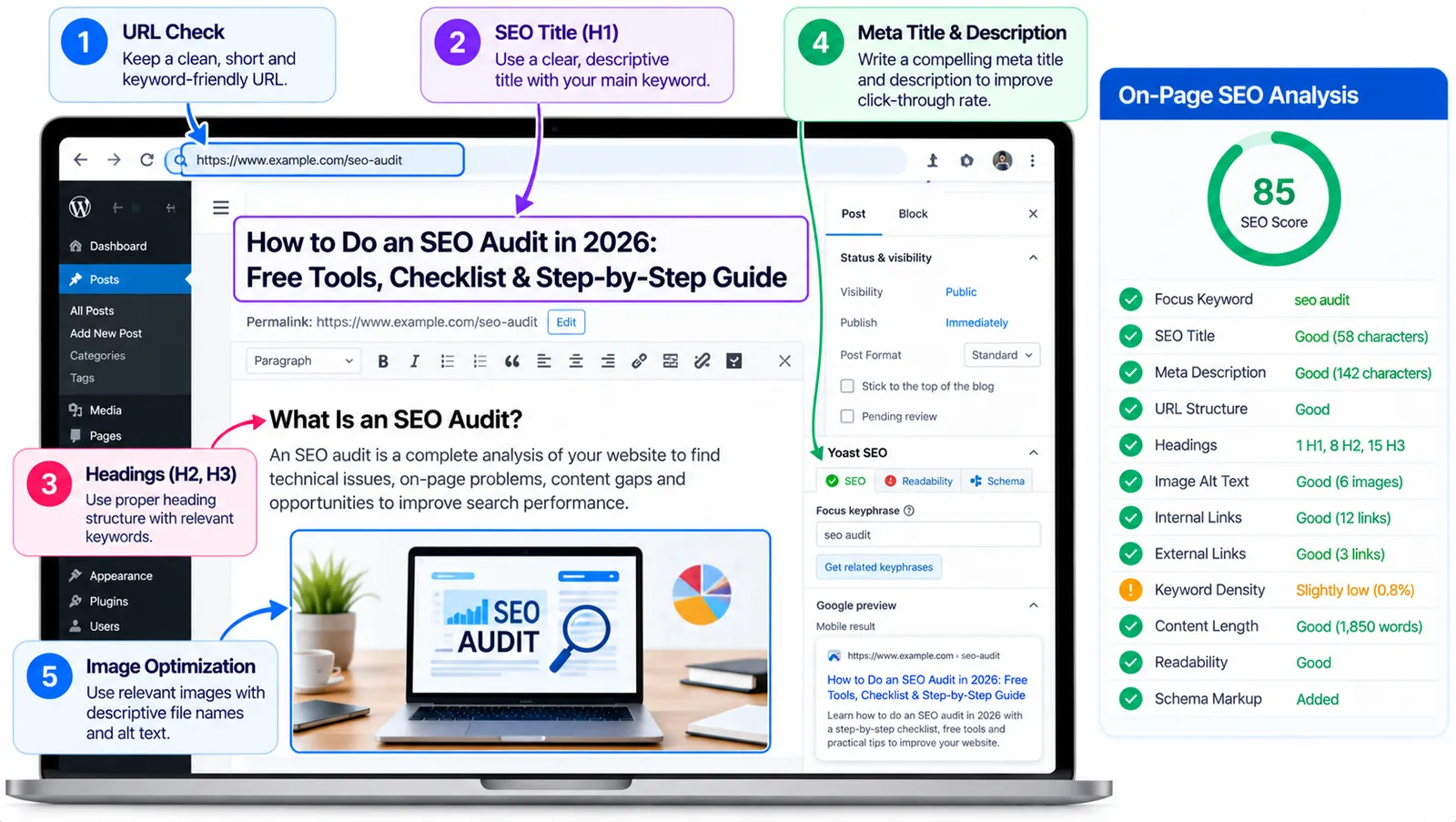
On-page SEO helps search engines and readers understand what each page offers.
Review SEO Titles
Each important page should have a descriptive title that reflects its actual content.
For example:
Weak title: "Our Services"
Better title: "Website Development Services for Small Businesses"
The improved version provides more context.
Avoid inserting multiple unrelated keywords simply to make the title longer.
Review Meta Descriptions
Meta descriptions can help communicate a page's value in search results, although Google may generate a different snippet.
Write descriptions that accurately summarize the page and give users a reason to explore it.
Check H1, H2 and H3 Headings
Use headings to organize information logically.
Your H1 should clearly identify the main topic, while H2 and H3 headings can introduce supporting sections.
You don't need to force keywords into every heading.
Review Image Optimization
Use descriptive file names and meaningful alternative text.
For example, an image explaining Google Search Console's indexing report might use:
google-search-console-indexing-report.webp
An appropriate alt description could be:
"Google Search Console indexing report showing indexed and non-indexed website pages."
Alt text should describe useful visual information, not become a place for keyword stuffing.
9. Step 6: Audit Your Website Content and Search Intent
Publishing more articles isn't always the best way to improve organic visibility.
Sometimes existing pages need clearer information, updated examples, or better alignment with user expectations.
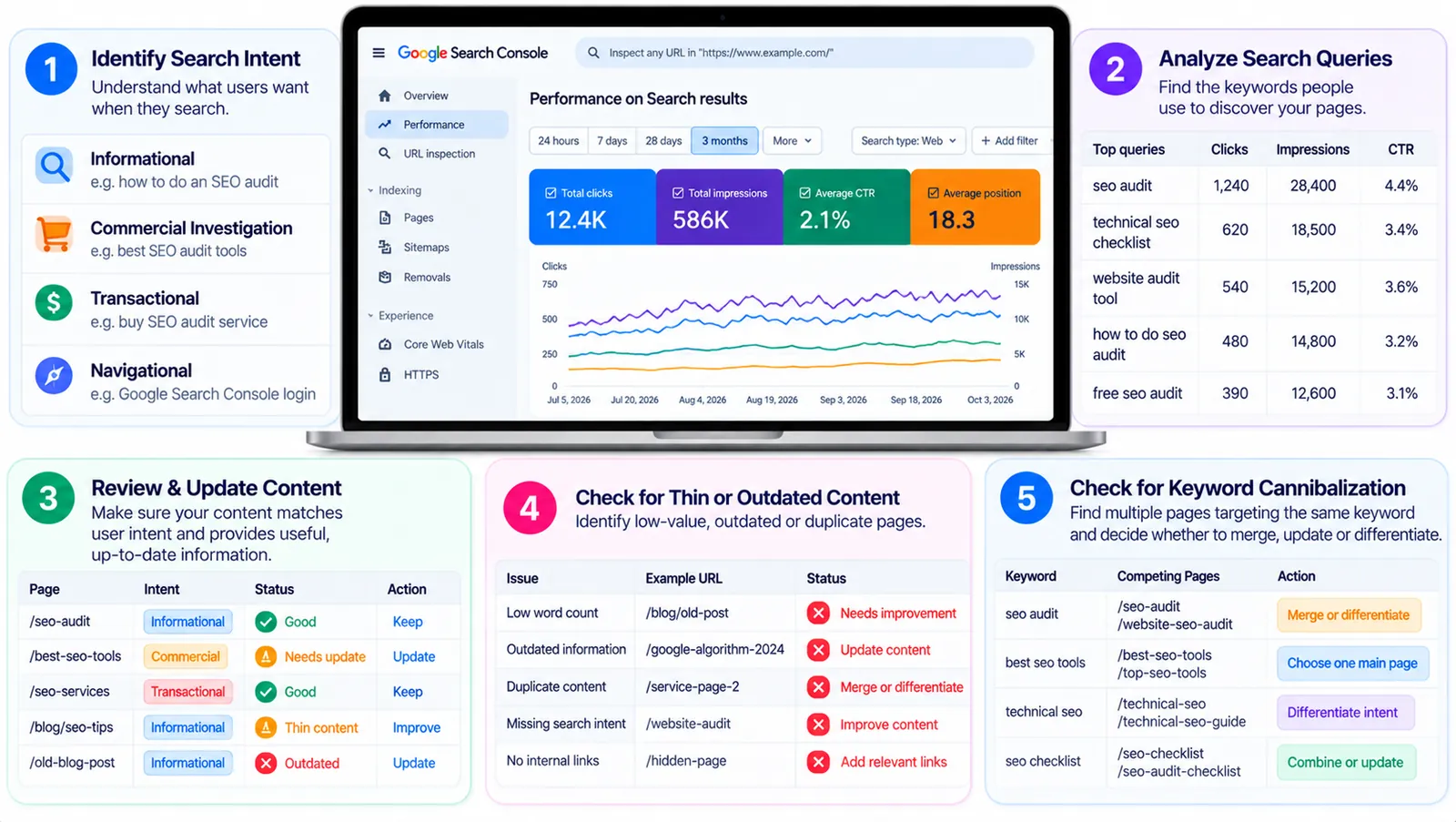
Identify Search Intent
Search intent describes what someone wants to accomplish.
Common types include:
| Intent | Example query |
|---|---|
| Informational | How to do an SEO audit |
| Commercial investigation | Best SEO audit tools |
| Transactional | Buy an SEO audit service |
| Navigational | Google Search Console login |
A page targeting an informational query should provide a useful explanation or tutorial.
A page targeting commercial investigation may benefit from comparisons, limitations, pricing considerations, and selection criteria.
Identify Thin or Outdated Content
Review pages that provide little original information, contain outdated instructions, or fail to answer the main question.
However, don't automatically delete short articles.
A concise page can be useful if it fully satisfies the reader's needs.
Review Keyword Cannibalization
Keyword cannibalization may occur when multiple pages target substantially overlapping queries and serve nearly identical purposes.
For example, publishing several articles with almost the same SEO audit instructions can create unnecessary duplication.
Compare the pages' intent and usefulness before deciding whether to consolidate, differentiate, or retain them.
10. Step 7: Review Internal Links and Website Navigation
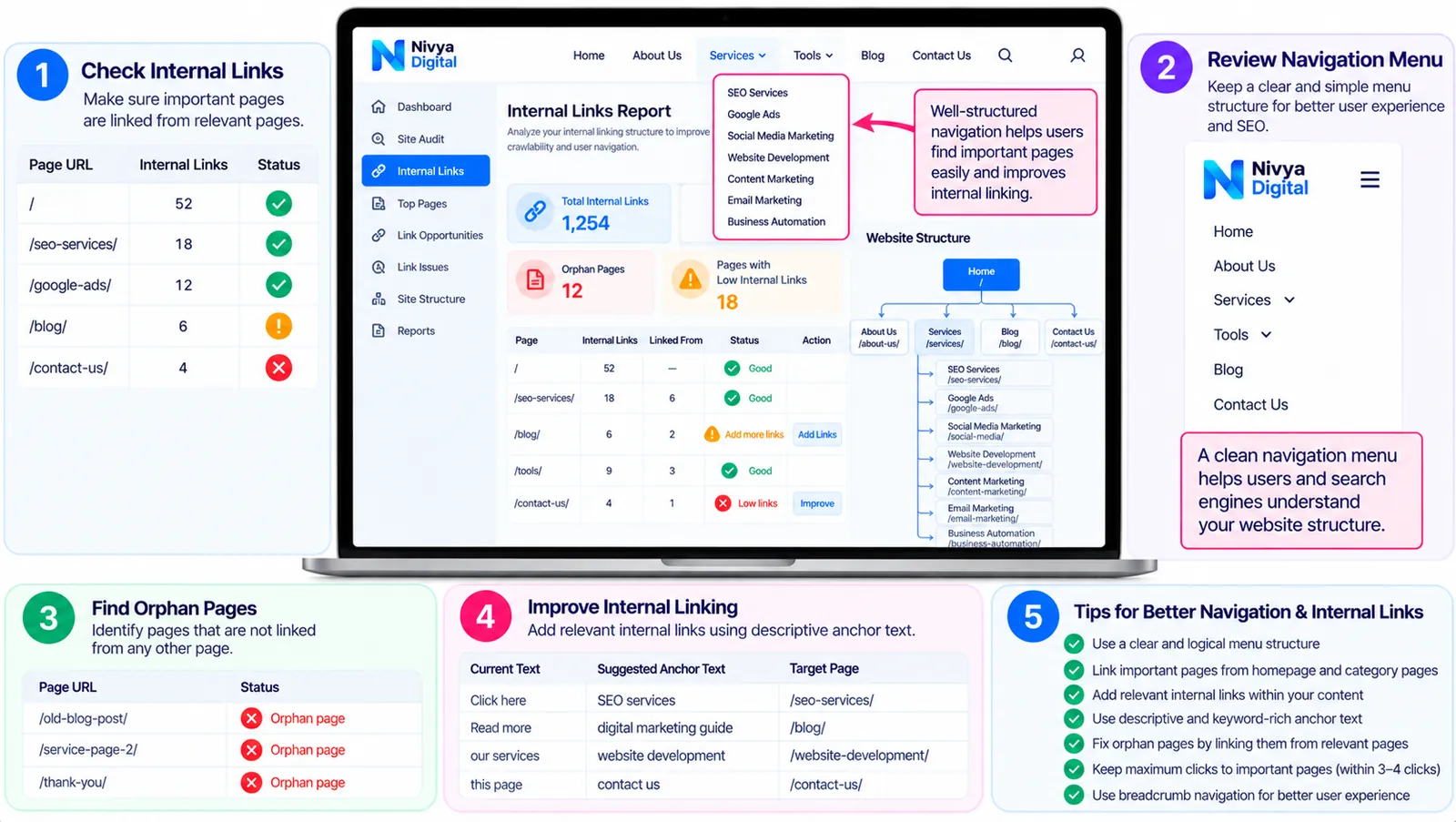
Internal linking helps visitors discover related content and helps search engines understand connections between pages.
Imagine your website contains articles about keyword research, technical SEO, and website speed.
A comprehensive SEO audit guide can link to these resources when they provide additional detail.
Internal Linking Best Practices
Use descriptive anchor text.
Instead of writing "click here," use a phrase such as "learn how to improve website speed."
Link to relevant pages that genuinely help the reader.
Avoid adding dozens of unrelated links merely to increase internal link counts.
Identify Orphan Pages
An orphan page has no discoverable internal links pointing to it.
Important orphan pages can be difficult for visitors to find.
Review whether valuable pages should be connected to your main navigation, relevant categories, or other useful content.
11. Step 8: Analyze Backlinks and Website Authority
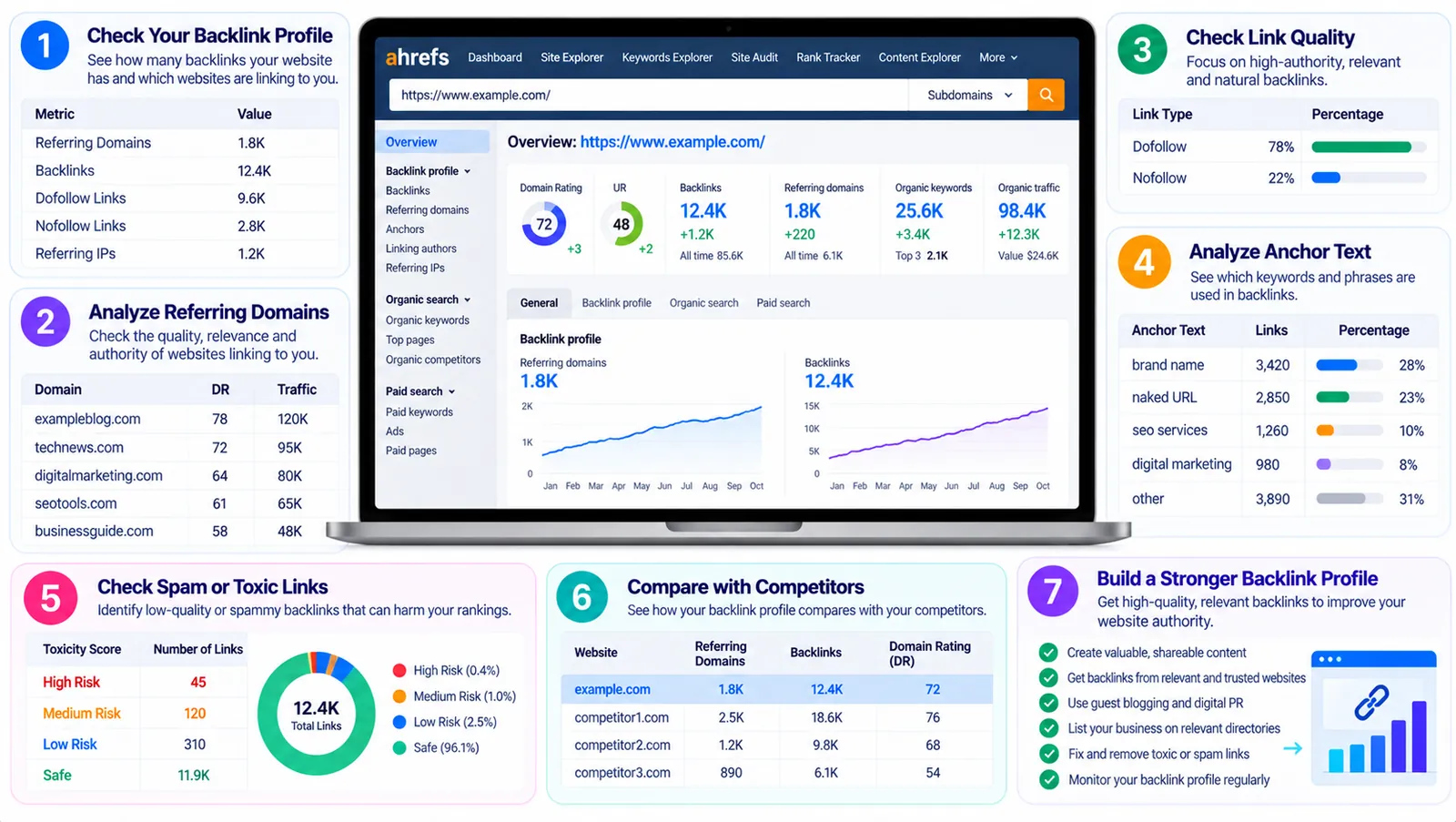
Backlinks are links from other websites to yours.
They can help users discover your content and may contribute to search engines' understanding of the web.
However, backlink quantity alone doesn't determine quality.
What to Review
Look for:
Relevant editorial backlinks
Links from credible industry resources
Broken backlinks to old URLs
Unusual linking patterns
Potentially manipulative link-building activity
Google Search Console provides a Links report, while third-party platforms can offer additional backlink research.
Should You Disavow Every Suspicious Link?
No.
Don't automatically disavow links simply because a third-party tool labels them as toxic.
Google's disavow process is intended for specific situations involving substantial artificial or low-quality links and potential manual-action concerns.
Focus primarily on avoiding manipulative link-building practices and earning relevant references through useful content and legitimate relationships.
12. Step 9: Check Your Website for International SEO Issues
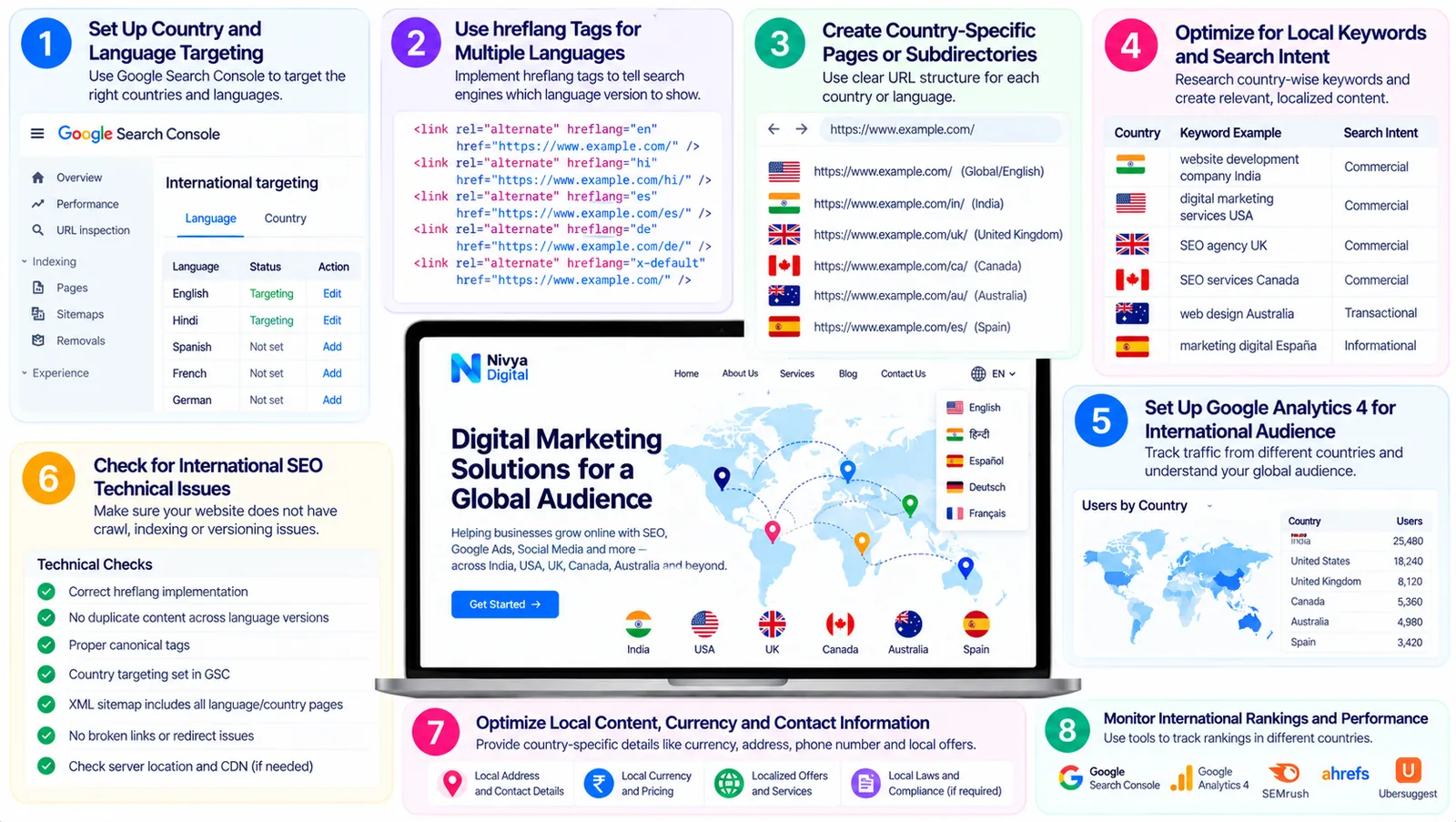
If your business serves customers in multiple countries, international SEO deserves attention.
A global website may need to accommodate different search terminology, languages, customer expectations, and regional service details.
Research Country-Specific Keywords
Search behavior can vary between the United States, United Kingdom, Canada, Australia, and India.
Use Google Search Console's country filters and suitable keyword research tools to understand regional opportunities.
Review International Pages
If your website has country-specific service pages, ensure they provide genuinely useful regional information.
Avoid creating dozens of nearly identical pages that simply replace one country name with another.
Check Hreflang Where Relevant
Hreflang annotations can help search engines understand alternate language or regional versions of content.
They are useful when you maintain appropriate alternate versions, not automatically necessary just because your website serves international customers.
Make International Contact Easy
Explain which countries you serve and how customers can enquire.
Provide clear service details, relevant contact options, and transparent information about availability.
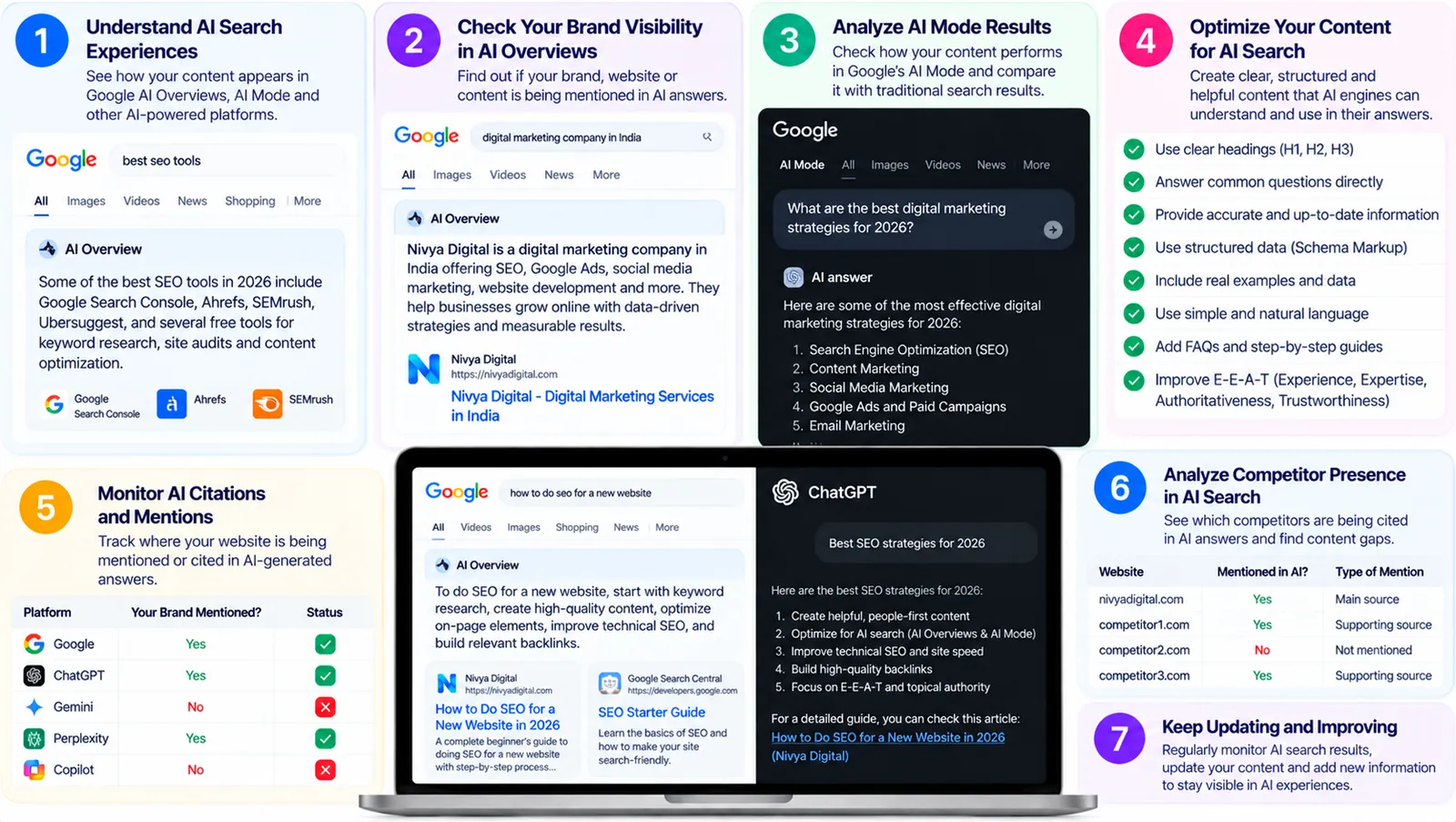
13. Step 10: Review SEO for AI Search Experiences
In 2026, businesses may also want to review how their websites support discovery through AI-powered search experiences.
However, there is no separate guaranteed optimization formula for Google AI Overviews, AI Mode, or ChatGPT Search.
Focus on Accessible Content
Make important information publicly accessible where appropriate.
Check whether technical restrictions interfere with relevant search crawlers.
Publish Useful, Original Information
Answer real questions clearly and include meaningful examples.
For instance, an SEO audit article becomes more valuable when it explains how to diagnose an indexing issue instead of simply listing the term.
Keep Business Information Accurate
Your service descriptions, contact details, and business information should be consistent and current.
Avoid AI Search Shortcuts
Be cautious of claims promising guaranteed inclusion in AI-generated answers.
Improving discoverability is worthwhile, but inclusion and citations are not guaranteed.
14. Step 11: Prioritize SEO Issues by Business Impact
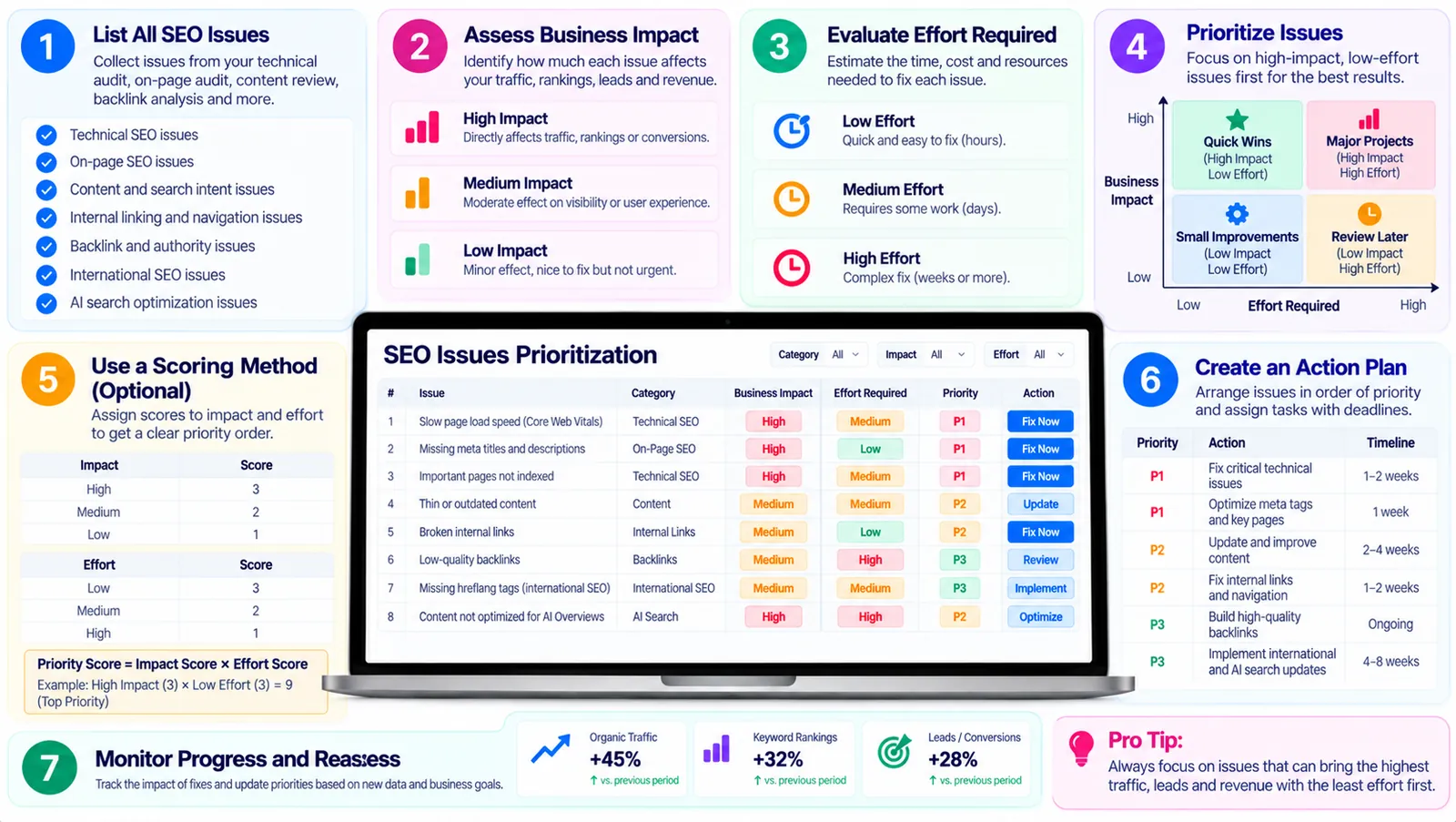
An audit may reveal dozens or even hundreds of potential improvements.
Trying to fix everything simultaneously can waste time and resources.
A better approach is to prioritize issues based on impact, urgency, and implementation effort.
| SEO issue | Example priority | Reason |
|---|---|---|
| Important service page blocked from indexing | Critical | Prevents normal organic visibility |
| Broken internal links on key pages | High | Affects navigation and discovery |
| Slow mobile performance | High or medium | Depends on severity and affected pages |
| Weak title on a high-impression page | Medium | May be a useful optimization opportunity |
| Minor formatting inconsistency | Low | Usually limited search impact |
These are illustrative priorities. Actual severity depends on the website.
Start with issues affecting revenue-generating pages, important informational content, and essential site functionality.
15. Step 12: Create a 30-Day SEO Audit Action Plan
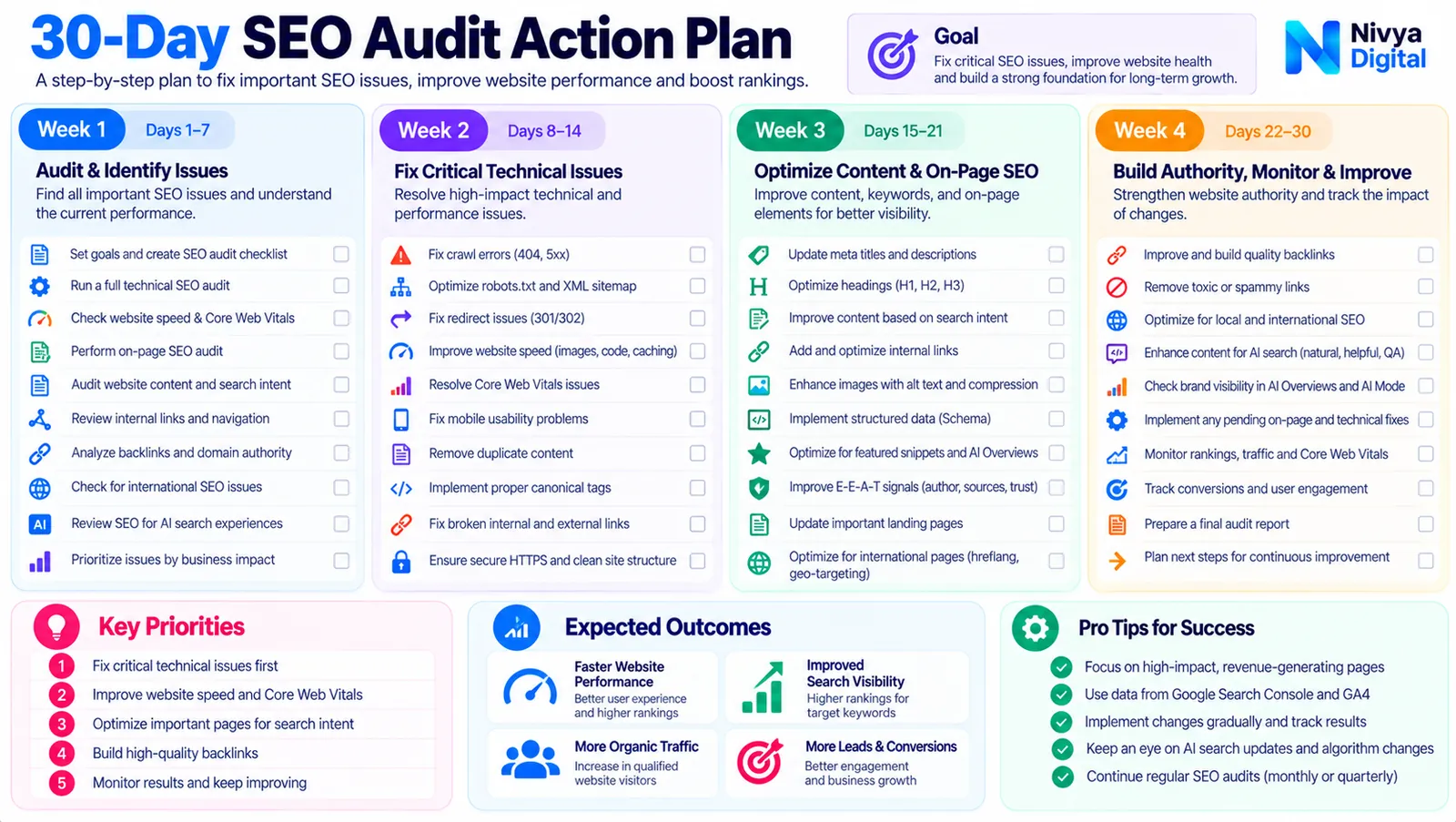
A structured plan makes it easier to turn audit findings into improvements.
| Timeline | Activities |
|---|---|
| Week 1 | Check indexing, robots.txt, sitemap, redirects, and important technical issues |
| Week 2 | Review on-page SEO, titles, content quality, and internal links |
| Week 3 | Investigate performance, mobile experience, backlinks, and international SEO |
| Week 4 | Implement priority fixes, validate changes, and establish reporting |
What Should You Track After the Audit?
Monitor:
Organic search clicks
Search impressions
Relevant keyword queries
Indexing status
Important landing-page performance
Qualified leads
Conversion rates
Core Web Vitals where available
Some changes may take time to be reflected in search results.
Evaluate trends over meaningful periods instead of expecting immediate ranking improvements after every adjustment.
16. Free SEO Audit vs Professional SEO Audit: Which Do You Need?
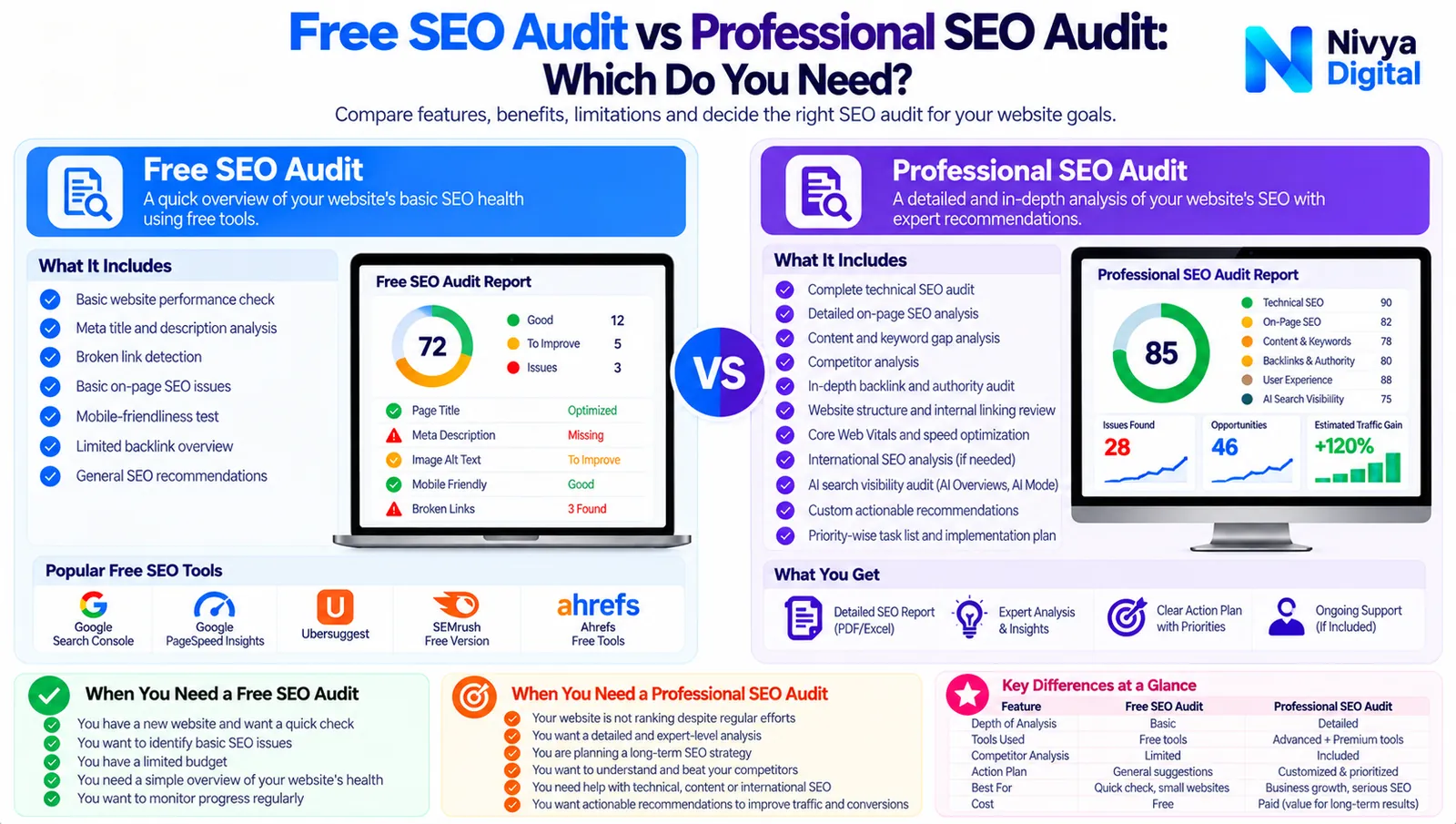
A free SEO audit can be an excellent starting point.
It may help identify basic technical issues, performance concerns, and opportunities for further investigation.
However, automated tools have limitations.
They cannot always understand your business objectives, evaluate every aspect of search intent, or determine which improvements are most valuable.
| Factor | Free SEO audit | Professional SEO audit |
|---|---|---|
| Initial technical checks | Often available | Included |
| Content strategy review | Usually limited | Can be comprehensive |
| Competitor analysis | Limited or manual | May include detailed research |
| Implementation planning | Basic recommendations | Prioritized recommendations |
| Business-specific insights | Limited | Tailored to business goals |
| Cost | Often free | Depends on scope and provider |
When Should You Consider Professional Support?
Professional assistance may be useful when your website has persistent indexing problems, complex technical issues, international SEO requirements, or a significant gap between traffic and business enquiries.
Before hiring an SEO agency, ask what the audit includes, how recommendations are prioritized, and whether implementation support is available.
Avoid providers promising guaranteed first-page rankings.
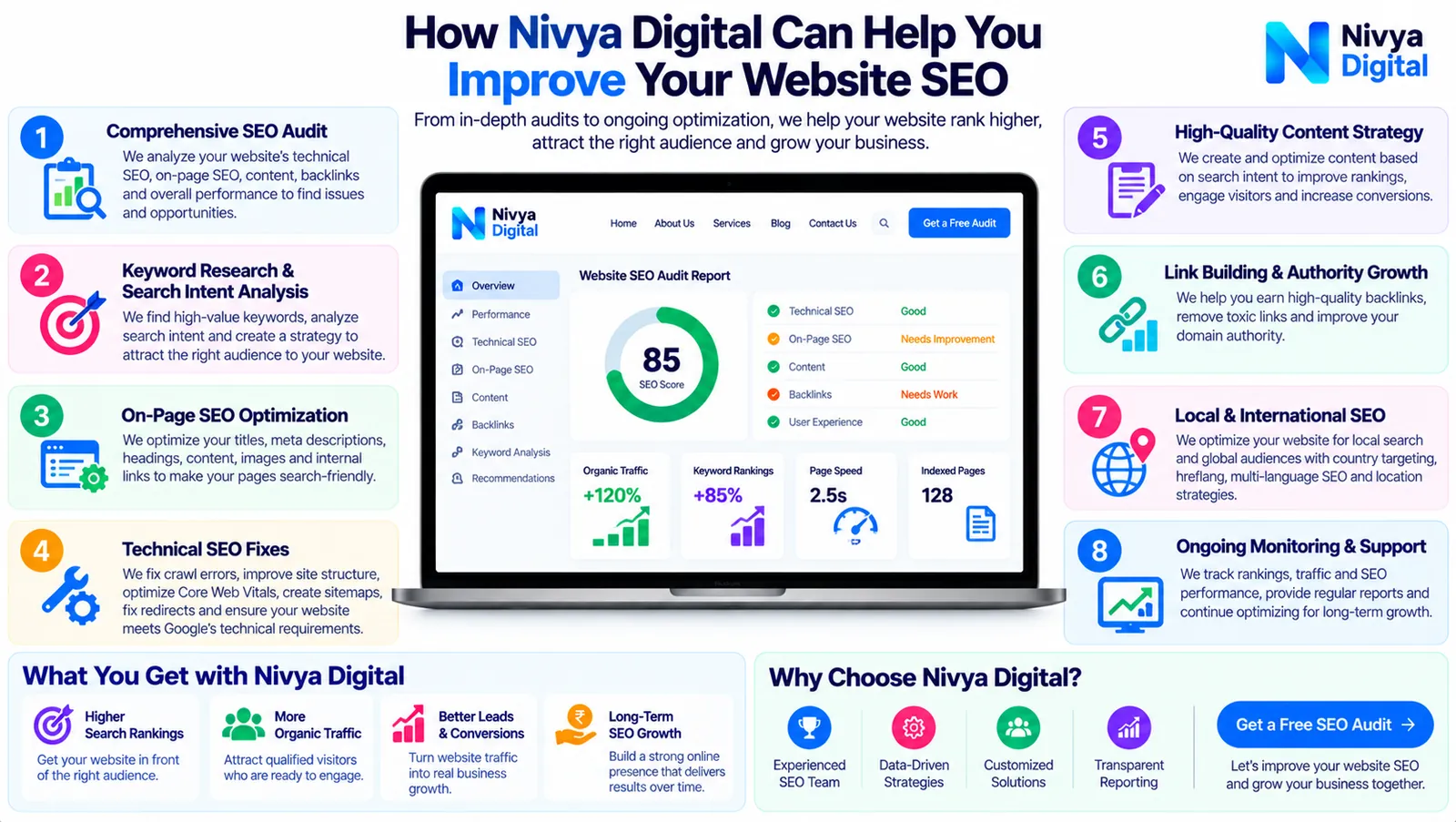
17. How Nivya Digital Can Help You Improve Your Website SEO
Understanding why a website isn't performing well is often the first step toward improving its online visibility.
Nivya Digital provides digital marketing and technology services, including SEO, content marketing, website development, and related solutions.
For businesses reviewing their website performance, a practical starting point is to identify technical problems, examine important pages, and understand where visitors may be encountering difficulties.
Start with the Nivya Digital SEO Audit Tool
You can explore the SEO Audit Tool through Nivya Digital for preliminary website checks.
Use its available findings to identify areas that may need closer investigation.
An automated result should be treated as a starting point rather than a complete assessment of your website's SEO health.
Build a More Complete SEO Strategy
Depending on your business needs, an SEO improvement plan may involve:
Technical SEO improvements
Keyword and search intent research
On-page optimization
Content planning
Internal linking improvements
Website performance reviews
International SEO considerations
Analytics and reporting
The goal is not simply to attract more visitors, but to help the right audience discover useful information and take meaningful action.
Want to understand your website's SEO opportunities?
Visit Nivya Digital to explore its digital marketing services and available website tools.
18. Final Thoughts: Make SEO Audits Part of Your Growth Strategy
An SEO audit is more than a technical checklist.
It's an opportunity to understand how people discover your website, how effectively your pages answer their questions, and which obstacles may be limiting your online performance.
Start with indexing and technical accessibility. Then review page performance, content quality, internal links, and search intent.
Use free tools to gather evidence, but don't rely entirely on automated scores.
Most importantly, prioritize improvements that support real users and meaningful business objectives.
A successful SEO audit doesn't end when you find problems. It becomes valuable when you turn those findings into practical improvements.
Comments (1)
This guide made SEO audits much easier to understand. I found the step-by-step checklist and free tools especially helpful for identifying technical SEO issues, improving website performance, and finding opportunities to increase organic traffic. Great resource for website owners and beginners!