
Launching a new website is exciting. You've chosen a domain name, worked on the design, written your first few pages, and finally clicked the publish button.
But then comes a frustrating question: Why isn't anyone finding my website on Google?
If you've recently launched a website and aren't getting much organic traffic, you're certainly not the only one facing this challenge.
A new website doesn't automatically appear at the top of Google just because it looks professional or has good content. Search engines need to discover your pages, understand what they're about, and determine when they're relevant to someone's search.
That's where search engine optimization (SEO) comes in.
The good news is that you don't need to be a developer or spend thousands of dollars on SEO software to get started.
In this beginner-friendly guide, you'll learn how to do SEO for a new website in 2026, from setting up Google Search Console and researching keywords to optimizing pages, fixing technical problems, and tracking your progress.
Let's start with the basics.
What Is SEO and Why Does a New Website Need It?
SEO stands for Search Engine Optimization. It's the process of improving your website so search engines can discover, understand, and display your content for relevant searches.
Imagine you've launched a website selling handmade candles.
Your potential customers might search Google for:
Handmade scented candles
Natural soy candles
Best candles for home decoration
How long do soy candles burn?
Handmade candle gifts
If your website contains useful, relevant pages answering these searches, SEO can help search engines understand when those pages may be helpful.
Unlike paid advertising, organic SEO doesn't require you to pay Google every time someone clicks your website in unpaid search results.
However, SEO still requires time, effort, and sometimes investment in content, technical improvements, or professional support.
How Does Google Find a New Website?
Google Search generally involves three main stages:
1. Crawling: Google discovers URLs and retrieves their content using automated crawlers.
2. Indexing: Google processes the content and may store information about eligible pages in its search index.
3. Serving search results: When someone searches, Google selects results it considers relevant and useful.
Not every crawled page gets indexed, and being indexed doesn't guarantee a high ranking.
That's why new website SEO should begin with accessibility and content quality rather than shortcuts.
Step 1: Set Up Google Search Console
Before worrying about backlinks or advanced SEO strategies, make sure you can monitor your website's presence on Google.
Google Search Console is a free tool that helps you understand how Google discovers, indexes, and displays your website.
How to Set Up Google Search Console
Visit Google Search Console.
Sign in with your Google account.
Click Add Property.
Choose a Domain property or URL-prefix property.
Complete website ownership verification.
Open the Performance and Indexing reports after data becomes available.
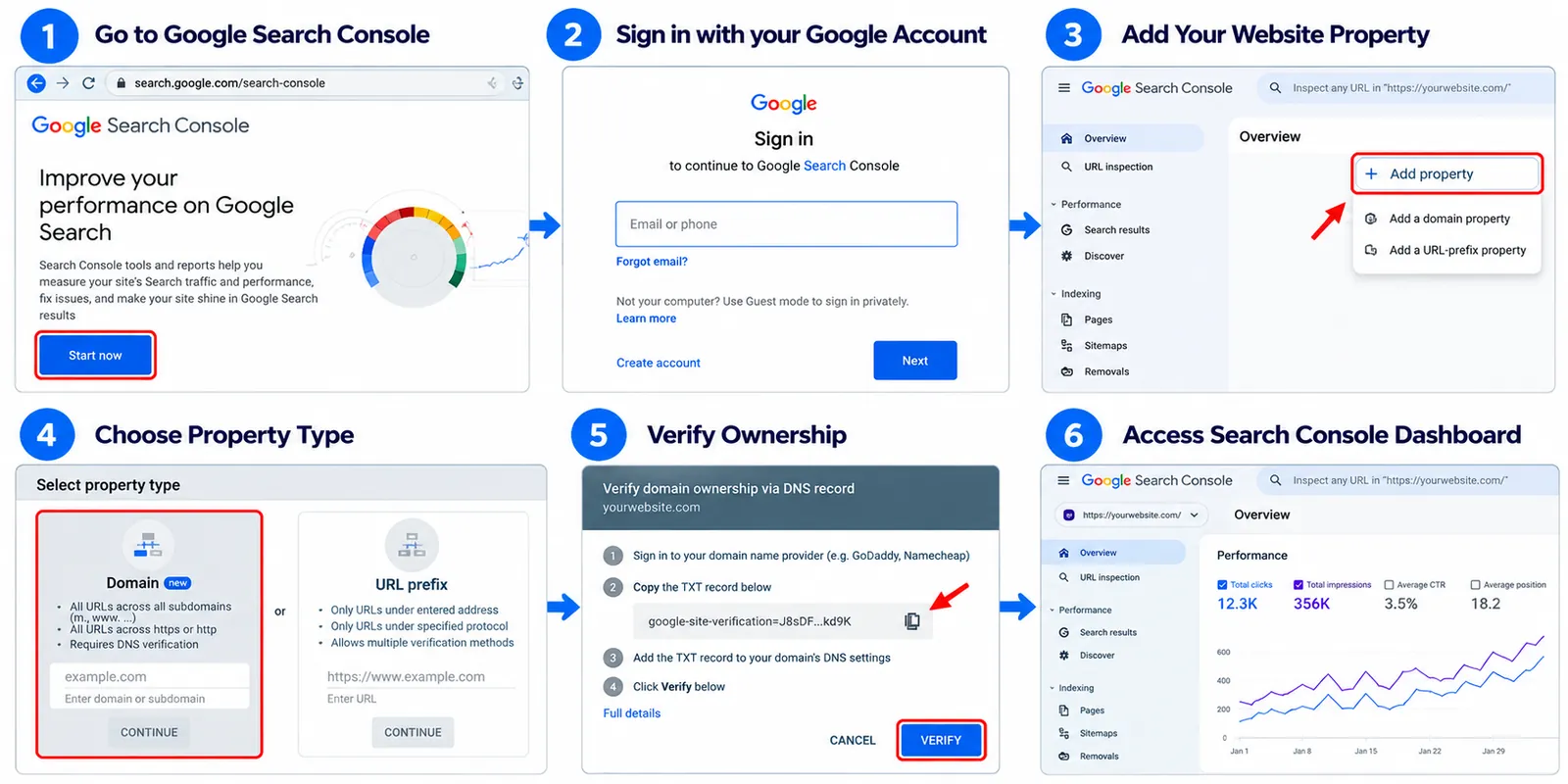
A Domain property covers the domain and its supported subdomains and protocols, while a URL-prefix property covers the specified prefix.
What Should Beginners Monitor?
Start with four important measurements:
| Metric | What it tells you |
|---|---|
| Total Clicks | How many clicks your website receives from Google Search |
| Impressions | How often your pages appear in search results |
| Average CTR | The percentage of impressions that result in clicks |
| Average Position | Your average ranking position across reported impressions |
Don't panic if your new website initially shows very little data.
Google needs time to discover your pages, and search performance develops differently for every website.
Beginner tip: Check Search Console regularly, but focus on meaningful trends rather than daily ranking fluctuations.
Step 2: Check Whether Google Can Index Your Website
One of the most important SEO tasks for a new website is making sure your pages are accessible to search engines.
A beautifully designed website won't attract Google Search traffic if important pages are accidentally blocked from indexing.
How to Check Website Indexing
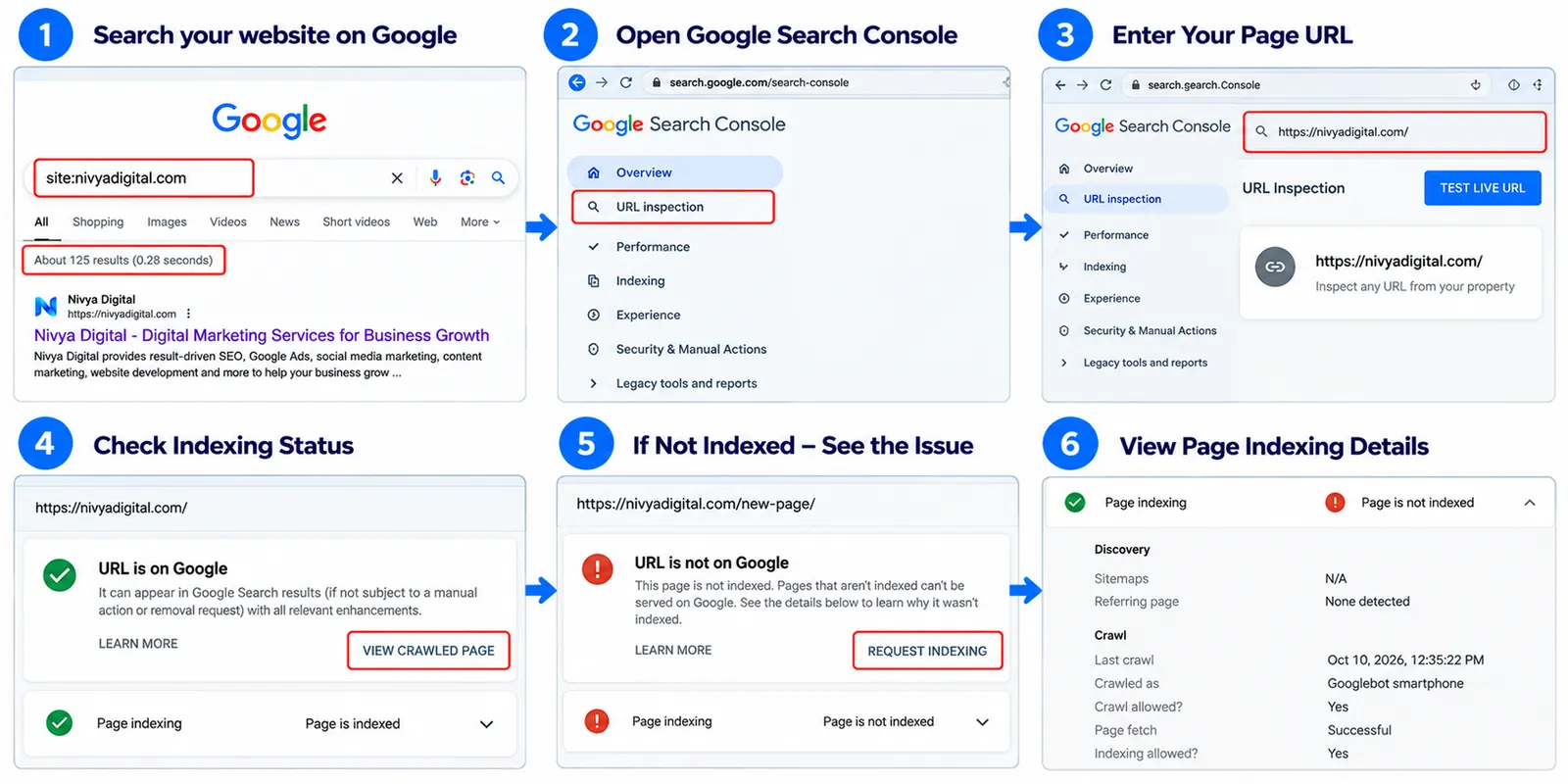
Open Google and search:
site:yourwebsite.com
This can give you an indication of which pages appear in Google's index, but it isn't a complete or precise count.
For a specific page, use the URL Inspection tool inside Google Search Console.
It can help you understand whether Google has indexed the URL and whether any issues require attention.
Common Indexing Problems
Some problems worth investigating include:
Accidental
noindextagsImportant pages blocked by robots.txt
Broken internal links
Server errors
Incorrect canonical tags
Duplicate or low-value pages
Content that Google cannot easily access
For WordPress websites, also review Settings → Reading and make sure the option discouraging search engines from indexing the website isn't accidentally enabled.
Be careful with robots.txt rules. They control crawling, not guaranteed exclusion from Google's index.
Important: Requesting indexing or submitting a sitemap doesn't guarantee that Google will index your website.
Step 3: Create and Submit an XML Sitemap
An XML sitemap helps search engines discover important URLs on your website.
Think of it as a list of pages you want search engines to know about.
For example, a small business website might include:
Homepage
About Us
Services
Individual service pages
Blog articles
Contact page
How to Submit Your Sitemap
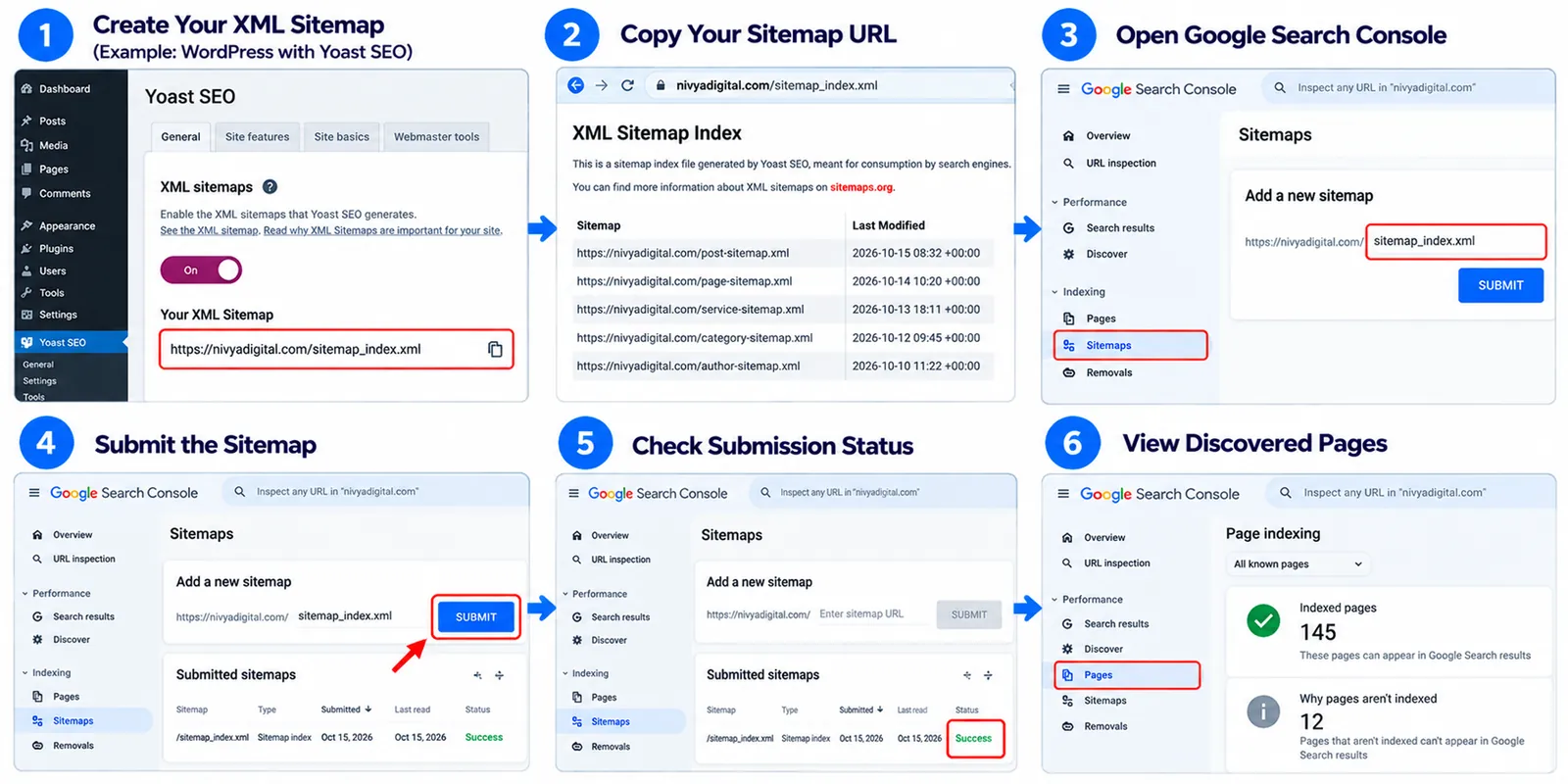
First, locate your website's sitemap.
Depending on your CMS or SEO plugin, it might be available at:
https://yourwebsite.com/sitemap.xml
or
https://yourwebsite.com/sitemap_index.xml
Next:
Open Google Search Console.
Select your website property.
Click Sitemaps under Indexing.
Enter the correct sitemap URL.
Click Submit.
Your sitemap should generally include canonical, indexable URLs that you want to appear in search results.
Avoid adding redirects, error pages, and URLs intentionally excluded from indexing.
WordPress tip: WordPress and popular SEO plugins can generate XML sitemaps automatically. Check which sitemap your website actually uses before submitting it.
Step 4: Find the Right Keywords for Your New Website
Keyword research is one of the most valuable parts of SEO, especially when your website is new.
A keyword is a word or phrase someone enters into a search engine.
The goal isn't simply to find keywords with the highest search volume.
You need to find keywords that match your audience's needs and the content your website can realistically provide.
Start With Your Business or Website Topic
Imagine you're launching a digital marketing website.
Your initial keywords might include:
SEO services
Digital marketing agency
Website development
Google Ads management
These broad terms may be highly competitive.
Instead of targeting only broad keywords, explore more specific searches.
For example:
| Broad keyword | More specific keyword |
|---|---|
| SEO | How to do SEO for a new website |
| Website development | How to build a small business website |
| Digital marketing | Digital marketing strategies for startups |
| Google Ads | How to set up Google Ads for beginners |
| Website traffic | How to get organic traffic to a new website |
More specific keywords often make it easier to understand exactly what the searcher needs, although they aren't always less competitive.
Free Tools for Keyword Research
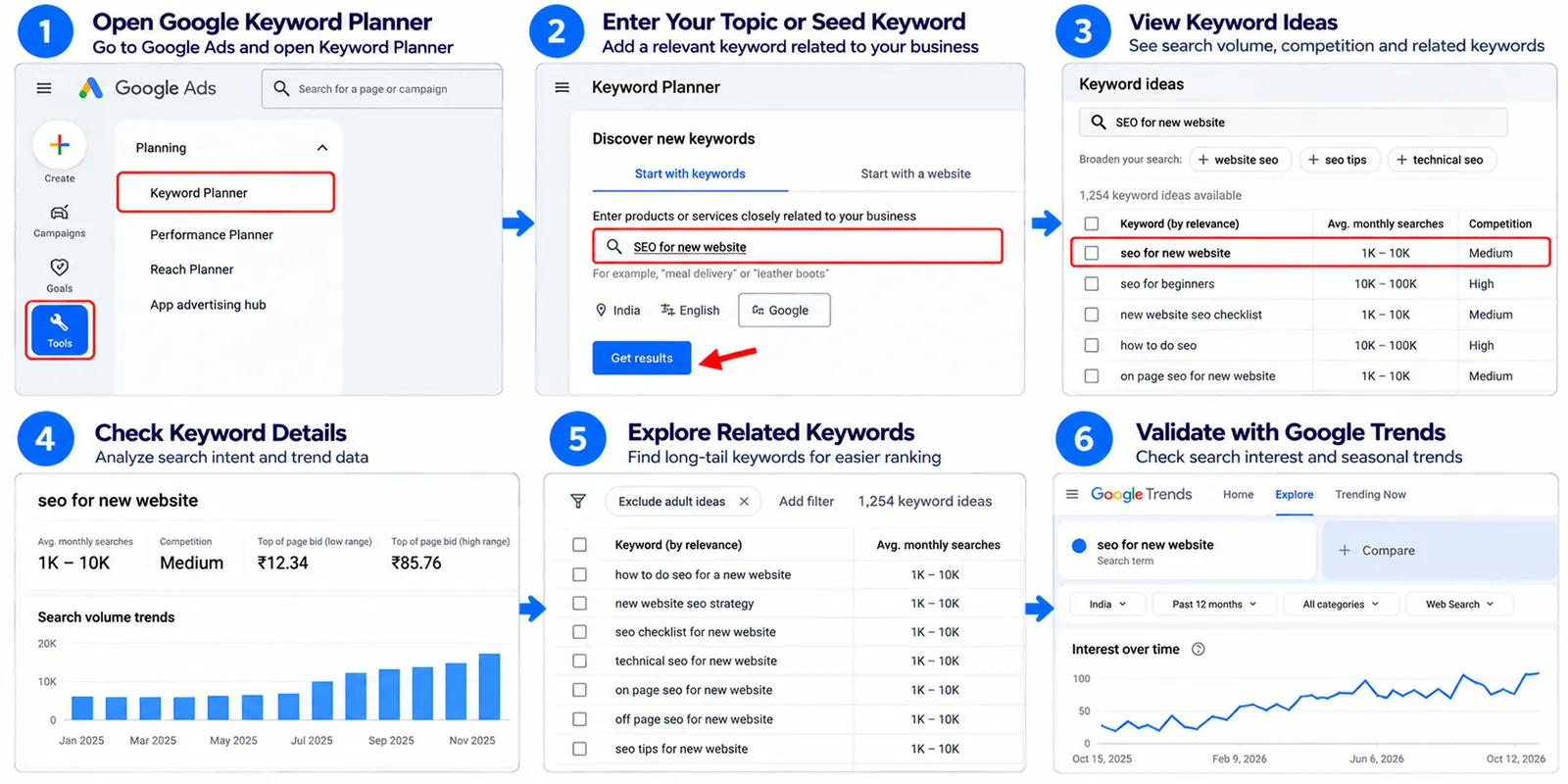
You can begin with:
Google Keyword Planner
Google Trends
Google Search autocomplete
Google Search Console
Free keyword research features from SEO platforms
When researching keywords, evaluate search intent, relevance, estimated demand, and competing results.
Practical tip: Before selecting a keyword, search it on Google and examine the existing results. If most results are beginner tutorials, creating a sales page probably won't satisfy that search intent.
Step 5: Understand Search Intent Before Writing Content
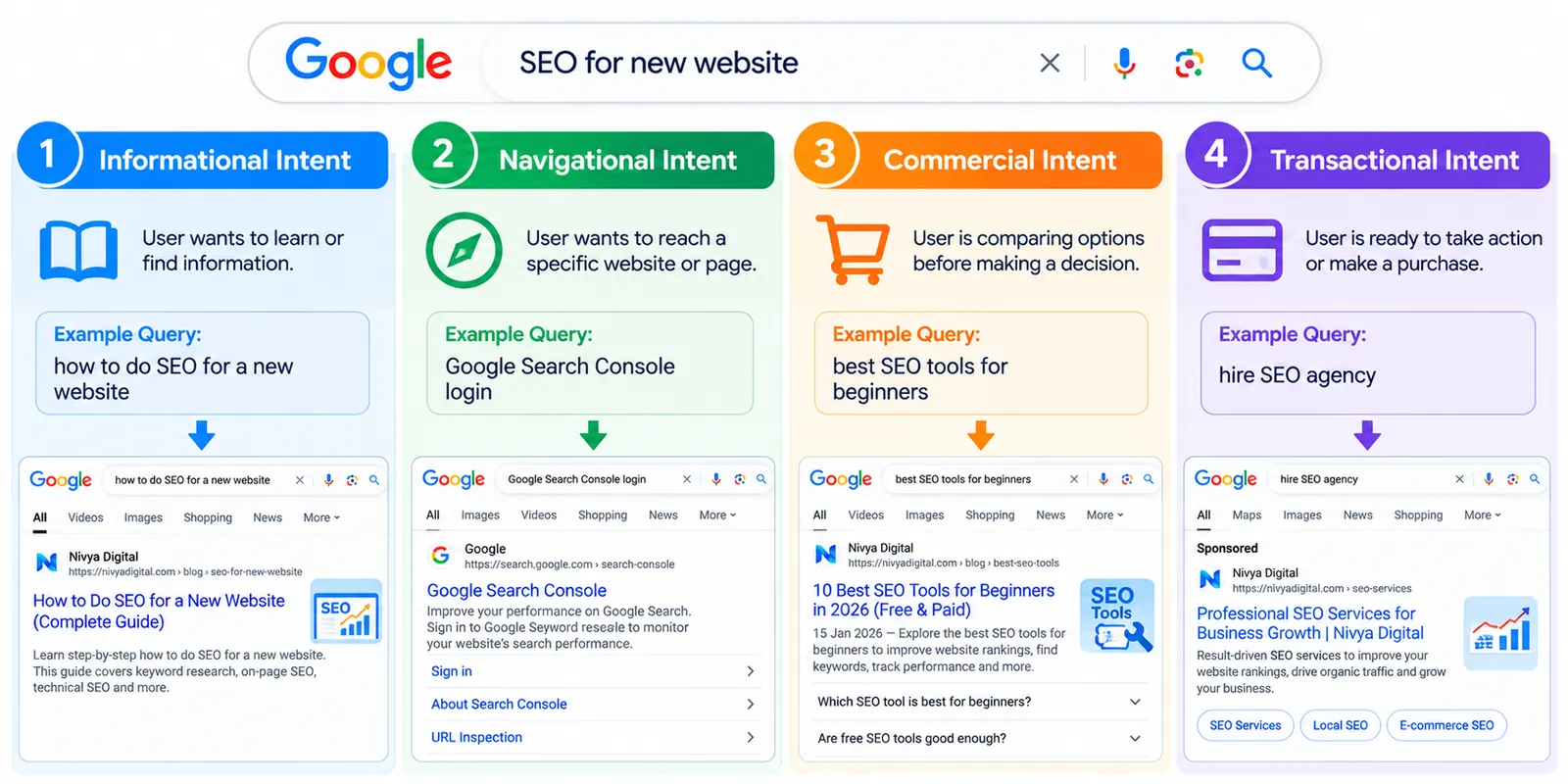
Search intent means the reason behind someone's search.
Understanding it helps you create the type of page users actually want.
There are four common categories.
| Search intent | Example | Suitable content |
|---|---|---|
| Informational | How does SEO work? | Educational guide |
| Navigational | Google Search Console login | Relevant destination page |
| Commercial | Best SEO tools for beginners | Comparison article |
| Transactional | Hire an SEO agency | Service or conversion page |
Let's say someone searches:
"How to improve website speed"
They're probably looking for instructions, tools, or solutions.
If your article only promotes a website development service without explaining how to improve speed, readers may leave without finding an answer.
The rule is simple: Answer the question first. Promote your services only when they're genuinely relevant.
Step 6: Optimize Your Website's On-Page SEO
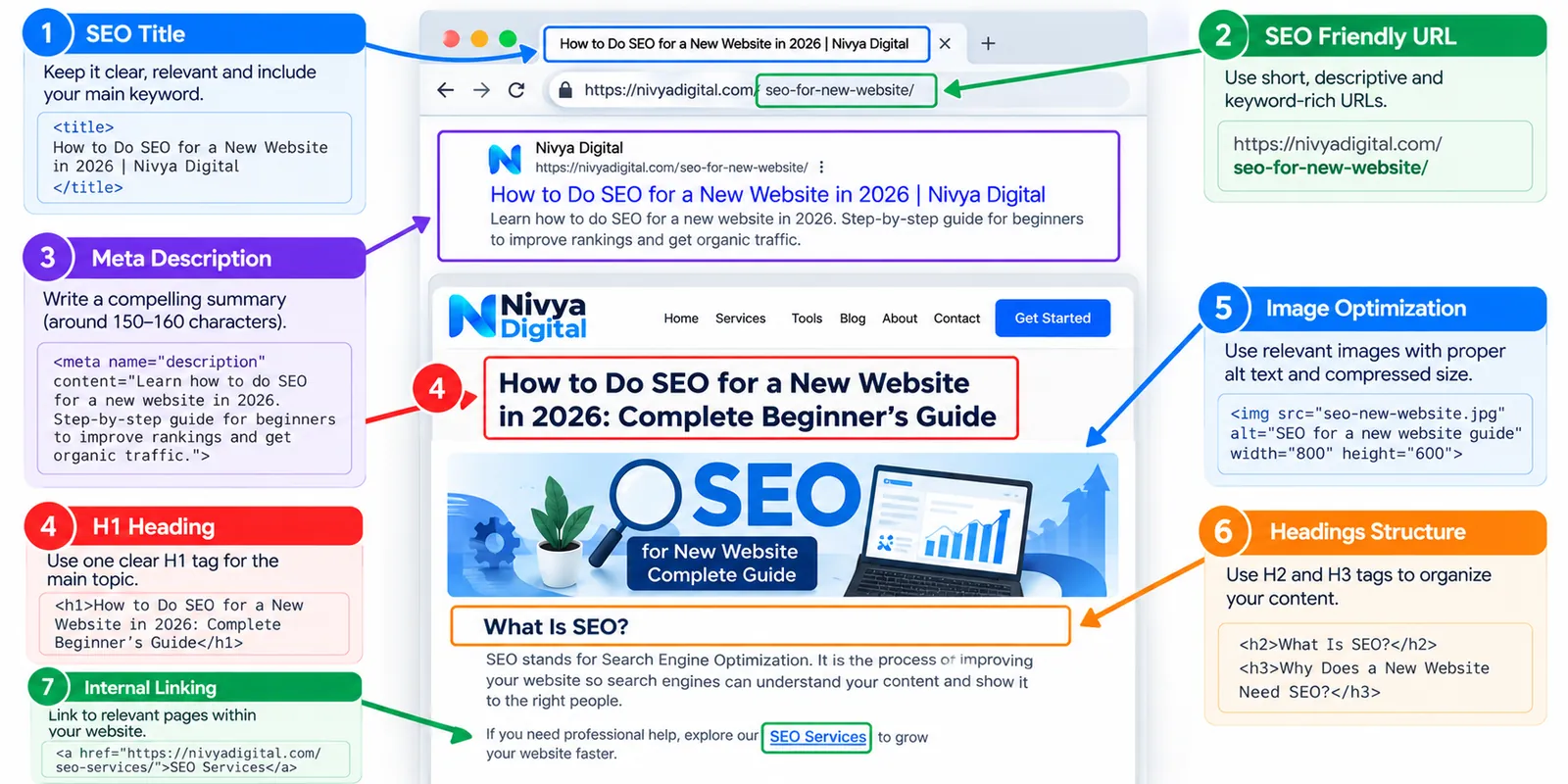
On-page SEO involves improving individual pages so their content and structure are easier for users and search engines to understand.
For beginners, focus on a few important elements.
Write Clear SEO Titles
Your page title should accurately describe the content.
For example:
Weak title: Home | Digital Services
Better title: SEO Services for Small Businesses | Your Brand
Avoid repeating the same keyword several times.
Google doesn't require every title to follow a fixed character count. The most important qualities are clarity, relevance, and accuracy.
Create Useful Meta Descriptions
A meta description summarizes a page's content.
For example:
"Explore practical SEO services for small businesses, including keyword research, technical SEO, content optimization and website audits."
A meta description isn't a direct ranking factor, and Google may display a different snippet.
Still, a clear description can help communicate what visitors should expect.
Use H1, H2 and H3 Headings Naturally
Headings make your content easier to navigate.
A simple structure might look like this:
H1: How to Do SEO for a New Website
H2: Keyword Research for Beginners
H3: How to Find Long-Tail Keywords
H2: Technical SEO Checklist
H3: How to Submit an XML Sitemap
You don't need to force your primary keyword into every heading.
Create Descriptive URLs
Compare these examples:
Poor URL:
yourwebsite.com/page?id=128
Descriptive URL:
yourwebsite.com/seo-for-new-website/
Short, meaningful URLs are easier for people to understand and share.
Optimize Images
Use relevant images that help explain your content.
Before uploading an image:
Choose an appropriate file format.
Compress large files without unnecessarily reducing quality.
Add descriptive alternative text where appropriate.
Use responsive image dimensions.
Avoid uploading oversized images for small display areas.
For example, a screenshot of Google Search Console might use the alt text:
"Google Search Console performance report showing clicks and impressions"
Don't stuff keywords into image alt text.
Step 7: Build a Simple Website Structure
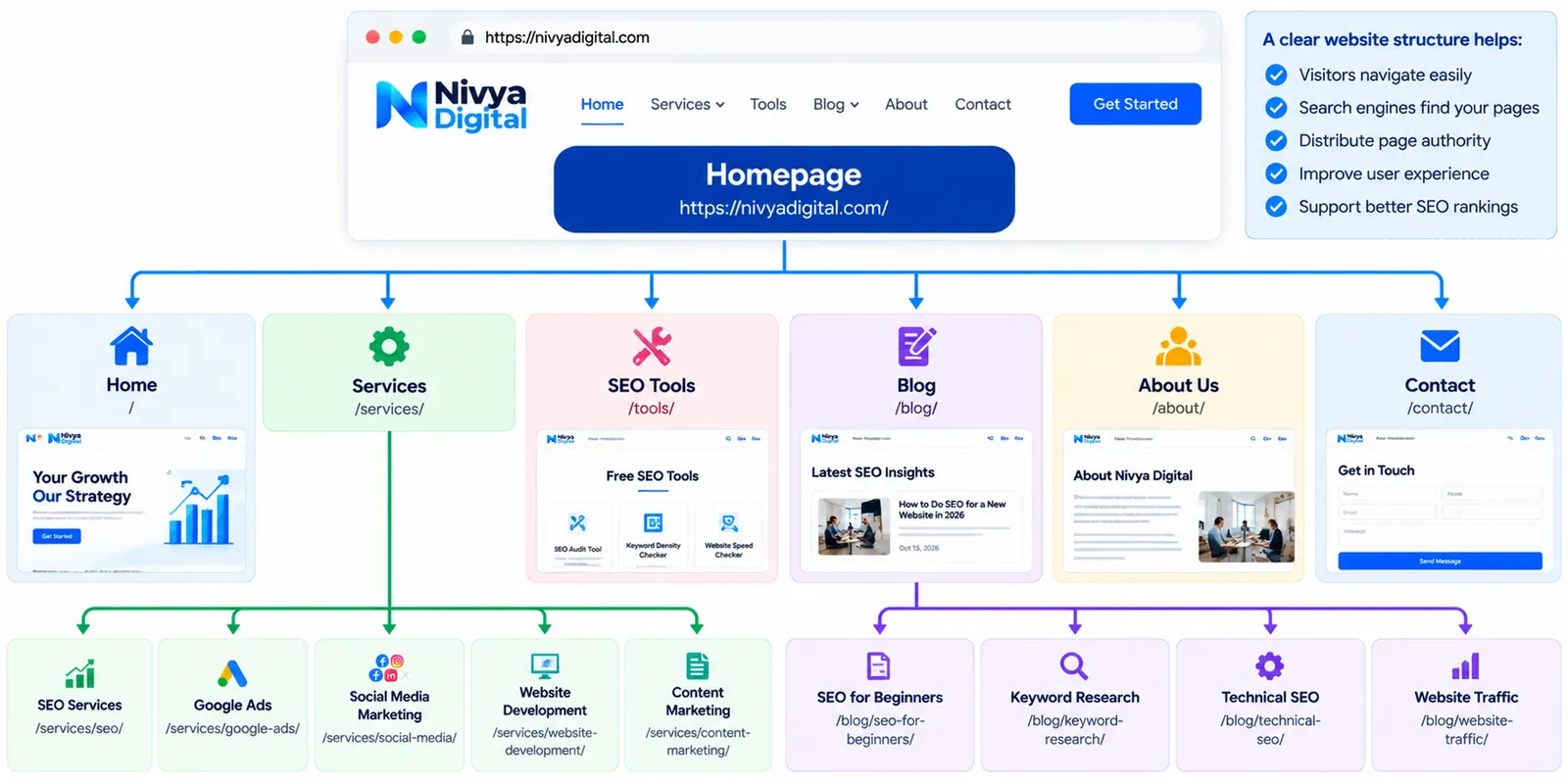
A clear website structure helps visitors navigate your website and allows search engines to discover related pages.
Imagine you're launching a digital marketing website.
Your structure could look like this:
Homepage
SEO Services
Google Ads Services
Website Development
Free SEO Tools
Blog
SEO for Beginners
Keyword Research Guide
Technical SEO Checklist
Each important page should be accessible through relevant navigation or internal links.
Why Internal Linking Matters
Internal links connect pages on the same website.
For example, an article about website speed can naturally link to a guide about Core Web Vitals.
A blog about SEO for beginners can link to your SEO audit tool.
Use descriptive anchor text that explains the destination.
Instead of:
"Click here"
Try:
"Check your website's SEO performance"
Internal links help readers find related information and can help search engines discover and understand your pages.
Step 8: Improve Technical SEO and Website Speed
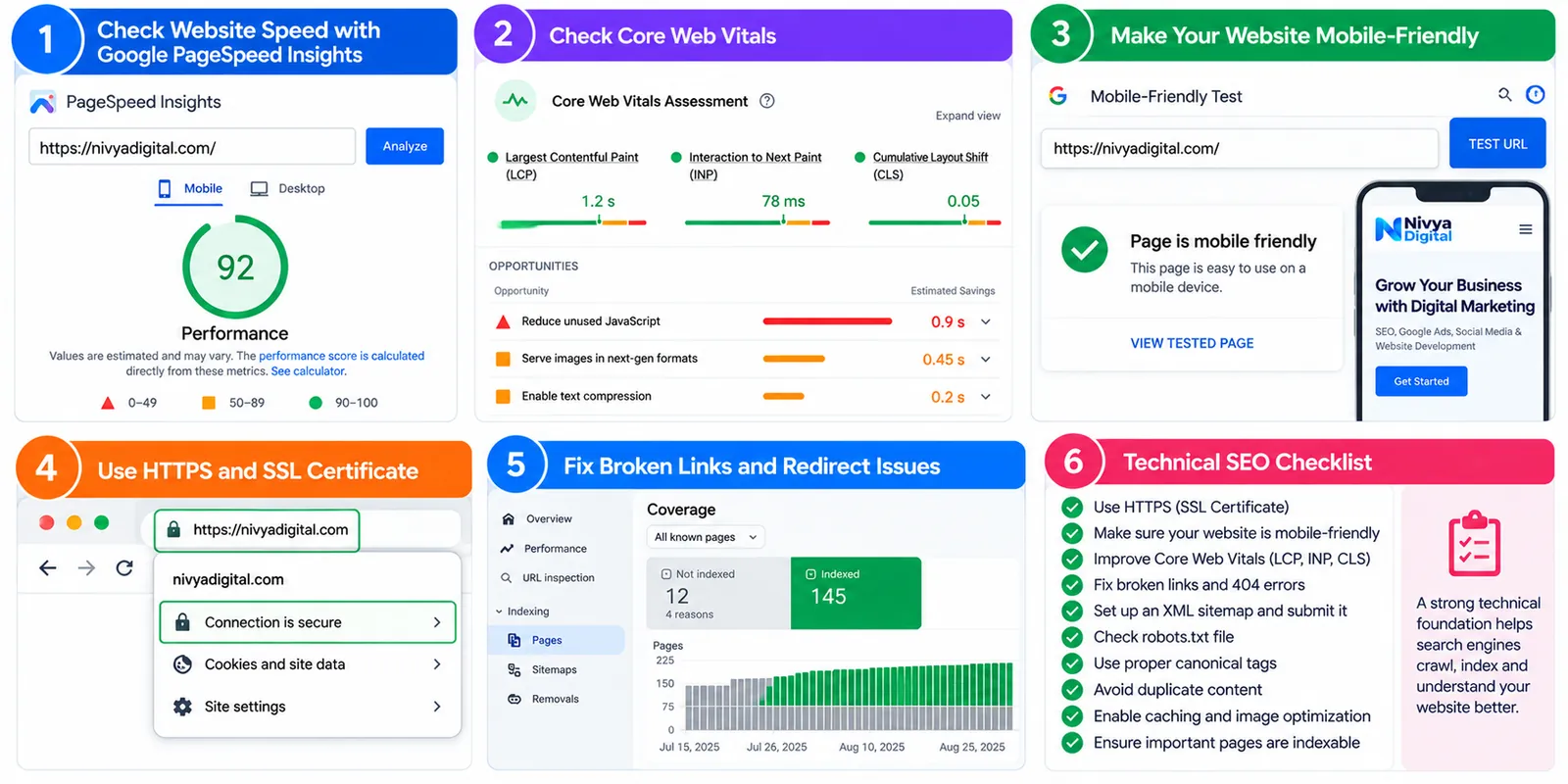
Technical SEO focuses on the systems that allow your website to function properly for users and search engines.
You don't need to become a developer overnight, but understanding the basics is useful.
Make Your Website Mobile-Friendly
Many visitors browse websites on smartphones.
Check that your website:
Fits smaller screens
Uses readable text
Has easy-to-tap buttons
Provides clear navigation
Doesn't hide important content on mobile devices
Understand Core Web Vitals
Google uses Core Web Vitals to assess important aspects of page experience.
The three primary metrics are:
| Metric | What it measures | Good threshold |
|---|---|---|
| Largest Contentful Paint (LCP) | Main content loading | 2.5 seconds or less |
| Interaction to Next Paint (INP) | Responsiveness | 200 milliseconds or less |
| Cumulative Layout Shift (CLS) | Visual stability | 0.1 or less |
These thresholds are evaluated using the 75th percentile of real-user experiences where field data is available.
You can use Google PageSpeed Insights to review performance and potential improvements.
Use HTTPS
Your website should use HTTPS with a valid TLS certificate.
HTTPS protects data in transit and helps users browse securely.
Fix Broken Links and Redirect Problems
Check for:
Pages returning 404 errors unexpectedly
Internal links pointing to deleted pages
Unnecessary redirect chains
Incorrect canonical URLs
Server errors
Not every 404 is an SEO emergency. Prioritize broken links that affect important content or navigation.
Step 9: Create Helpful, People-First Content
Content is one of the main reasons people visit a website.
But publishing more articles doesn't automatically mean you'll receive more traffic.
A useful article should answer a real question, explain the topic clearly, and offer information that readers can apply.
What Makes SEO Content Helpful?
Consider a blog titled:
"How to Improve Website Speed"
A genuinely helpful article might explain:
Why websites become slow
How to test loading performance
Which issues to fix first
How to optimize images
How caching works
How to check whether improvements worked
That's more valuable than repeatedly saying that website speed is important.
Does Google Allow AI-Generated Content?
Google doesn't automatically prohibit content simply because AI helped create it.
The important question is whether the content is accurate, useful, original, and created to benefit readers rather than manipulate search rankings.
AI can assist with outlining, editing, or brainstorming, but it shouldn't replace fact-checking and subject-matter expertise.
If you're publishing an article about a tool, try to use the tool yourself and include genuine observations.
Never invent customer results, testing data, or personal experience.
How Long Should an SEO Blog Be?
There's no universal ideal word count.
A short article can perform well if it answers the question completely.
A longer guide may be appropriate when the topic requires detailed instructions.
Write enough to satisfy the reader, then stop.
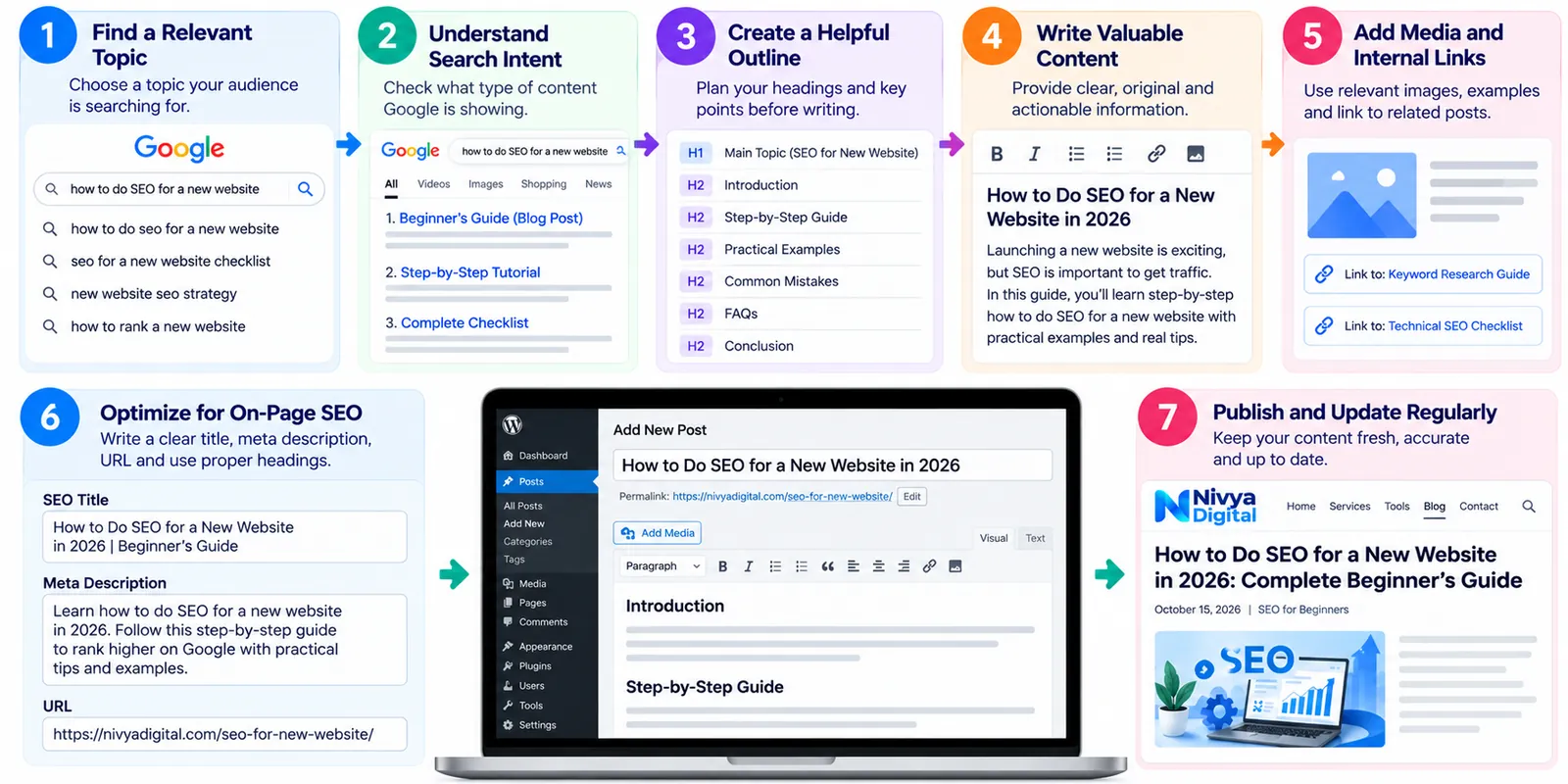
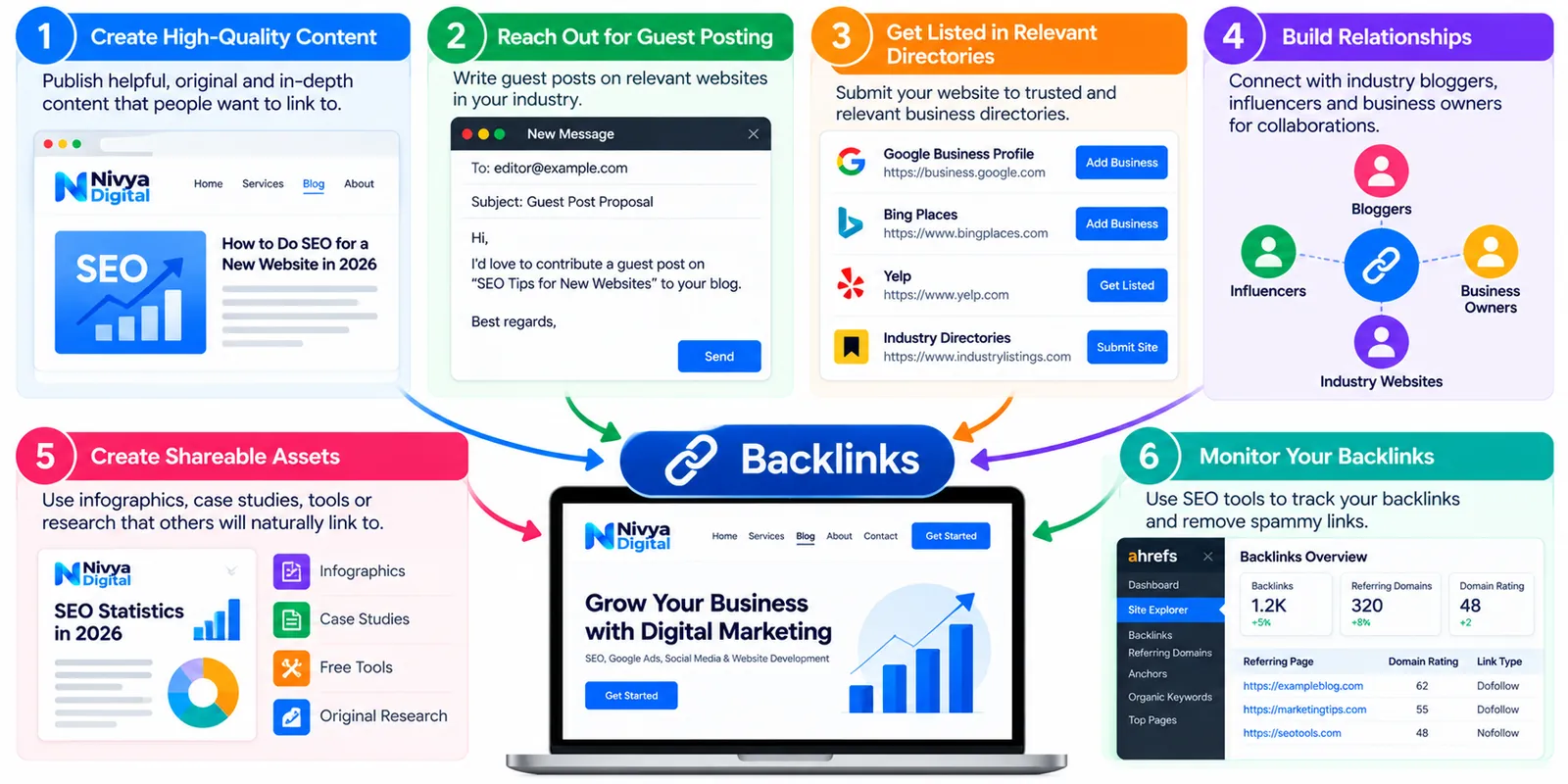
Step 10: Start Building Trust and Relevant Backlinks
Backlinks are links from other websites to yours.
They can help people discover your content and may contribute to how search engines evaluate pages.
However, backlinks vary greatly in quality and relevance.
How Can a New Website Earn Backlinks?
Start with practical activities:
Publish original research or useful resources.
Create tutorials that others may want to reference.
Contribute relevant expertise to industry publications.
Build genuine relationships with businesses in your field.
Share useful content with communities where it's appropriate.
For example, a website that publishes an original study about common WordPress performance problems may attract relevant references from other website owners.
Avoid buying links intended to manipulate rankings, participating in link schemes, or posting spammy comments.
A small number of genuinely relevant links can be more valuable than a large collection of low-quality links.
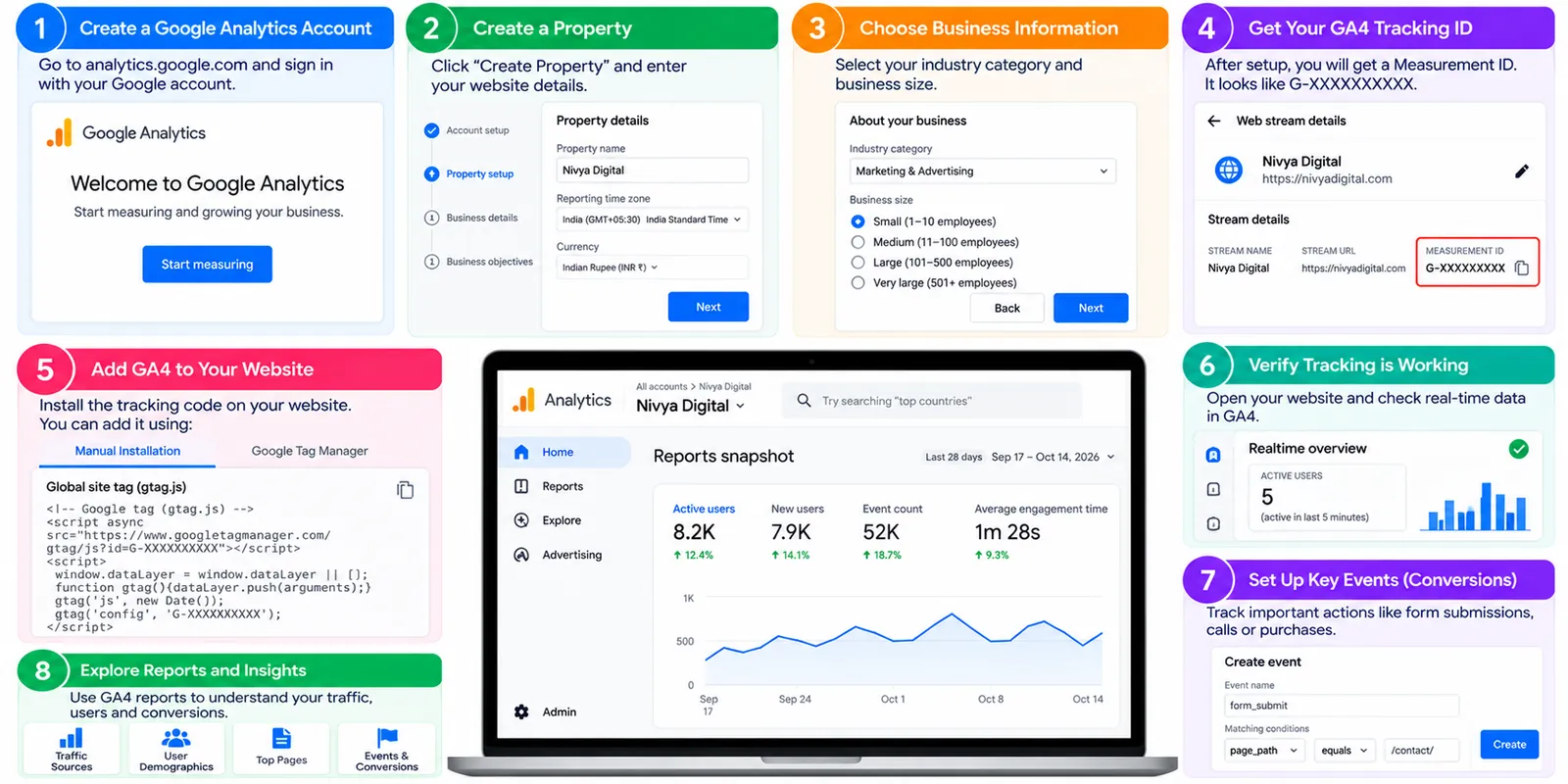
Step 11: Set Up Google Analytics 4
Google Search Console helps you understand your website's presence in Google Search.
Google Analytics 4 (GA4) helps you understand what visitors do after arriving on your website.
With GA4, you can analyze:
Traffic acquisition
Landing pages
User engagement
Events
Key events and conversions
Device and geographic information
For a business website, useful conversions might include contact form submissions, consultation bookings, or qualified inquiries.
For a blog, you might track newsletter subscriptions or other meaningful actions.
Make sure your analytics setup follows applicable privacy and consent requirements.
Step 12: Use Free SEO Tools to Review Your Website
You don't need a large SEO software budget to perform basic checks.
A combination of Google tools and practical website utilities can help you identify common problems.
Nivya Digital offers SEO and content-related utilities that website owners can explore as part of their optimization workflow.
| Tool | How it can help |
|---|---|
| Nivya Digital SEO Audit Tool | Review potential on-page SEO issues |
| Website Speed Checker | Investigate website performance |
| Meta Tag Generator | Prepare titles and descriptions |
| Keyword Density Checker | Review keyword repetition |
| Word Counter | Edit content length and structure |
| Robots.txt Generator | Prepare crawl instructions |
| Google Search Console | Monitor indexing and search performance |
| Google PageSpeed Insights | Analyze performance and Core Web Vitals |
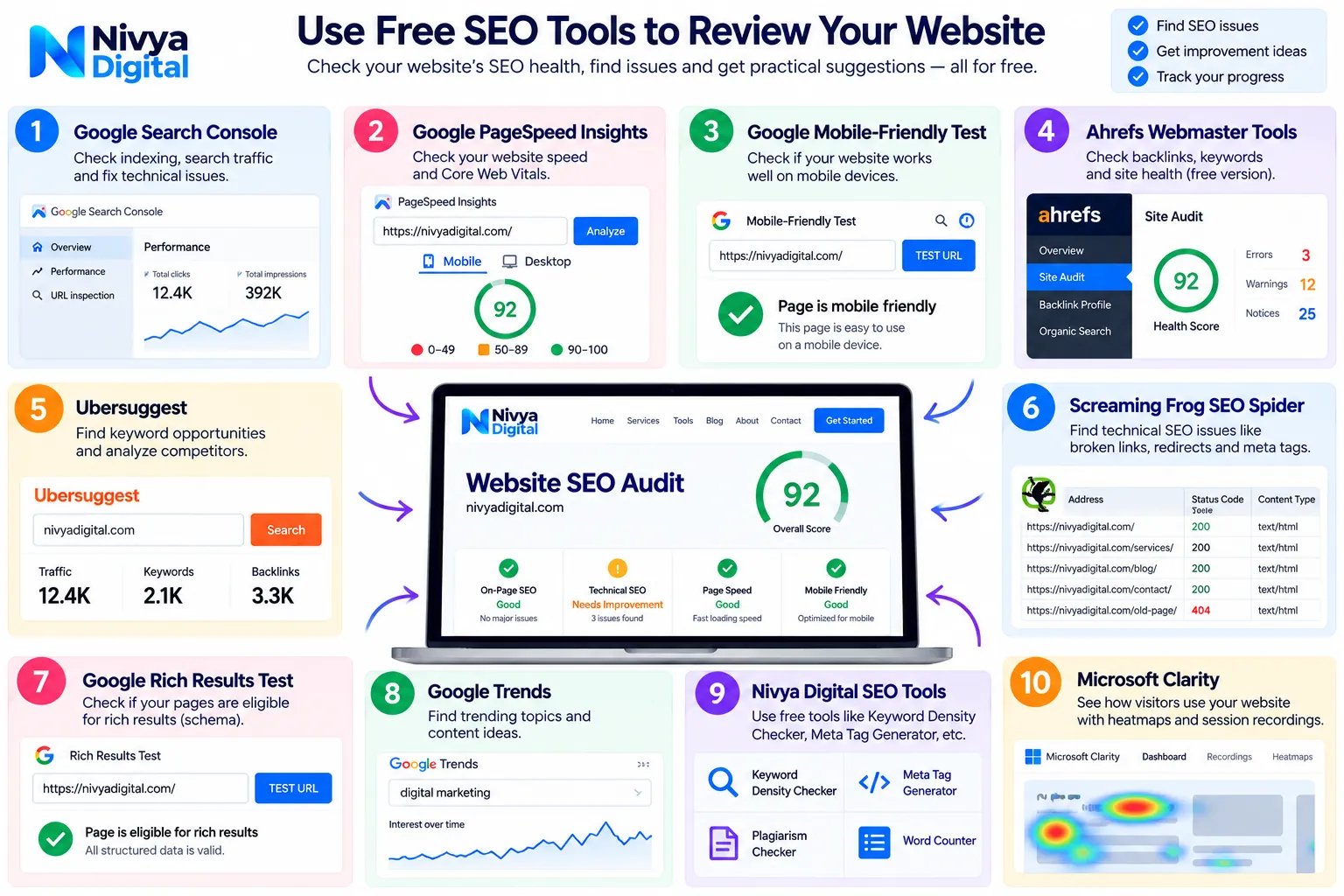
Explore Nivya Digital's Free SEO Tools: https://nivyadigital.com/tools
Remember that an SEO audit score isn't the same as a Google ranking score.
Use automated reports to guide your investigation, then decide what needs fixing based on the actual website.
Step 13: Optimize Your Website for International SEO
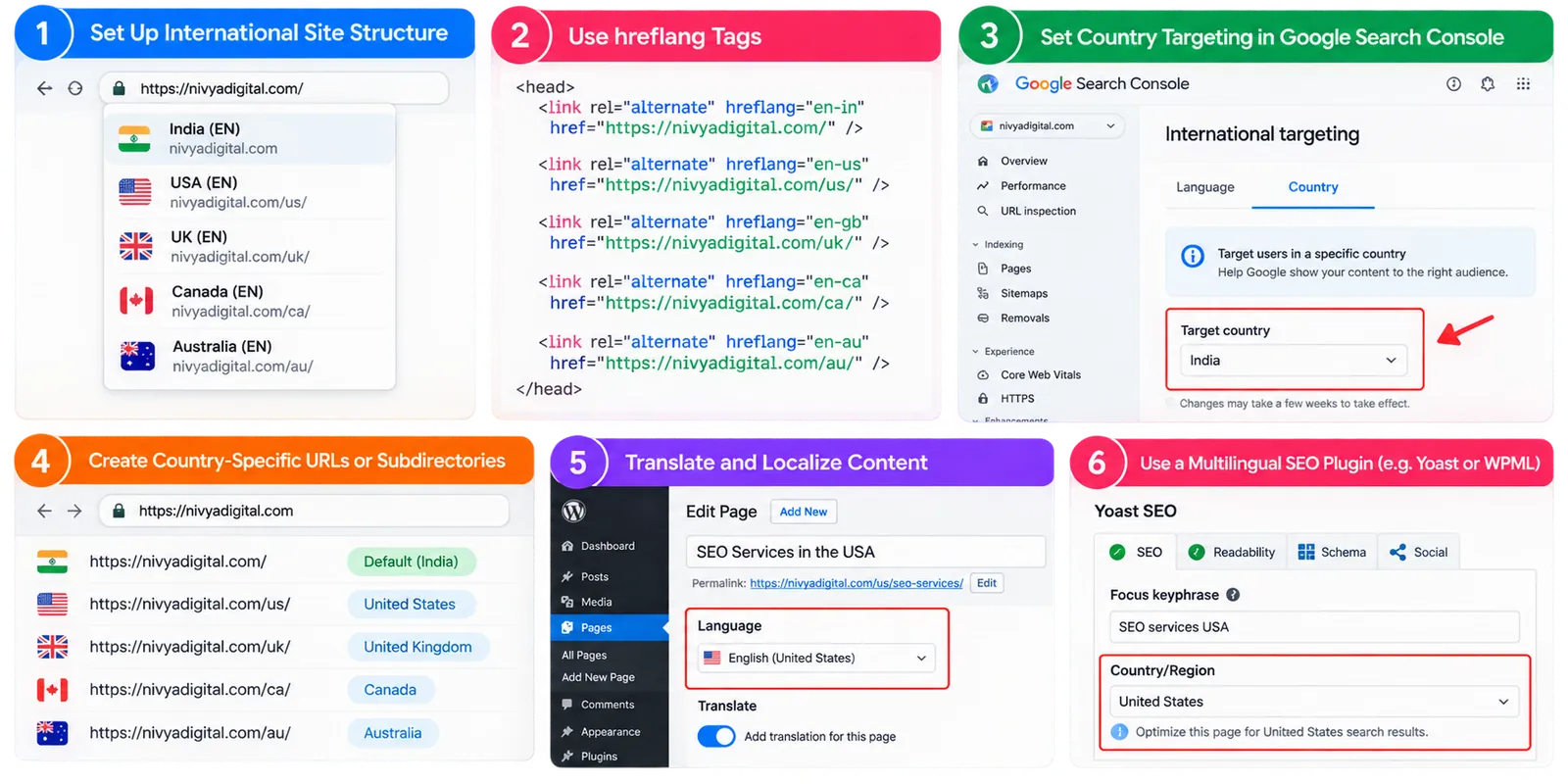
If your website serves customers in multiple countries, international SEO deserves attention from the beginning.
For example, a digital marketing company may want to attract visitors from India, the United States, the United Kingdom, Canada, and Australia.
You don't necessarily need separate websites for every country.
A well-written English article can be relevant to readers in several markets.
However, when you create country-specific content, consider meaningful differences such as:
Local search terminology
Currency and pricing
Service availability
Regional regulations
Customer expectations
Language preferences
For example, a page about SEO services in India should provide genuinely relevant information for Indian businesses.
A page targeting UK businesses should reflect the actual services and information relevant to that market.
Avoid publishing nearly identical country pages with only the country name changed.
For multilingual or regional URL variations, implement hreflang correctly where appropriate.
Step 14: Understand SEO for Google AI Overviews and AI Mode
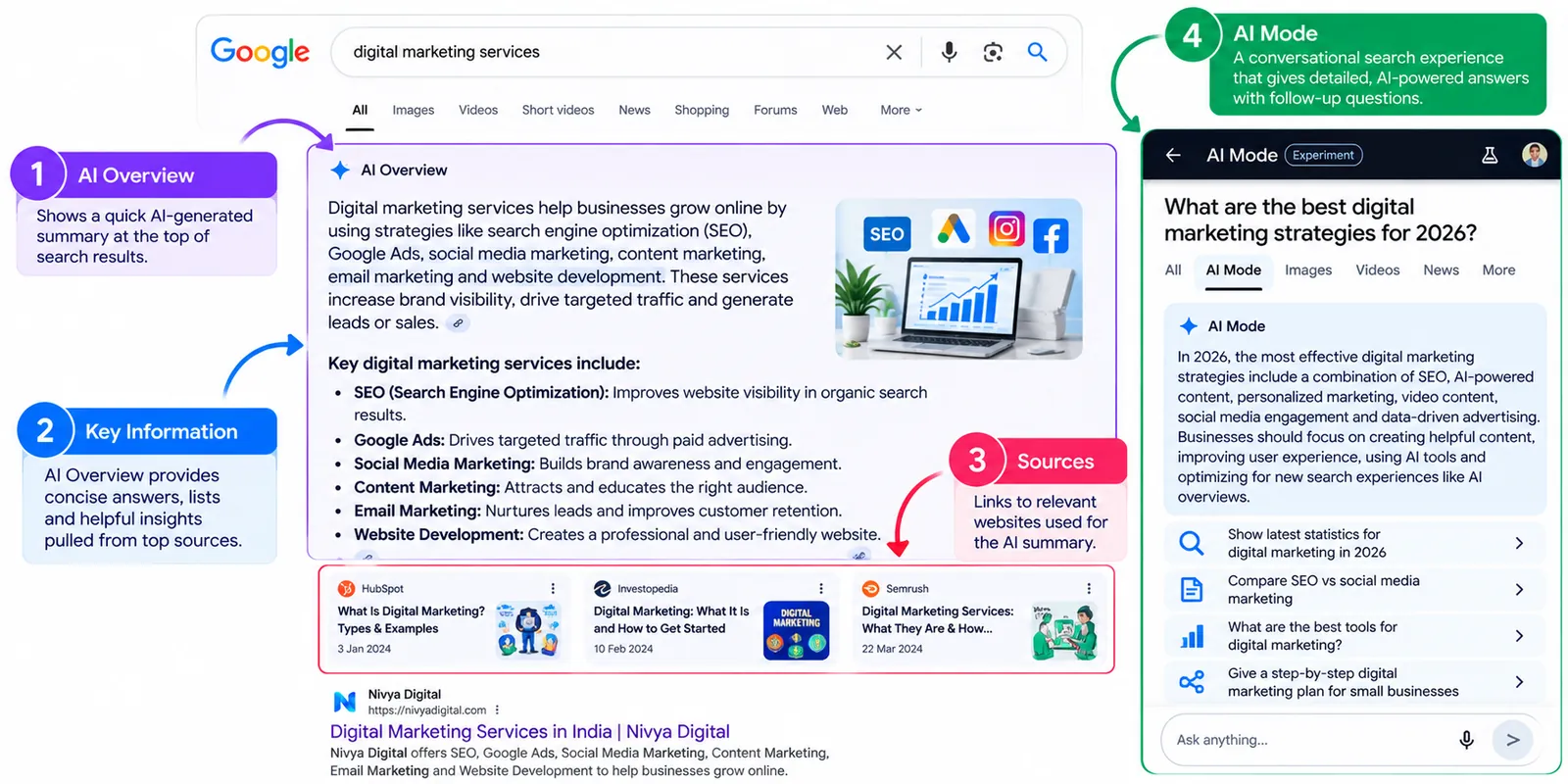
In 2026, website owners are also thinking about visibility in AI-powered search experiences.
Google AI Overviews and AI Mode can help users explore questions and discover information through AI-assisted results.
Does that mean traditional SEO is no longer useful?
No.
Google's guidance continues to emphasize established SEO fundamentals.
For a new website, focus on:
Publishing accurate and original content
Answering relevant questions clearly
Keeping important content accessible
Using meaningful internal links
Providing a good page experience
Including helpful images or videos where appropriate
Making business information accurate
You don't need a special AI-specific file or schema markup to become eligible for Google's AI search features.
And no tool can guarantee that your website will be cited in an AI-generated answer.
Step 15: Monitor Your SEO Progress and Keep Improving
SEO doesn't end when you publish your first blog.
Your website will change, competitors will publish new content, and search behavior may evolve.
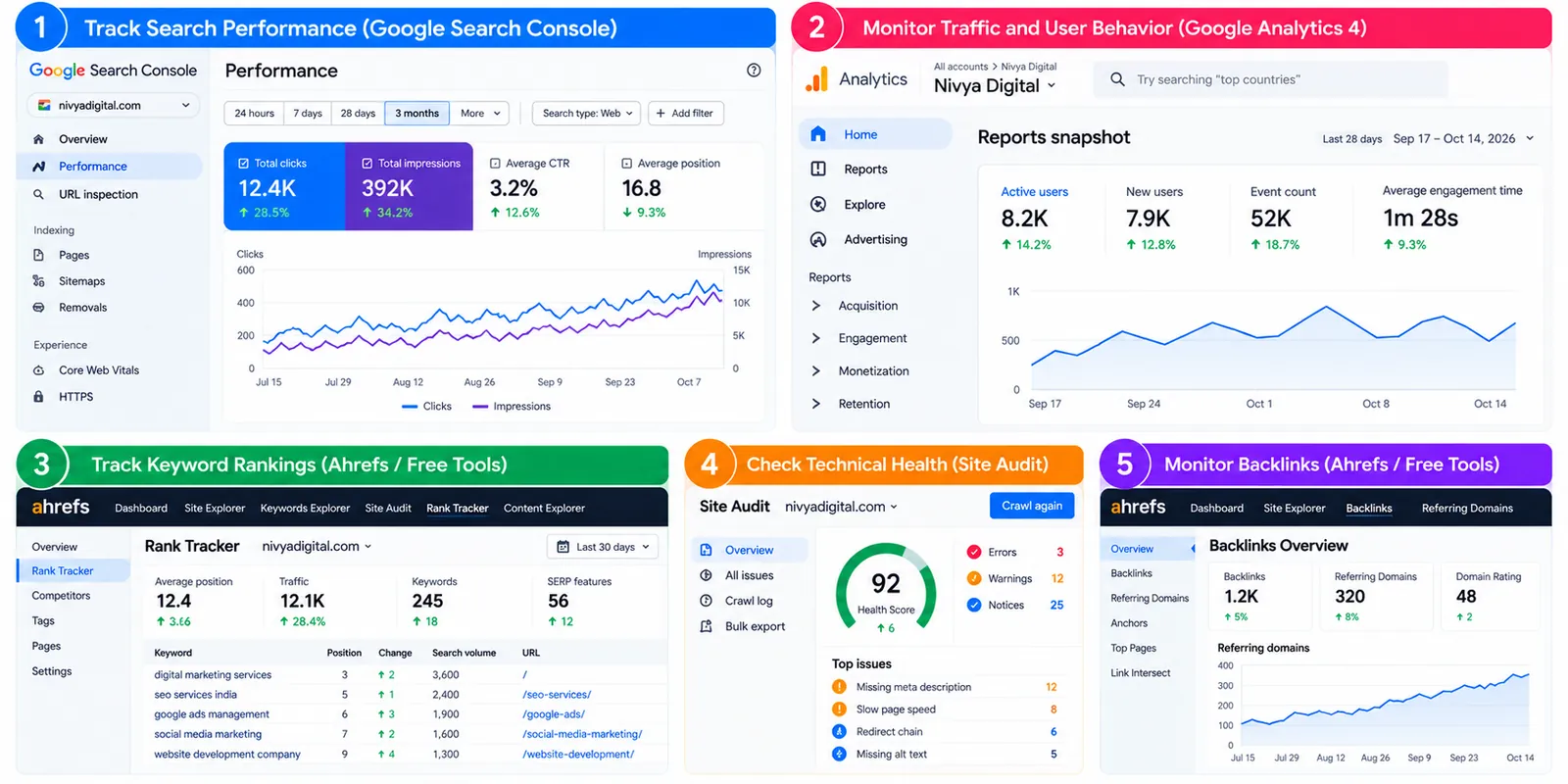
Regular reviews help you understand what's working.
Which SEO Metrics Should Beginners Track?
Focus on measurements that connect to your goals.
| SEO metric | Why it matters |
|---|---|
| Organic clicks | Shows search traffic from Google |
| Impressions | Indicates search visibility |
| Search queries | Reveals how people find your pages |
| Indexed pages | Helps monitor discoverability |
| Organic conversions | Shows meaningful business outcomes |
| Core Web Vitals | Helps evaluate page experience |
Don't judge your SEO performance solely by one keyword's ranking.
A website may gain valuable traffic from many relevant searches rather than a single high-volume term.
A Practical 30-Day SEO Plan for a New Website
If you're unsure where to begin, use this plan to organize your first month.
| Timeline | Main activities |
|---|---|
| Week 1 | Set up Search Console, check indexing, submit sitemap, review website structure |
| Week 2 | Research keywords, identify search intent, optimize titles and headings |
| Week 3 | Publish helpful content, add internal links, improve important service pages |
| Week 4 | Review technical issues, test website speed, configure analytics, monitor early data |
The goal of this plan isn't to guarantee rankings within 30 days.
It's to build a strong foundation and establish a repeatable SEO process.
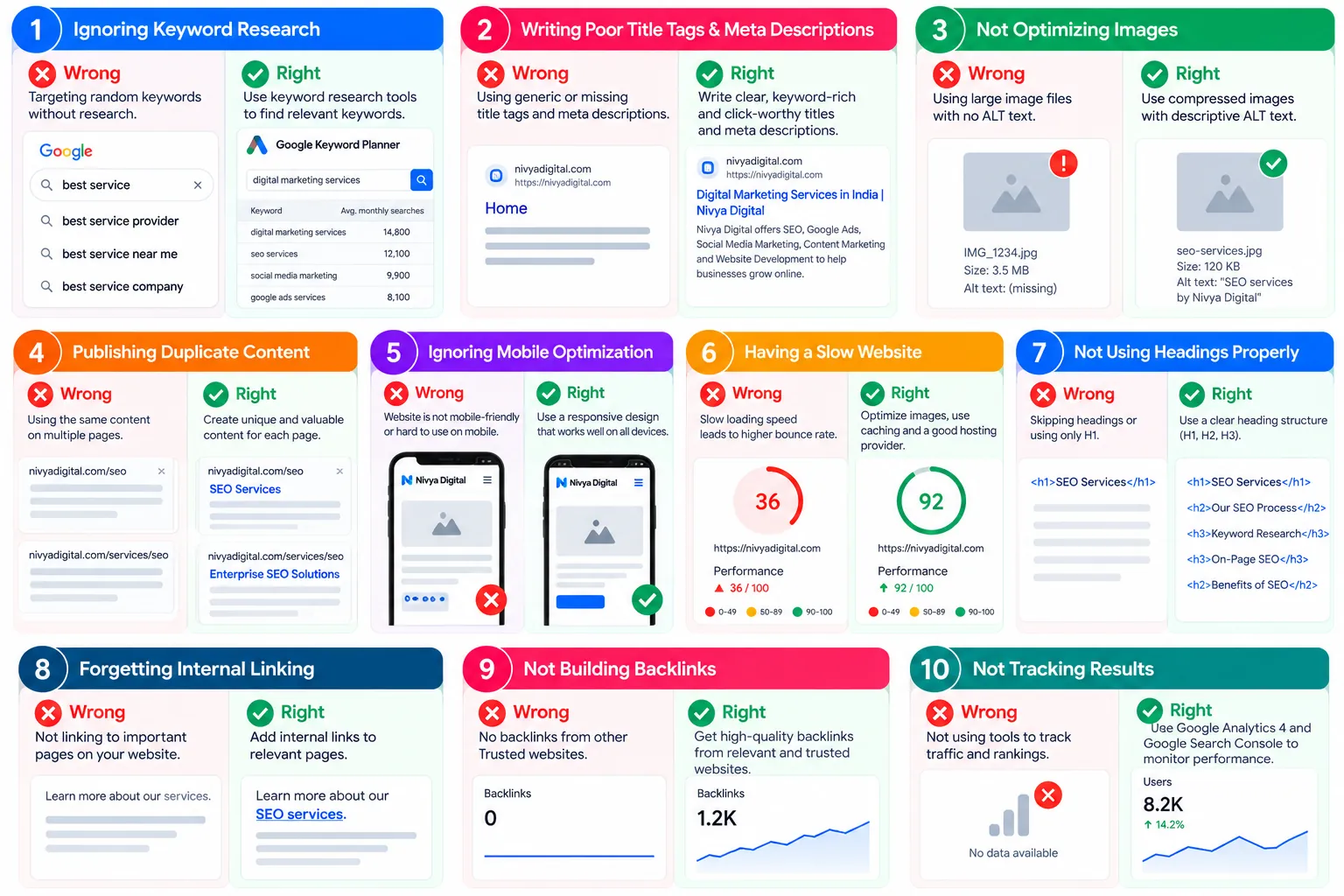
Common SEO Mistakes Beginners Should Avoid
Even small mistakes can make a new website harder to discover or less useful to visitors.
1. Targeting Only Highly Competitive Keywords
Broad keywords may attract attention, but they aren't always the best starting point.
Look for relevant, specific questions your website can answer well.
2. Publishing Content Without Understanding Search Intent
Before writing, investigate what searchers actually want.
A useful tutorial and a sales landing page serve different purposes.
3. Copying Competitor Content
Competitor research should help you identify opportunities, not provide material to duplicate.
Add original explanations, examples, and insights.
4. Ignoring Mobile Users
Test your website on real mobile devices and fix usability problems.
5. Keyword Stuffing
Repeating a keyword unnaturally won't make your article more helpful.
Use natural language and related terms where they genuinely fit.
6. Buying Spammy Backlinks
Avoid manipulative link-building tactics that violate search engine spam policies.
7. Forgetting Internal Links
Help visitors move between related articles, tools, and service pages.
8. Expecting Instant Results
SEO improvements may take time to be discovered, processed, and reflected in search performance.
No reliable SEO strategy can promise a specific ranking date.
Final Thoughts
Starting SEO for a new website can feel overwhelming, especially when every online guide recommends different tools, techniques, and ranking strategies.
But you don't need to do everything at once.
Begin by making sure search engines can access your website. Understand what your audience is searching for. Create pages that genuinely answer those questions, and make your website easy to navigate.
Once those foundations are in place, focus on technical improvements, useful content, relevant links, and performance measurement.
Most importantly, remember that SEO is about helping the right people find the right information.
Need help getting started?
Explore the free SEO tools available at Nivya Digital to review your website, identify potential issues, and plan your next improvements.
If your business needs support with keyword research, technical SEO, content optimization, or long-term organic growth, you can also explore Nivya Digital's digital marketing services.
Your website doesn't need to become perfect overnight. It needs a clear purpose, useful content, and a practical plan for continuous improvement.
Comments (0)
No comments yet
Start the discussion by sharing your perspective