
AI-powered search is changing how people discover businesses, compare products, and visit websites. Platforms such as ChatGPT, Google Gemini, Microsoft Copilot, and Perplexity are becoming additional sources of website discovery.
For digital marketers and business owners, this creates an important question: How can you track AI search traffic in Google Analytics 4 (GA4)?
Traditional SEO reporting focuses on organic search traffic, keyword rankings, and conversions. However, AI-powered platforms introduce new referral sources and attribution challenges.
The good news is that GA4 now offers an AI Assistant channel, making it easier to identify some visits from AI platforms. You can also use custom reports and Google Search Console to develop a more complete understanding of AI search performance.
In this guide, Nivya Digital explains how to track AI search traffic in GA4, measure conversions, and identify opportunities to improve your AI search strategy in 2026.
What Is AI Search Traffic?
AI search traffic refers to website visits originating from AI-powered search engines, conversational assistants, and answer platforms.
For example, someone might ask ChatGPT to recommend a digital marketing agency. If ChatGPT includes a link to your website and the user clicks it, that visit may appear as AI referral traffic in GA4.
Common AI platforms include:
ChatGPT: Helps users research topics, compare services, and discover websites.
Google Gemini: Provides AI-powered answers and may link to external resources.
Perplexity: Offers AI-generated responses with links to supporting sources.
Microsoft Copilot: Helps users discover information through conversational AI.
Claude: Can direct users to websites when links are available in its responses.
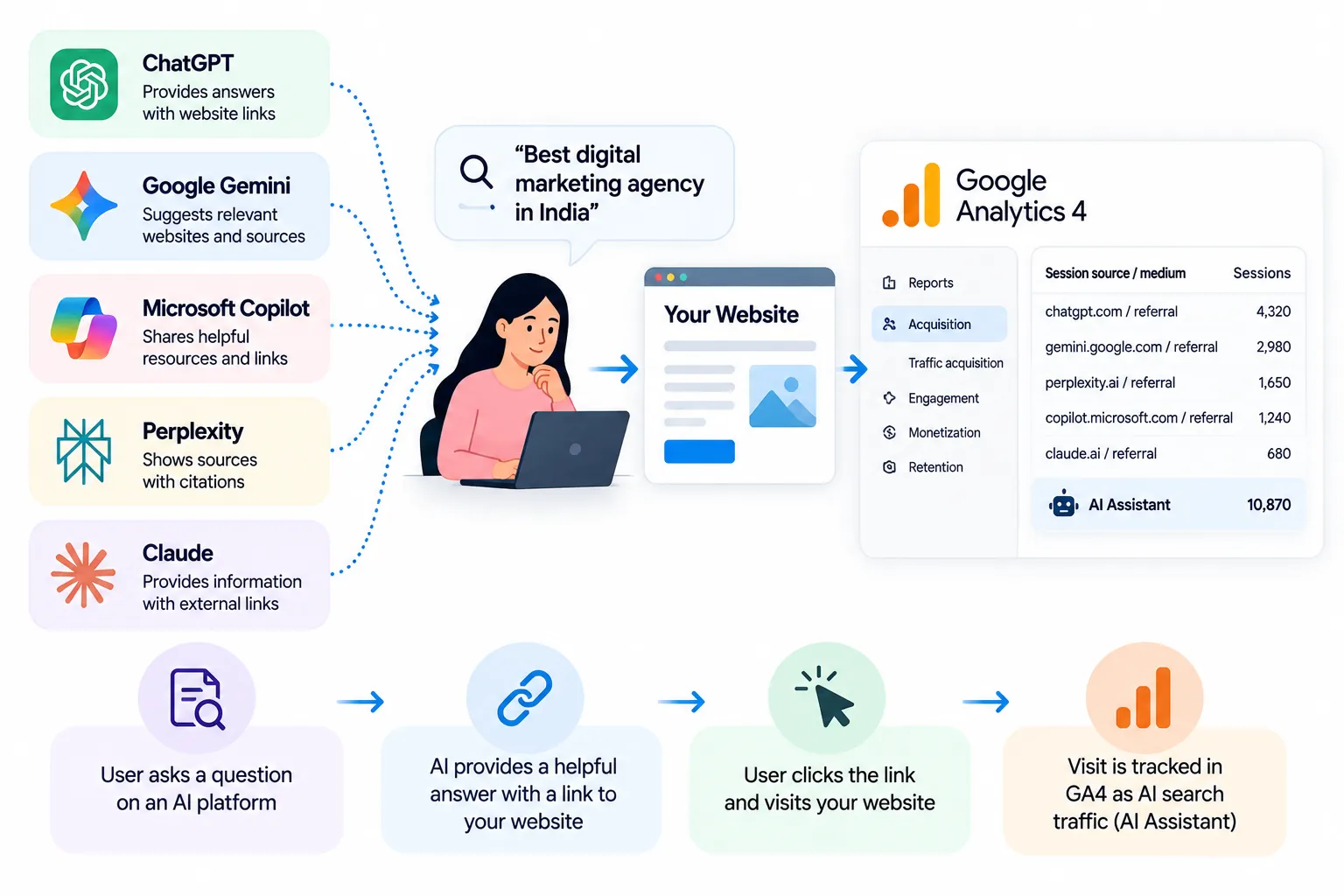
However, not every interaction with these platforms results in a website visit. AI mentions and citations without clicks cannot be measured as sessions in GA4.
Why Tracking AI Search Traffic Matters in 2026
Understanding AI-driven visits helps businesses evaluate how their digital visibility translates into meaningful results.
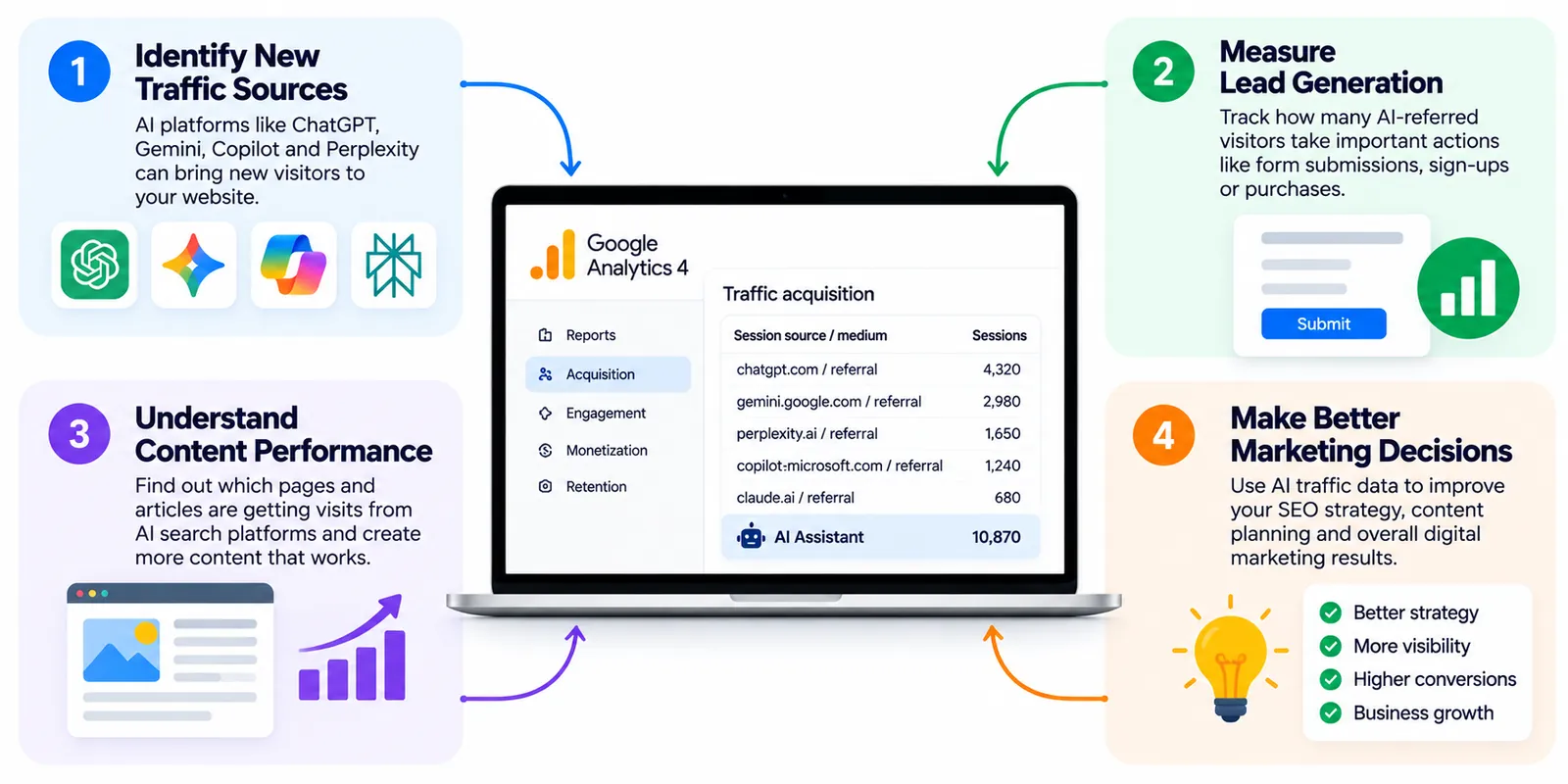
1. Identify New Traffic Sources
AI assistants can introduce your website to potential customers who might not discover your business through traditional search results.
Tracking these visits helps you understand which platforms are sending users to your website.
2. Measure Lead Generation
Website visits alone do not demonstrate business success.
By monitoring form submissions, consultation requests, purchases, and other important actions, you can evaluate whether AI-referred visitors are contributing to business goals.
3. Understand Content Performance
Some informational articles, comparison guides, and service pages may attract visits from AI-generated answers.
Identifying these landing pages helps you understand which content is being discovered through AI platforms.
4. Improve Marketing Decisions
AI traffic reporting can support decisions about content creation, website improvements, and marketing investment.
However, AI traffic should be evaluated alongside organic search, direct traffic, and other acquisition channels rather than in isolation.
How Does GA4 Track AI Search Traffic?
Google Analytics 4 identifies website acquisition sources using information such as referring websites and campaign parameters.
In 2026, GA4 includes an AI Assistant default channel for traffic originating from recognized AI assistants.
This channel can include sources such as ChatGPT, Gemini, Copilot, DeepSeek, and Grok. Google's documentation specifically excludes Google AI Overviews and AI Mode from this channel.
The important distinction is that GA4 tracks identifiable website visits, not every time an AI system mentions your brand.
For additional analysis, marketers can inspect session sources and create custom channel groups.
How to Track AI Search Traffic in GA4: Step-by-Step
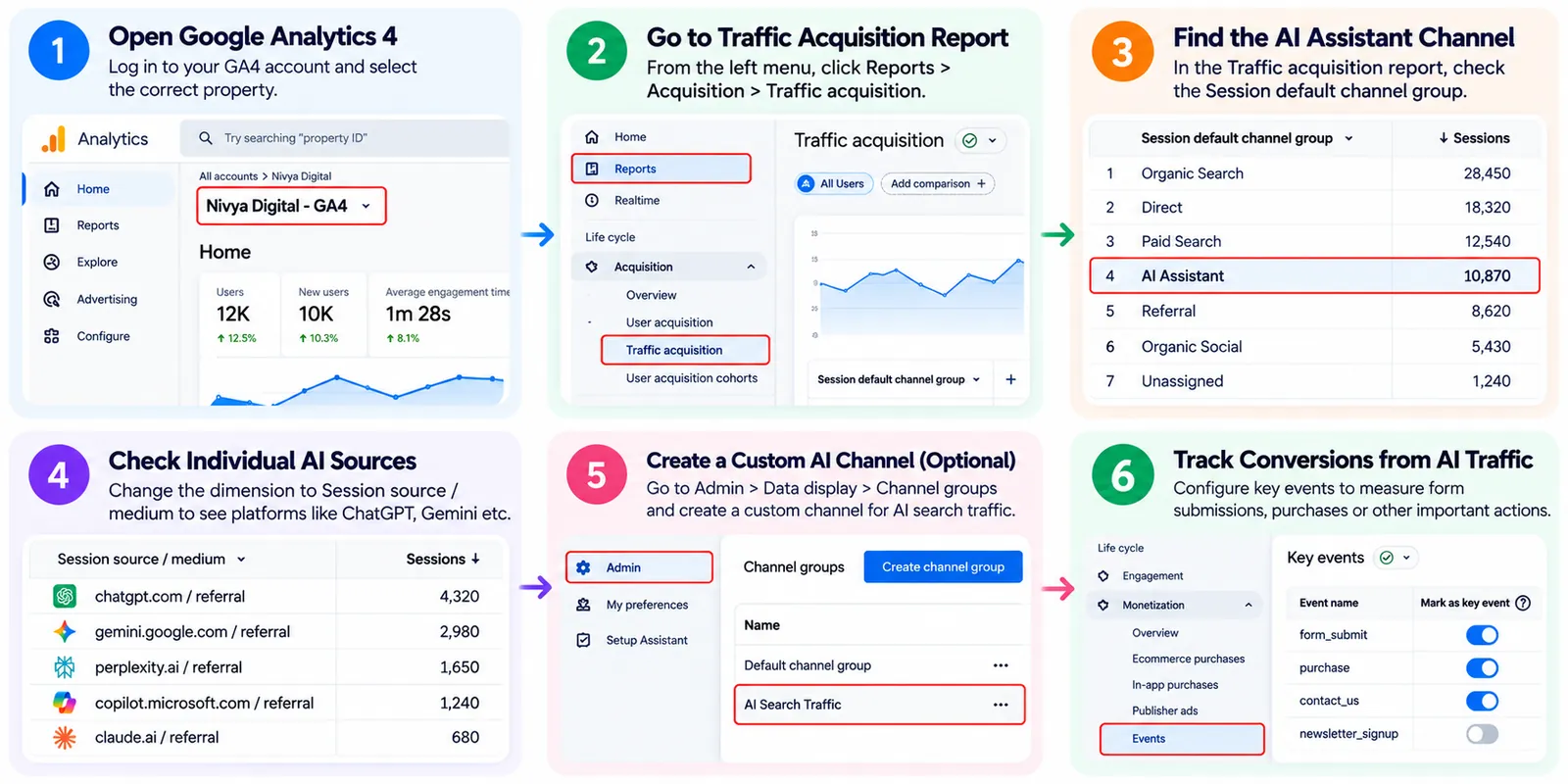
Step 1: Open Google Analytics 4
Visit Google Analytics and select the GA4 property connected to your website.
Make sure the correct website data stream is collecting events.
If GA4 tracking is not installed properly, acquisition reports may be incomplete.
Step 2: Open the Traffic Acquisition Report
From the left navigation menu, follow:
Reports → Acquisition → Traffic acquisition
This report shows where your website sessions originate.
You can review metrics such as sessions, engaged sessions, engagement rate, and key events.
Choose a date range that provides enough information to identify meaningful patterns.
Step 3: Look for the AI Assistant Channel
In the Traffic acquisition report, review the Session default channel group dimension.
Look for a channel named AI Assistant.
If it appears, you can review the sessions attributed to recognized AI assistants.
If you cannot find it, your property may not have recorded qualifying traffic during the selected period.
Remember that channel classification depends on the source information GA4 receives.
Step 4: Identify Individual AI Platforms
To understand which assistants are driving visits, change the report dimension to:
Session source / medium
Look for recognizable sources such as:
| AI platform | Example referral source |
|---|---|
| ChatGPT | chatgpt.com |
| ChatGPT | chat.openai.com |
| Google Gemini | gemini.google.com |
| Perplexity | perplexity.ai |
| Microsoft Copilot | copilot.microsoft.com |
| Claude | claude.ai |
These are examples of potential referring domains, not a guarantee that every visit will appear under these names.
You can search or filter the report to investigate individual sources.
Step 5: Create a Custom AI Traffic Channel
If you want a dedicated reporting category covering additional AI sources, GA4 supports custom channel groups.
Navigate to:
Admin → Data display → Channel groups
Create a custom channel group and add a channel such as AI Search Traffic.
Configure rules using relevant source domains or regular expressions.
For example, a simplified matching pattern might be:
chatgpt.com|chat.openai.com|gemini.google.com|perplexity.ai|claude.ai|copilot.microsoft.com
This is an illustrative pattern. Review it against actual source values and update it as platforms change.
Position the custom AI channel appropriately so matching traffic is classified as intended.
Custom channel groups help organize identifiable traffic; they cannot recover visits whose referral information was never recorded.
How to Track Google AI Overviews and AI Mode Traffic
Google AI Overviews and AI Mode require a different measurement approach from standalone AI assistants.
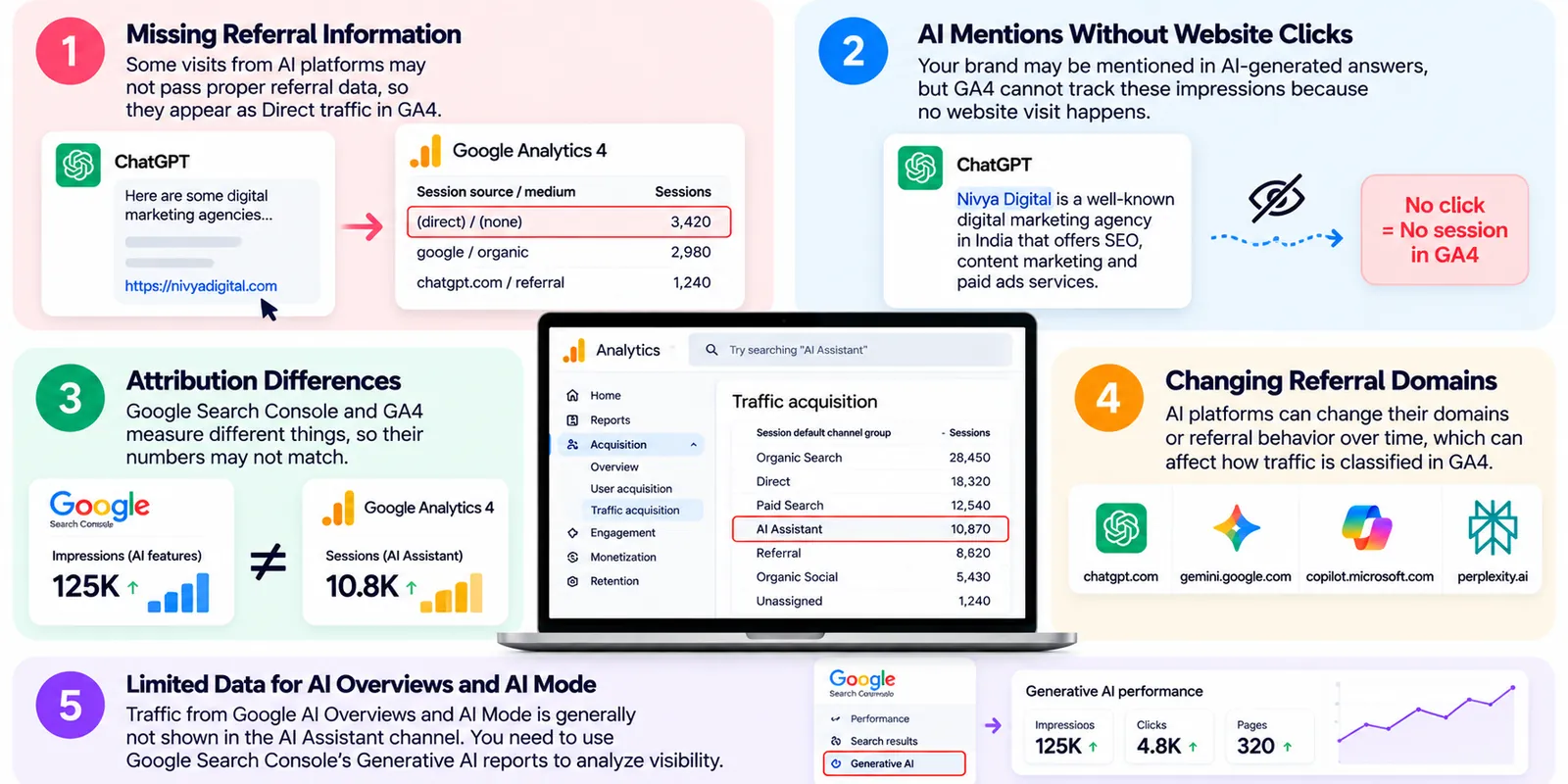
Visits originating from Google's AI search experiences are generally associated with Google Search rather than GA4's AI Assistant channel.
Fortunately, Google introduced dedicated Generative AI performance reports in Google Search Console in June 2026. According to Google, these reports became available worldwide by August 31, 2026.
They help website owners examine visibility in generative AI features.
What Can You Measure in Search Console?
The reports provide information such as:
Impressions within Google's generative AI features
Pages appearing in AI experiences
Visibility by country
Device information for Search
Performance trends over time
These insights complement GA4's website engagement and conversion metrics.
For example, Search Console can help you identify pages receiving AI-feature impressions, while GA4 can show how users behave after reaching your website.
Important: Do not assume that all google / organic sessions came from AI Overviews or AI Mode.
How to Measure AI Traffic Conversions in GA4
Tracking AI referral sessions is useful, but measuring business outcomes is more valuable.
Set Up Important Events
Identify actions that represent meaningful progress toward your business goals.
Examples include:
Contact form submissions
Consultation bookings
Qualified lead submissions
Purchases
Newsletter subscriptions
Configure the relevant GA4 events and mark appropriate events as key events.
Compare AI Traffic With Other Channels
Review AI traffic alongside Organic Search, Direct, and other acquisition sources.
Focus on:
| Metric | What it tells you |
|---|---|
| Sessions | How many recorded visits came from the channel |
| Engaged sessions | Visits meeting GA4's engagement criteria |
| Engagement rate | Percentage of sessions classified as engaged |
| Key events | Important actions completed by visitors |
| Session key event rate | Share of sessions generating a key event |
For example, an AI platform might send fewer visitors than Google Search but still generate valuable consultation requests.
This would be worth investigating before deciding whether to expand content targeting that audience.
How to Find Pages Receiving AI Referral Traffic
Understanding which pages attract AI-referred visitors can improve your content strategy.
In GA4, use the Landing page report or an Exploration to analyze landing pages alongside session acquisition sources.
Filter for your AI Assistant channel or selected AI referral domains.
Review whether visitors are reaching:
Educational blog posts
Service pages
Comparison articles
Pricing pages
Case studies
For a digital marketing agency, an article explaining SEO costs might attract research-focused visitors, while a service page could generate consultation requests.
Use these findings to improve internal links, calls to action, and supporting information.
Common Challenges When Tracking AI Traffic
Missing Referral Information
Some visits from AI platforms may arrive without usable referral information.
Depending on the circumstances, these sessions may be classified as Direct or another channel.
Therefore, GA4's recorded AI traffic should not be treated as a complete count of all AI-influenced visits.
AI Mentions Without Website Clicks
A brand may appear in an AI-generated answer without receiving a click.
GA4 cannot measure these impressions because no website session occurs.
Separate AI visibility monitoring tools may provide additional insights, although their results should be interpreted carefully.
Attribution Differences
Google Search Console and GA4 measure different activities.
Search Console focuses on search visibility and clicks, while GA4 focuses on website interactions.
Their totals may differ because of measurement methods, consent settings, and other factors.
Changing Referral Domains
AI platforms can change domains, referral behavior, or traffic classification.
Review your reporting rules periodically rather than relying on a permanent list of sources.
Best Practices for Improving AI Search Traffic in 2026
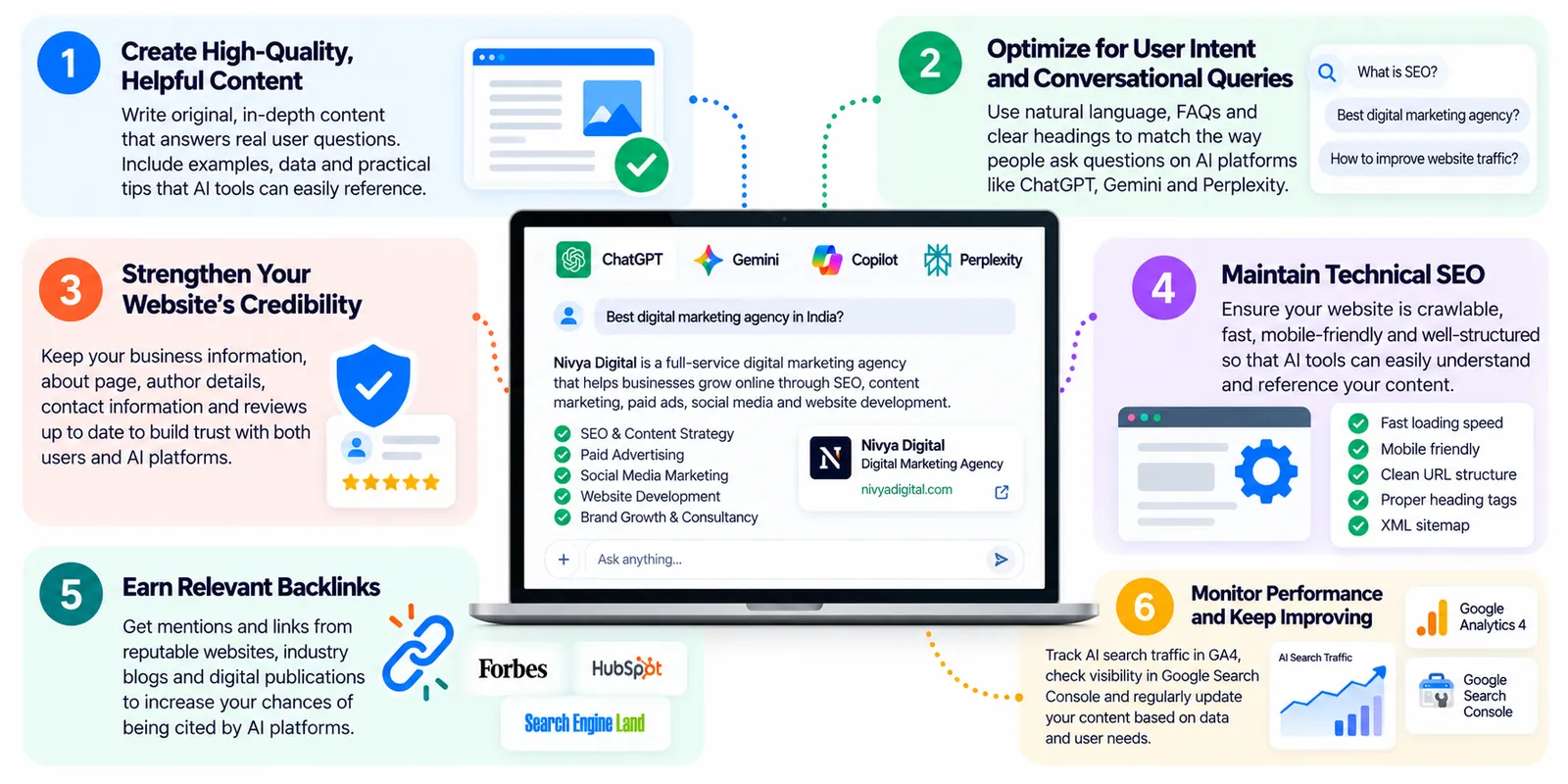
Tracking AI traffic becomes more useful when combined with a strong content strategy.
Create Helpful, Original Content
Publish content that directly answers real customer questions.
Include relevant examples, clear explanations, and accurate information that demonstrates practical experience.
Strengthen Your Website's Credibility
Keep service information, author details, business information, and contact pages accurate.
Avoid exaggerated claims or unsupported statistics.
Maintain Technical SEO
Make important pages crawlable, accessible, mobile-friendly, and easy to navigate.
Use descriptive headings and internal links to help visitors discover related information.
Monitor Visibility and Conversions Together
Use Search Console for Google search visibility and GA4 for website engagement.
Review both regularly to understand whether increased exposure is contributing to business results.
Final Thoughts
AI-powered search is creating new opportunities for businesses to reach potential customers, but accurate measurement requires more than checking traditional organic traffic.
With GA4's AI Assistant channel, custom reporting, and Google's Generative AI performance reports in Search Console, marketers can build a clearer picture of AI-related website discovery.
The key is to distinguish AI visibility, identifiable referral traffic, and actual conversions.
At Nivya Digital, we believe successful AI search optimization starts with useful content, reliable analytics, and sustainable SEO practices. By monitoring the right metrics and improving the visitor experience, businesses can make better decisions as search continues to evolve.
Comments (0)
No comments yet
Start the discussion by sharing your perspective