
Digital marketing campaigns depend on accurate conversion tracking. Businesses invest in Google Ads, Meta Ads, SEO, and other marketing channels to generate leads and sales. However, when conversion data is incomplete or incorrectly configured, marketers may struggle to understand which campaigns actually deliver results.
Browser privacy restrictions, tracking prevention technologies, ad blockers, and technical implementation errors can all affect marketing measurement.
This is where server-side tracking becomes important.
Server-side tracking allows businesses to process measurement data through a server-controlled environment before forwarding permitted information to analytics and advertising platforms.
With solutions such as Google Tag Manager server-side tagging, Google Analytics 4 (GA4), Google Ads enhanced conversions, and Meta Conversions API, businesses can build a more controlled and potentially more reliable measurement infrastructure.
In this guide, we explain what server-side tracking is, how it works, its benefits, implementation steps, common mistakes, and how businesses can use it to improve digital marketing decisions in 2026.
1. What Is Server-Side Tracking?
Server-side tracking is a method of collecting and processing website or application events through a server environment rather than relying entirely on tracking code running inside a visitor's browser.
Traditional browser-based tracking typically sends events directly from the website to analytics or advertising platforms.
Server-side tracking introduces an additional processing layer.
For example, when someone completes a contact form, the website can send an event to a server-side tagging endpoint. The server processes the event and forwards the appropriate data to configured marketing platforms.
Businesses can use this approach to manage:
Website purchases and ecommerce transactions
Contact form submissions
Qualified lead generation
Newsletter registrations
Account sign-ups
Other valuable customer interactions
Server-side tracking does not automatically eliminate the need for browser tracking. Many implementations use browser-side and server-side components together.
According to Google's official documentation, server-side tagging provides greater control over how measurement data is processed and distributed.
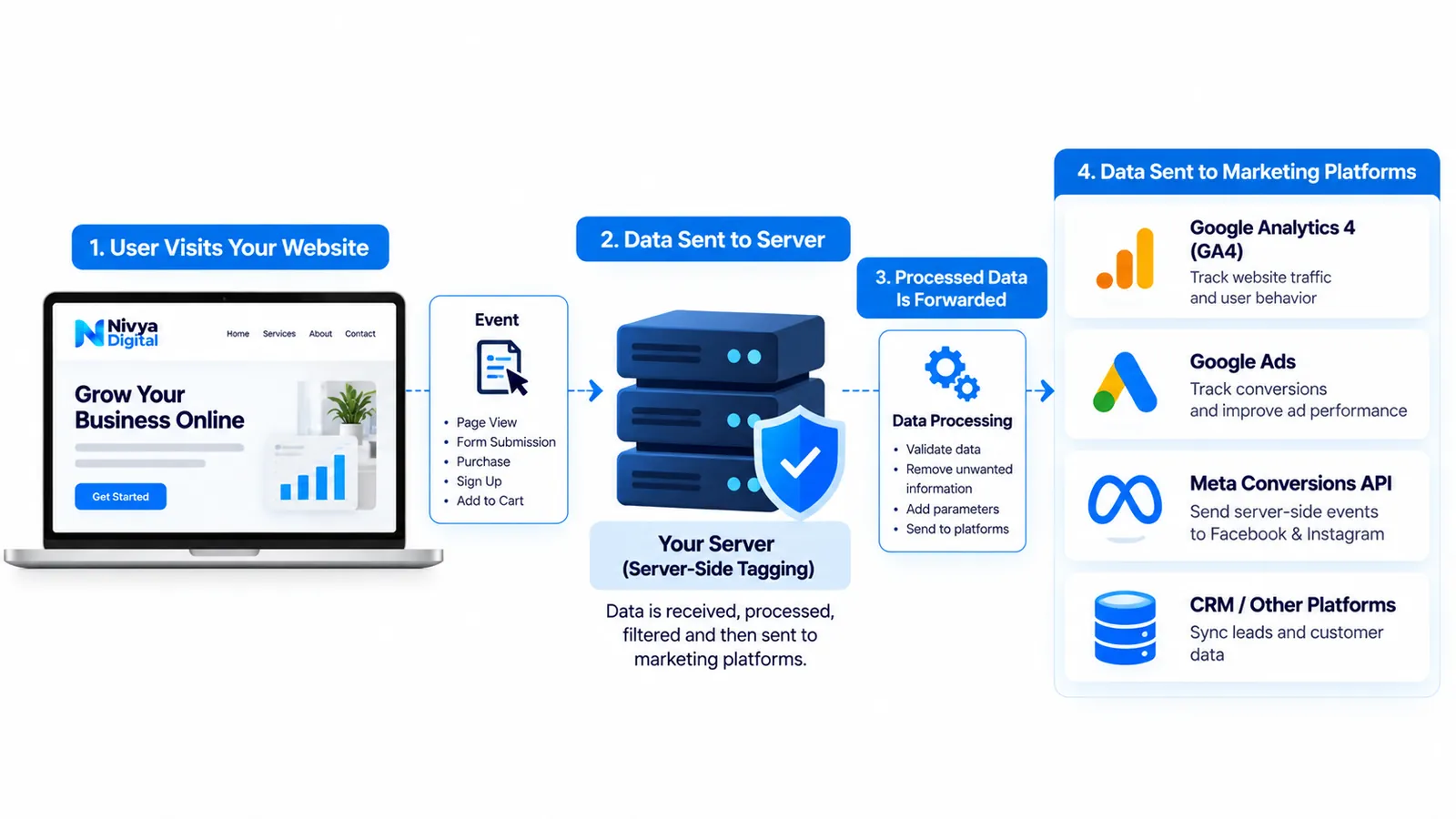
2. How Does Server-Side Tracking Work?
Server-side tracking creates an intermediate layer between your website and the platforms receiving your marketing data.
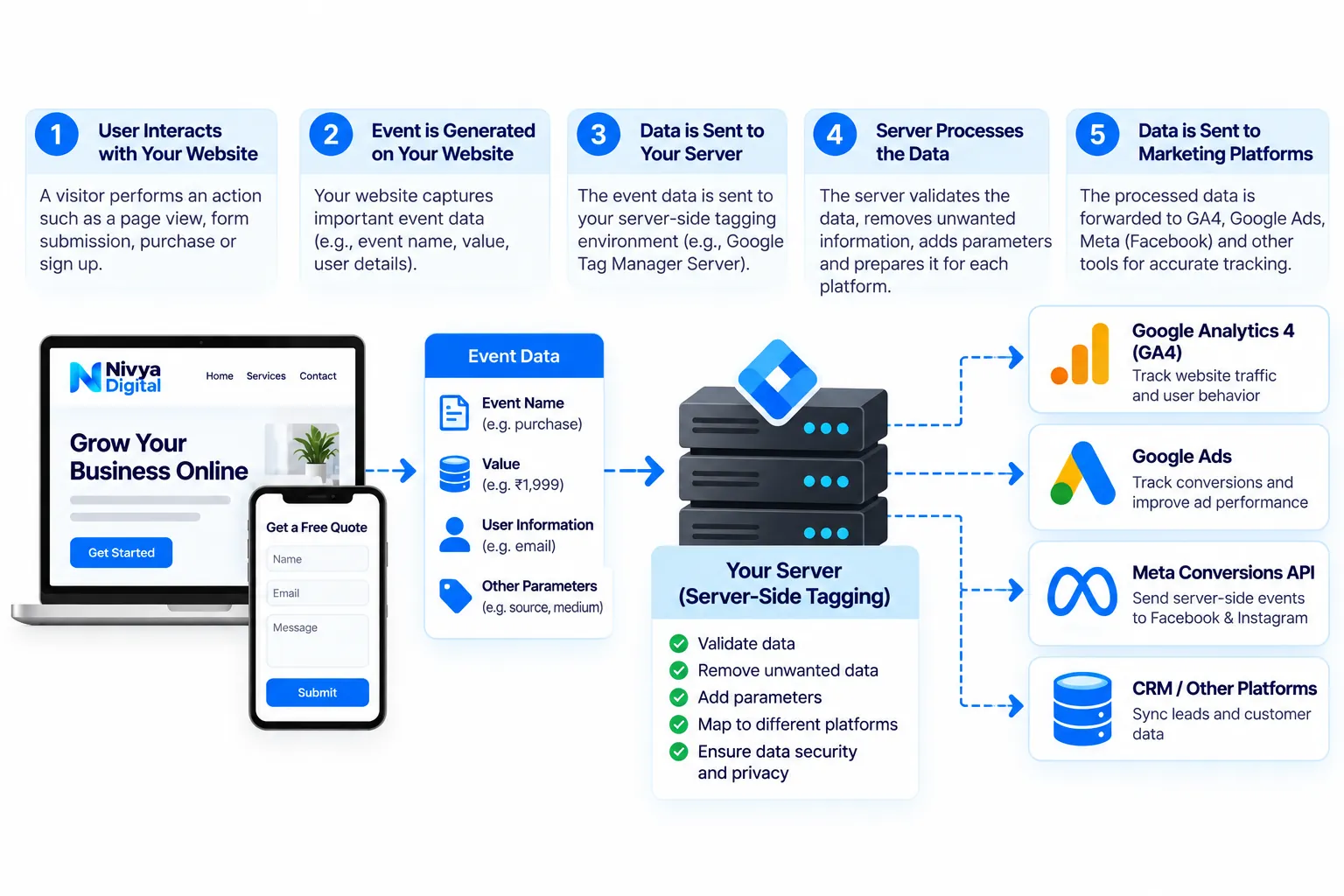
Step 1: A visitor interacts with your website
A visitor performs an action such as submitting a form, purchasing a product, or clicking an important button.
Step 2: The website generates an event
Your website or application creates an event containing relevant information, such as:
Event name
Transaction or lead identifier
Purchase value
Currency
Relevant campaign information
Permitted user information
Step 3: Data reaches your server endpoint
Instead of sending every measurement request directly to third-party services, the website can send data to a server-side Google Tag Manager container.
Step 4: The server processes the event
The server container can validate, transform, remove, or route data according to your configuration.
Step 5: Data is forwarded to marketing platforms
Depending on the setup, approved events can be sent to GA4, Google Ads, Meta, or other supported destinations.
Example: Server-side tracking for an ecommerce website
Imagine an online store receives an order worth $150.
The website records a purchase event and sends it to its server-side measurement environment.
The server checks the event details and forwards the appropriate information to configured platforms.
The business can then compare analytics reports with actual completed orders.
Important: Server-side tracking cannot guarantee that every conversion will be recorded. Consent choices, browser restrictions, implementation errors, and platform attribution rules can still affect measurement.
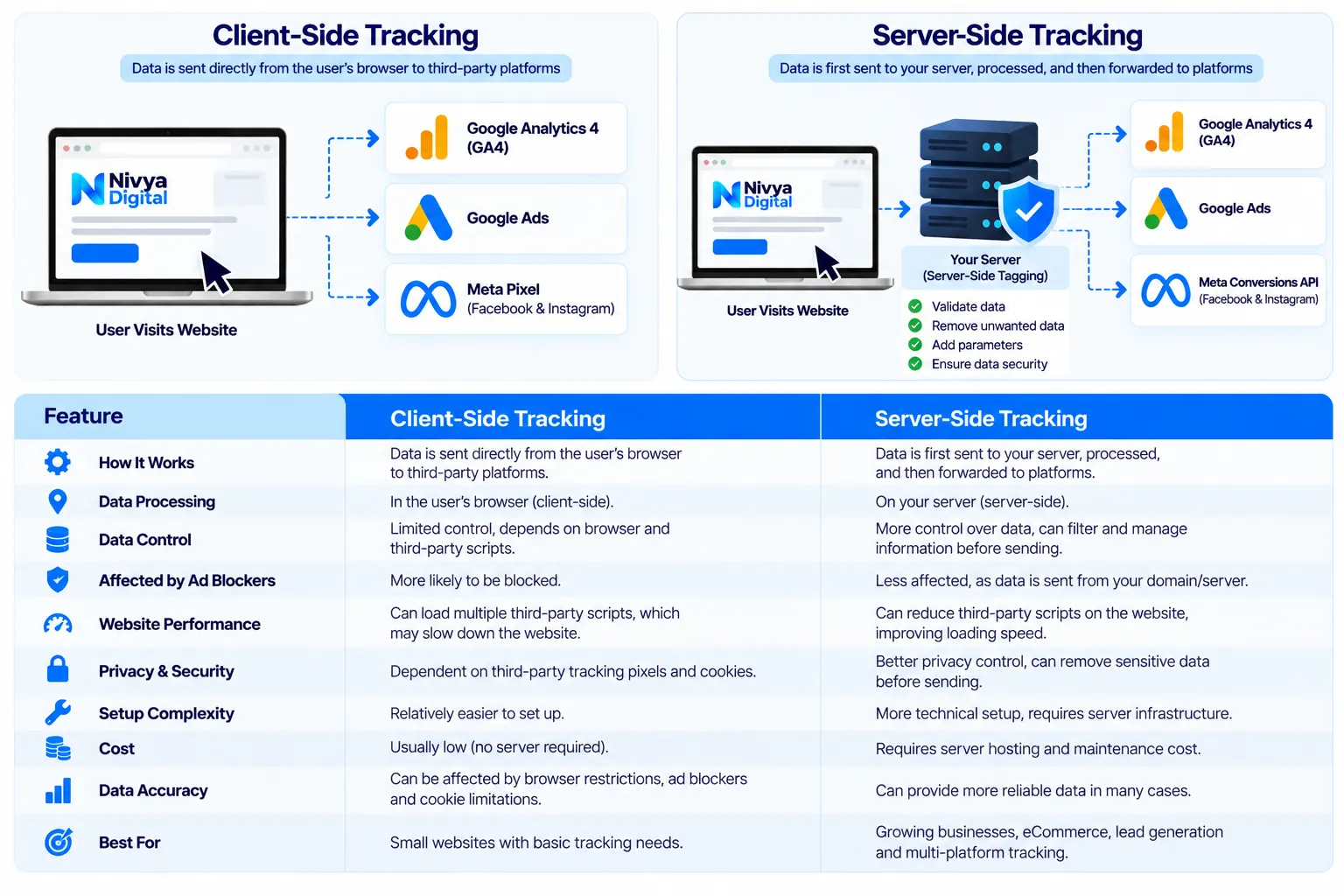
3. Client-Side Tracking vs Server-Side Tracking: Key Differences
Both client-side and server-side tracking are useful, but they process measurement information differently.
| Feature | Client-Side Tracking | Server-Side Tracking |
|---|---|---|
| Processing location | Visitor's browser | Server environment |
| Data control | More dependent on browser and vendor scripts | Greater control before forwarding |
| Browser JavaScript | Often requires multiple scripts | Can reduce third-party scripts |
| Privacy management | Managed through browser-side implementation | Additional server-level controls |
| Setup complexity | Usually simpler | More technical |
| Infrastructure cost | Often low | May require hosting and maintenance |
| Data reliability | Affected by browser conditions | May improve certain data flows |
| Best suited for | Basic website measurement | Businesses needing advanced measurement control |
Which tracking method is better?
There is no universal winner.
A small business with basic analytics requirements may find client-side tracking sufficient.
A growing ecommerce company managing multiple advertising platforms may benefit from a hybrid tracking setup.
The right decision depends on website traffic, marketing budgets, privacy requirements, technical resources, and business goals.
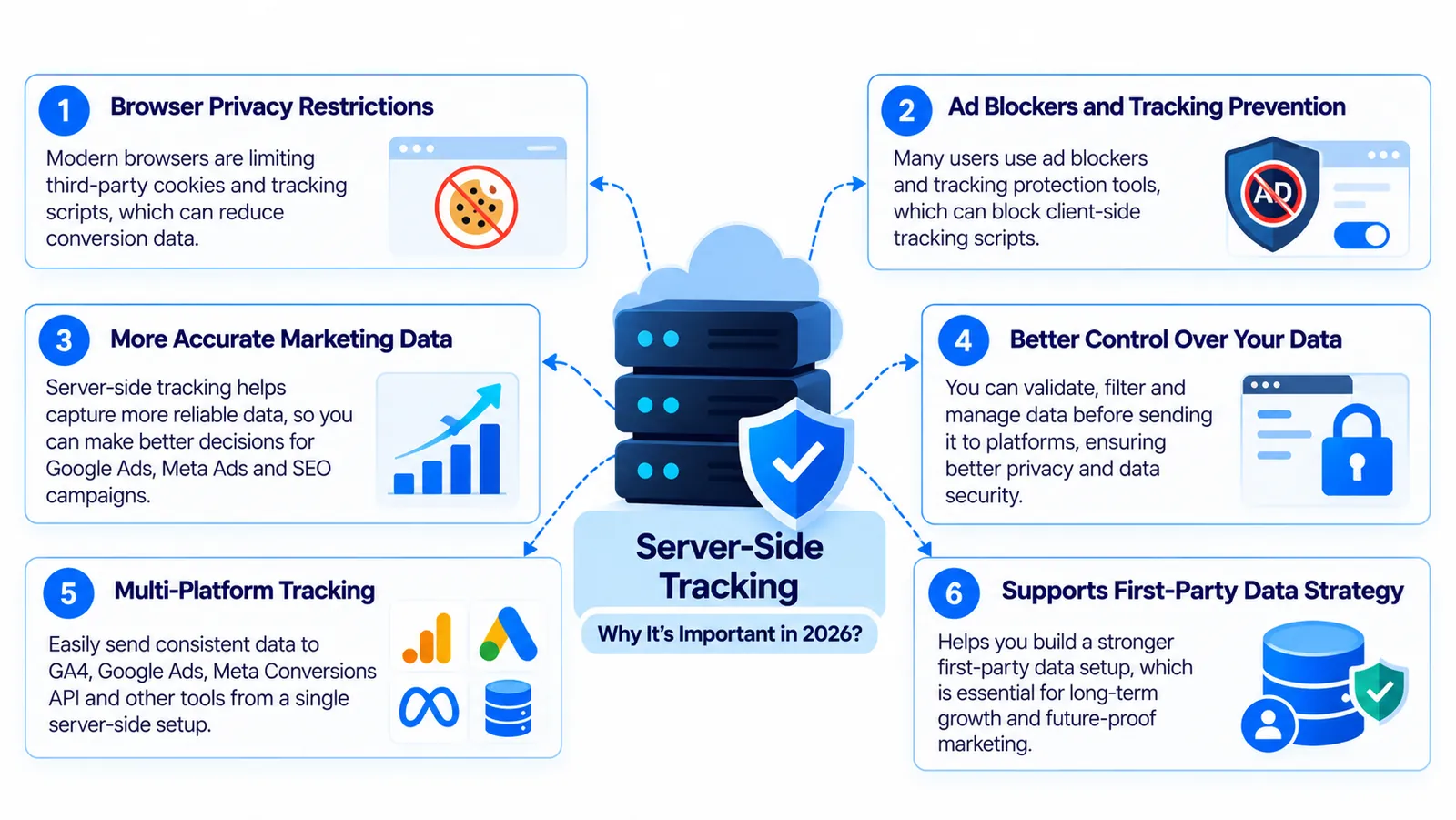
4. Why Is Server-Side Tracking Important in 2026?
Digital marketing measurement has become more complicated as businesses rely on multiple advertising channels and customer touchpoints.
Several factors make server-side tracking worth considering.
Browser privacy restrictions
Modern browsers include technologies that can limit certain tracking mechanisms.
These restrictions may affect cookies, identifiers, and other measurement processes.
Server-side tracking can provide more control over first-party data collection, but it does not bypass browser privacy rules or user consent requirements.
Ad blockers and tracking prevention
Some browser extensions block requests to known tracking services.
Using a first-party measurement endpoint may help in some configurations, but server-side tracking should never be treated as a guaranteed way to defeat tracking prevention.
Multiple marketing platforms
Businesses often use Google Ads, Meta Ads, GA4, and CRM systems simultaneously.
Without consistent event definitions, these platforms may report different conversion totals.
A server-side architecture can help standardize event information before distribution.
Demand for accurate marketing decisions
Incomplete data can lead businesses to underestimate successful campaigns or invest in ineffective ones.
Improving measurement quality helps marketers evaluate performance with greater confidence.
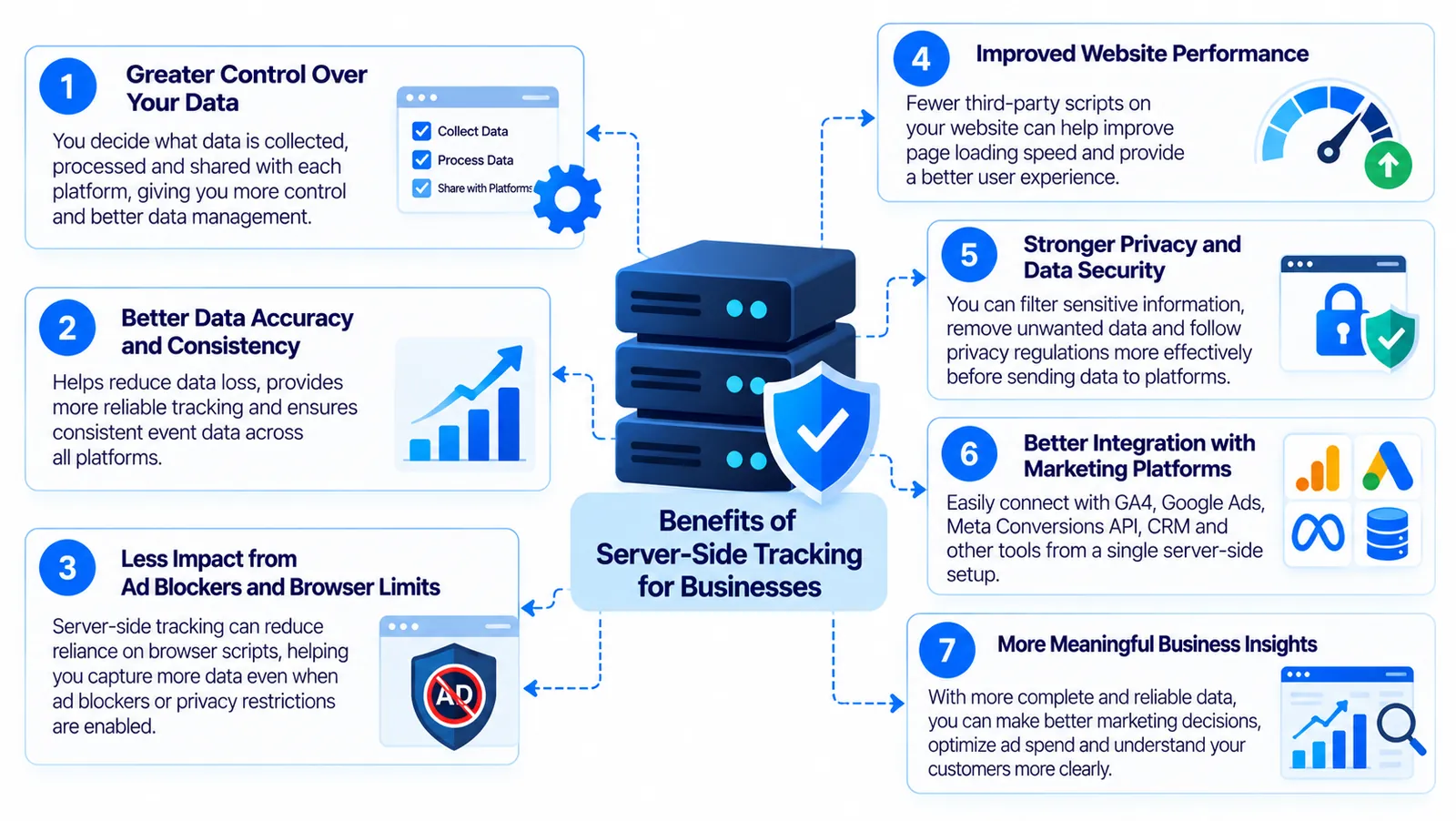
5. Benefits of Server-Side Tracking for Businesses
Server-side tracking can provide several practical benefits when implemented correctly.
1. Greater control over marketing data
Businesses can decide which event fields are collected, processed, and shared with each platform.
This makes it easier to apply consistent data governance policies.
2. Potential improvements in website performance
Reducing unnecessary third-party browser scripts can decrease client-side processing.
However, actual performance improvements depend on the implementation and should be verified using tools such as PageSpeed Insights.
3. Better event consistency
A structured measurement setup helps businesses maintain consistent event names, transaction identifiers, and conversion parameters.
4. Stronger privacy controls
Server-side processing allows businesses to remove or modify sensitive information before forwarding events.
These capabilities support privacy-conscious measurement but do not replace consent management or legal compliance.
5. More useful advertising data
When relevant conversion signals are implemented correctly, advertising platforms may receive more complete information for eligible conversions.
This can support campaign analysis and optimization.
6. Better integration with business systems
Server-side events can be connected with ecommerce platforms, order management systems, and CRM workflows.
This helps businesses measure outcomes beyond basic website clicks.
6. How to Set Up Server-Side Tracking with Google Tag Manager
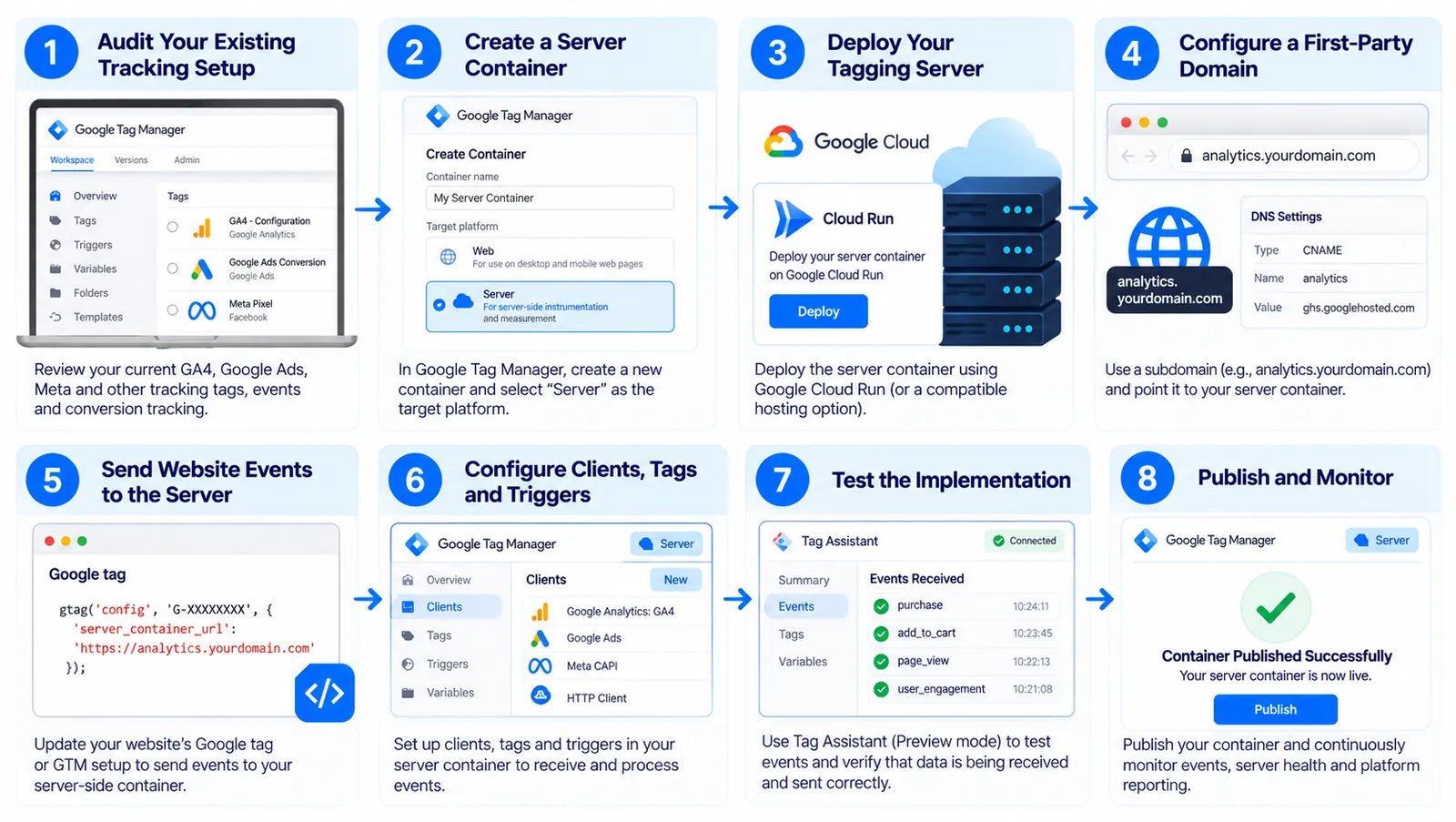
Google Tag Manager provides a server-side tagging environment that businesses can use to process and route measurement events.
The following steps outline a typical implementation.
Step 1: Audit your existing tracking setup
Before creating a new server container, review your current measurement configuration.
Check:
GA4 events
Google Ads conversion actions
Meta Pixel events
Ecommerce purchase tracking
Lead form tracking
Consent management
Duplicate or missing events
Document your existing conversion definitions so they remain consistent during migration.
Step 2: Create a server container
Sign in to Google Tag Manager and create a new container.
Select Server as the target platform.
The server container is separate from your existing website container.
Step 3: Deploy your tagging server
Google supports deployment through Google Cloud and other compatible infrastructure.
Google Cloud Run is a common deployment option.
The hosting environment must be configured for your expected traffic, availability, and security requirements.
Step 4: Configure a first-party domain
Businesses can use a subdomain such as:
analytics.example.com
This subdomain can point to the tagging server.
Using a properly configured first-party endpoint may offer benefits for cookie handling and measurement infrastructure.
Step 5: Route website events to the server container
Configure your Google tag or web Google Tag Manager setup to send eligible events to the server endpoint.
The exact configuration depends on your existing tagging implementation.
Step 6: Configure clients, tags, and triggers
Inside the server container, configure the components required to receive and process incoming events.
A client interprets incoming requests, while tags and triggers determine how events are handled.
Step 7: Test the implementation
Use Google Tag Manager Preview mode to inspect incoming requests and outgoing events.
Confirm that event names, parameters, and identifiers are correct.
Step 8: Publish and monitor
Once testing is complete, publish the configuration.
Continue monitoring server availability, event delivery, consent behavior, and platform reporting.
Google's official setup documentation provides the technical details for deploying server-side tagging.
7. GA4 Server-Side Tracking: How It Works
Google Analytics 4 is an event-based analytics platform used to understand website and application interactions.
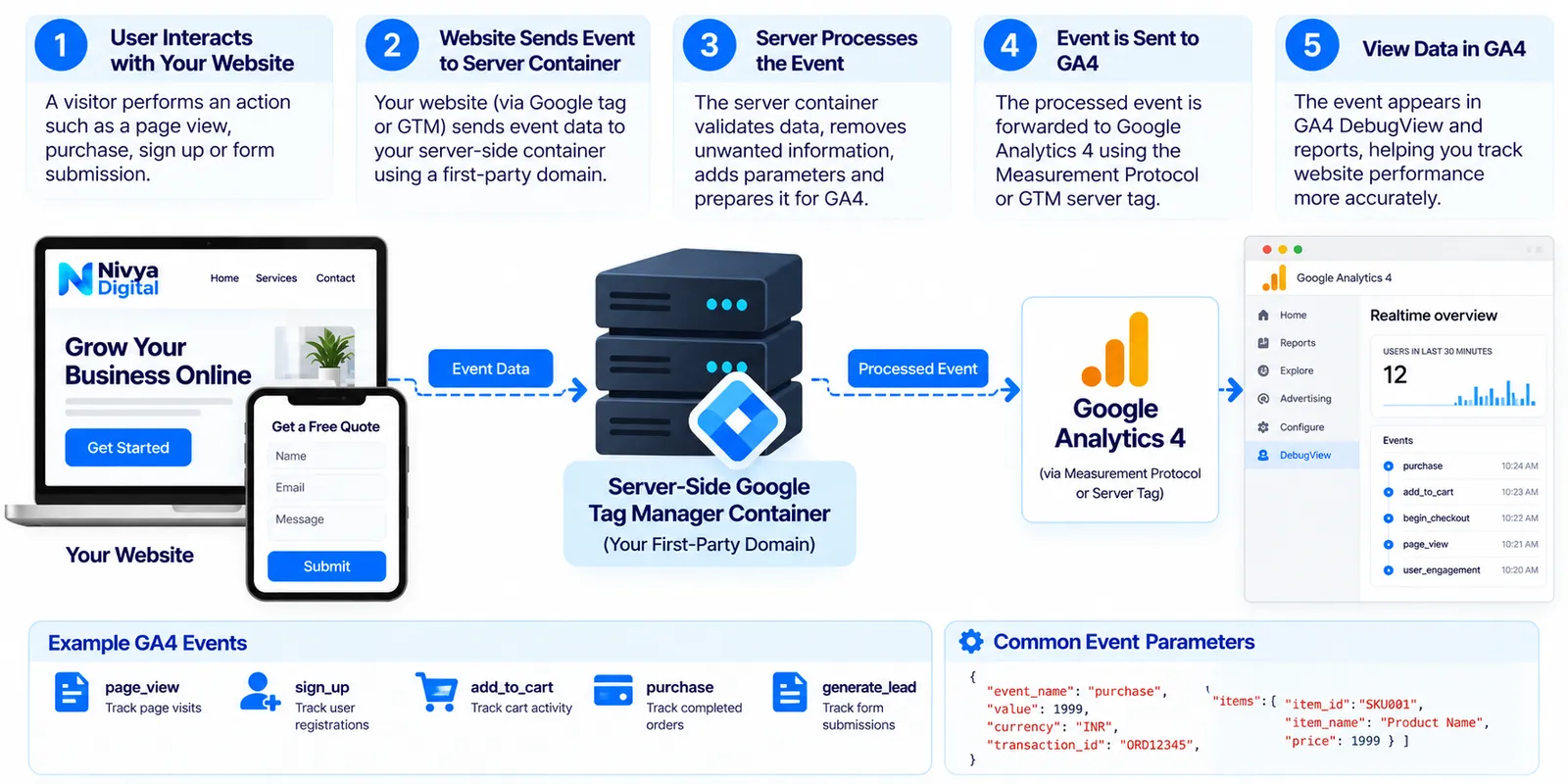
GA4 server-side tracking typically uses a server-side Google Tag Manager container to receive GA4 measurement requests and forward appropriately configured events.
Common GA4 events
Examples include:
page_view
session_start
generate_lead
sign_up
add_to_cart
begin_checkout
purchase
Businesses should follow GA4's recommended event naming and parameter conventions wherever applicable.
Benefits of GA4 server-side tracking
A properly configured setup can help businesses:
Control how GA4 event data is processed.
Standardize event parameters.
Reduce some direct third-party browser requests.
Apply additional privacy rules.
Integrate measurement into a broader server-side architecture.
How to verify GA4 events
After implementation, inspect events in Google Tag Manager Preview mode and GA4 DebugView.
Then review Realtime and standard reports as data becomes available.
Compare important events with your website database or CRM records.
For ecommerce tracking, transaction IDs and purchase values should be validated carefully.
Remember that GA4 reports may not match backend records exactly because analytics measurement and business transaction systems operate differently.
8. Google Ads Server-Side Tracking and Enhanced Conversions
Google Ads conversion tracking helps advertisers understand which ad interactions contribute to valuable business outcomes.
Common conversion actions include:
Online purchases
Lead submissions
Appointment bookings
Qualified enquiries
Customer registrations
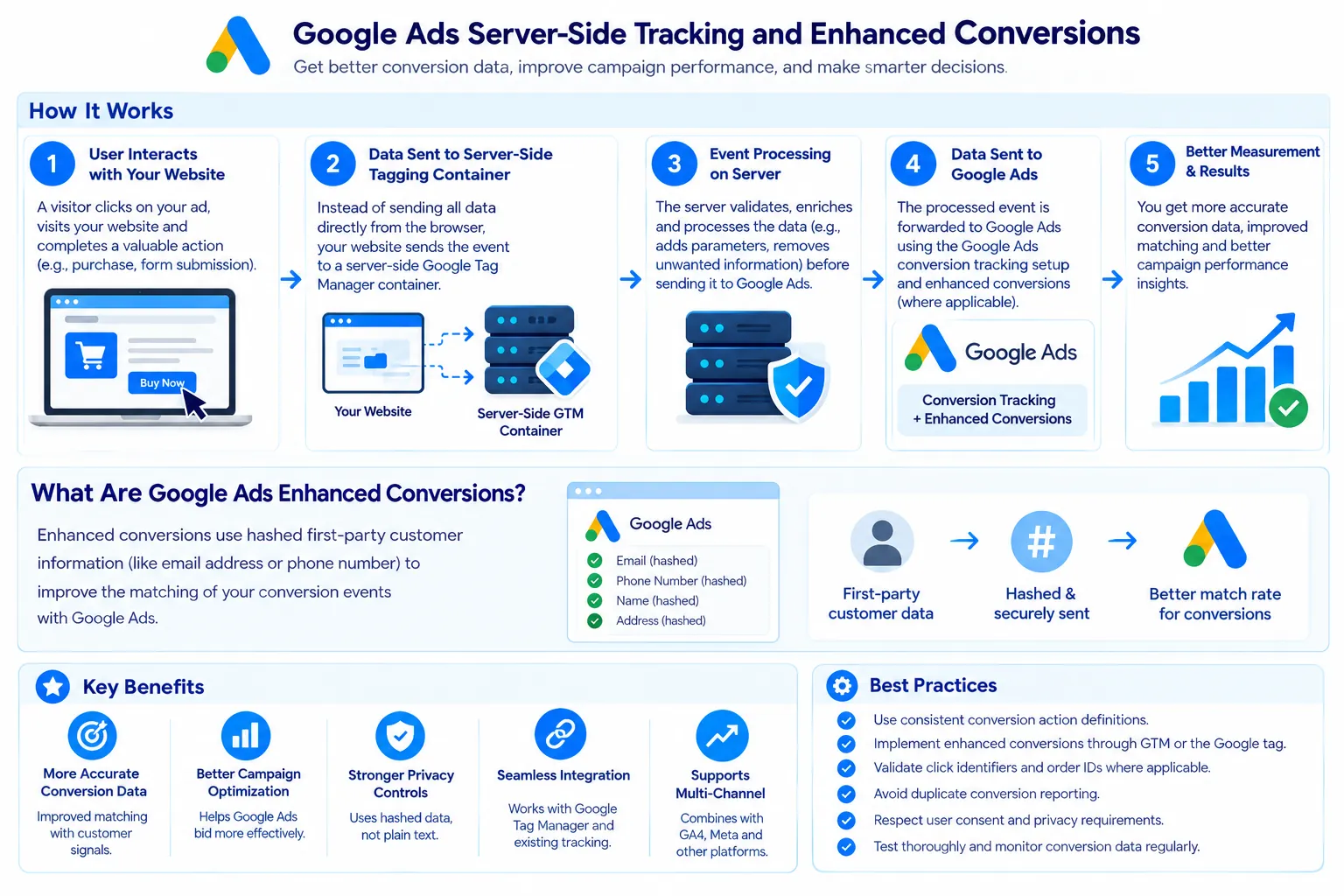
Google Ads also supports enhanced conversions, which can use appropriately collected and processed first-party customer data to improve eligible conversion measurement.
What are Google Ads enhanced conversions?
Enhanced conversions supplement existing conversion tracking by using hashed first-party customer information, such as an eligible email address, where permitted.
Google provides implementation options through Google Tag Manager, the Google tag, and supported API workflows.
Why are enhanced conversions useful?
Enhanced conversions may improve the matching of eligible conversion events with advertising interactions.
This can support more complete conversion measurement and better-informed bidding decisions.
However, results depend on data quality, eligibility, user consent, and platform matching.
Best practices for Google Ads tracking
Use consistent conversion action definitions, validate click identifiers where applicable, avoid duplicate conversion reporting, and verify order IDs.
For lead generation, consider connecting CRM outcomes so that reporting can distinguish initial enquiries from qualified leads or completed sales.
9. Meta Conversions API: How Server-Side Events Support Facebook and Instagram Ads
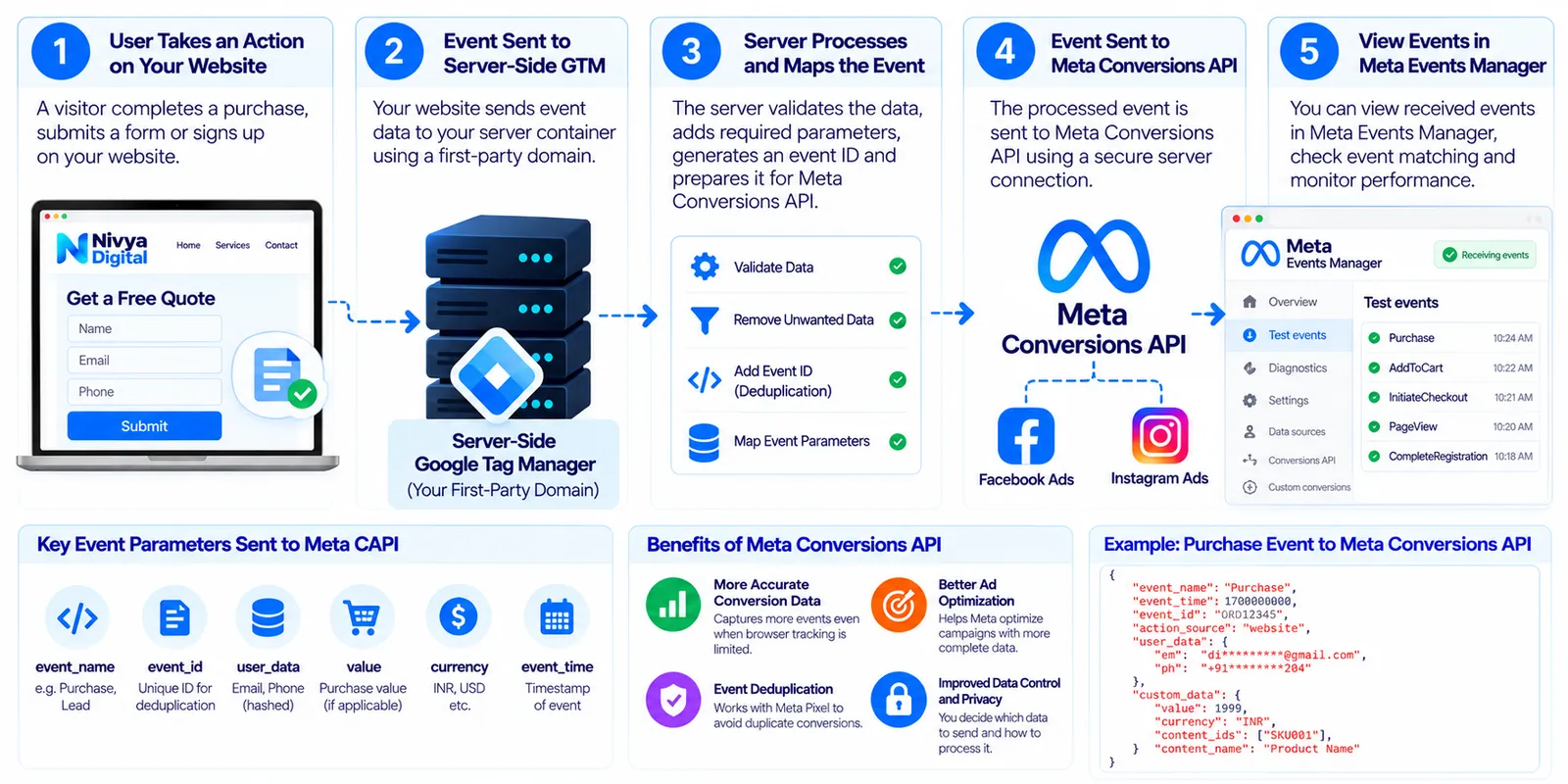
Meta Conversions API (CAPI) allows businesses to send supported marketing events from server-based systems to Meta.
It can complement browser-based Meta Pixel tracking.
How Meta Conversions API works
When a visitor completes a relevant action, an eligible event can be sent to Meta through a server-side integration.
Depending on the implementation, the event may include information such as:
Event name
Event time
Event ID
Event source
Purchase value
Currency
Permitted customer information
Meta Pixel vs Conversions API
Meta Pixel collects events through the browser.
Conversions API supports server-based event transmission.
Many businesses use both approaches together.
Why event deduplication matters
If the same purchase is sent through Meta Pixel and Conversions API, the implementation must support deduplication.
For corresponding browser and server events, consistent event identifiers are important.
Without proper deduplication, conversion totals may become inflated.
How to test Meta CAPI
Use the available diagnostics and testing features in Meta Events Manager.
Review event delivery, matching information, deduplication, and error messages.
Do not assume that sending more events automatically improves advertising performance.
Event quality and correctness matter more than event volume.
10. How Much Does Server-Side Tracking Cost in 2026?
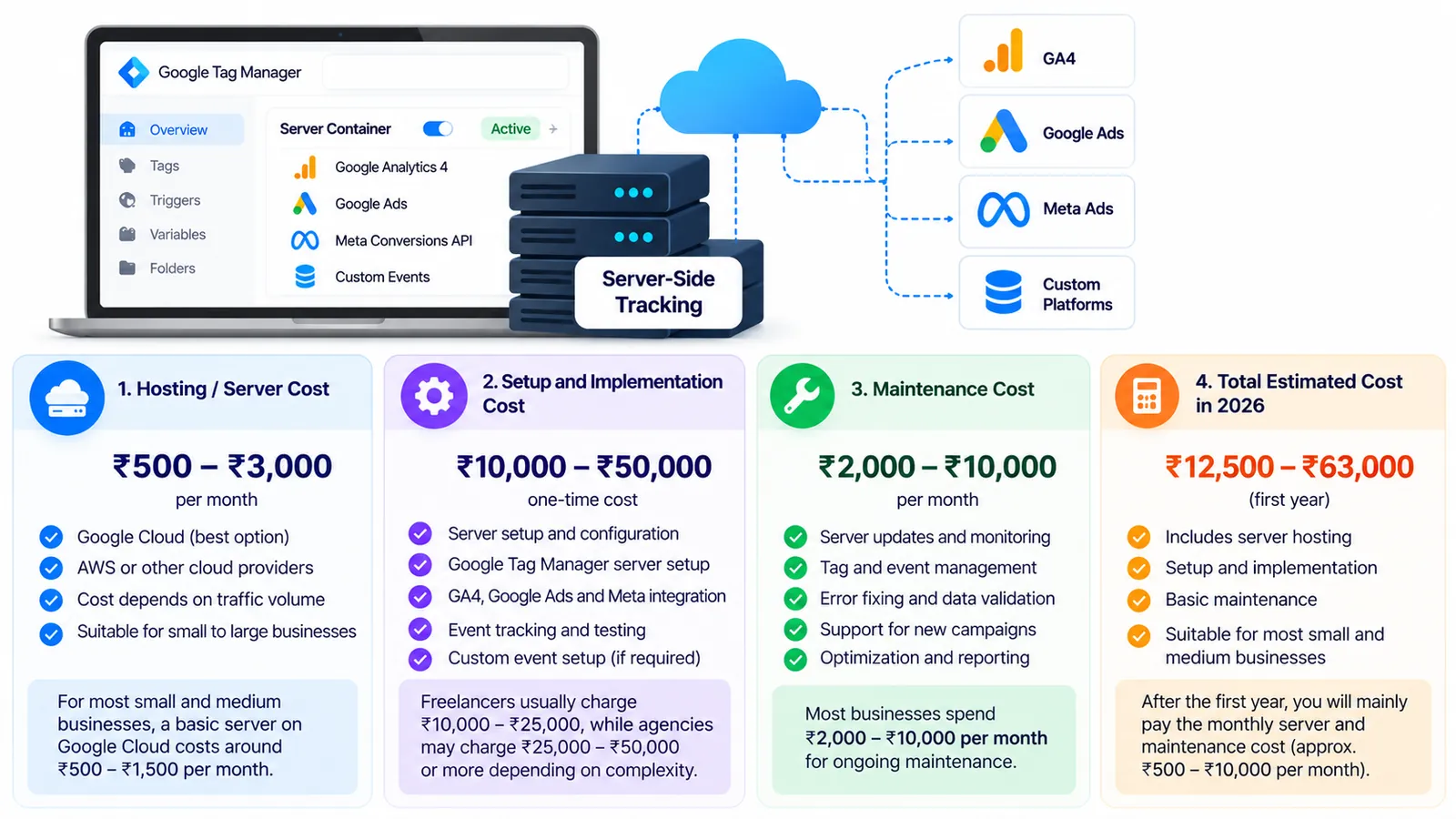
The cost of server-side tracking depends on the technology, traffic volume, infrastructure, and implementation requirements.
Unlike basic client-side tagging, server-side tracking typically requires a maintained server environment.
Common cost components
| Cost component | What it covers |
|---|---|
| Server hosting | Cloud or managed tagging infrastructure |
| Initial configuration | Containers, domains, tags, and event routing |
| Platform integration | GA4, Google Ads, Meta, and CRM connections |
| Testing and debugging | Event validation and deduplication |
| Maintenance | Monitoring, security, updates, and troubleshooting |
Google's server-side Tag Manager documentation describes Cloud Run deployment options and associated hosting considerations.
Some small test deployments may fall within cloud free-tier allowances. Production environments can incur ongoing charges.
Google's documentation gives an illustrative Cloud Run upgrade cost of approximately $30–$50 per server per month, with actual costs varying according to configuration and usage.
That estimate is not a guaranteed total implementation price.
Is server-side tracking worth the investment?
Businesses should evaluate the cost against their measurement needs.
For example, a company spending heavily on paid advertising may benefit more from improved conversion measurement than a small website with limited traffic and no active campaigns.
Start with a tracking audit before investing in advanced infrastructure.
11. Common Server-Side Tracking Mistakes to Avoid
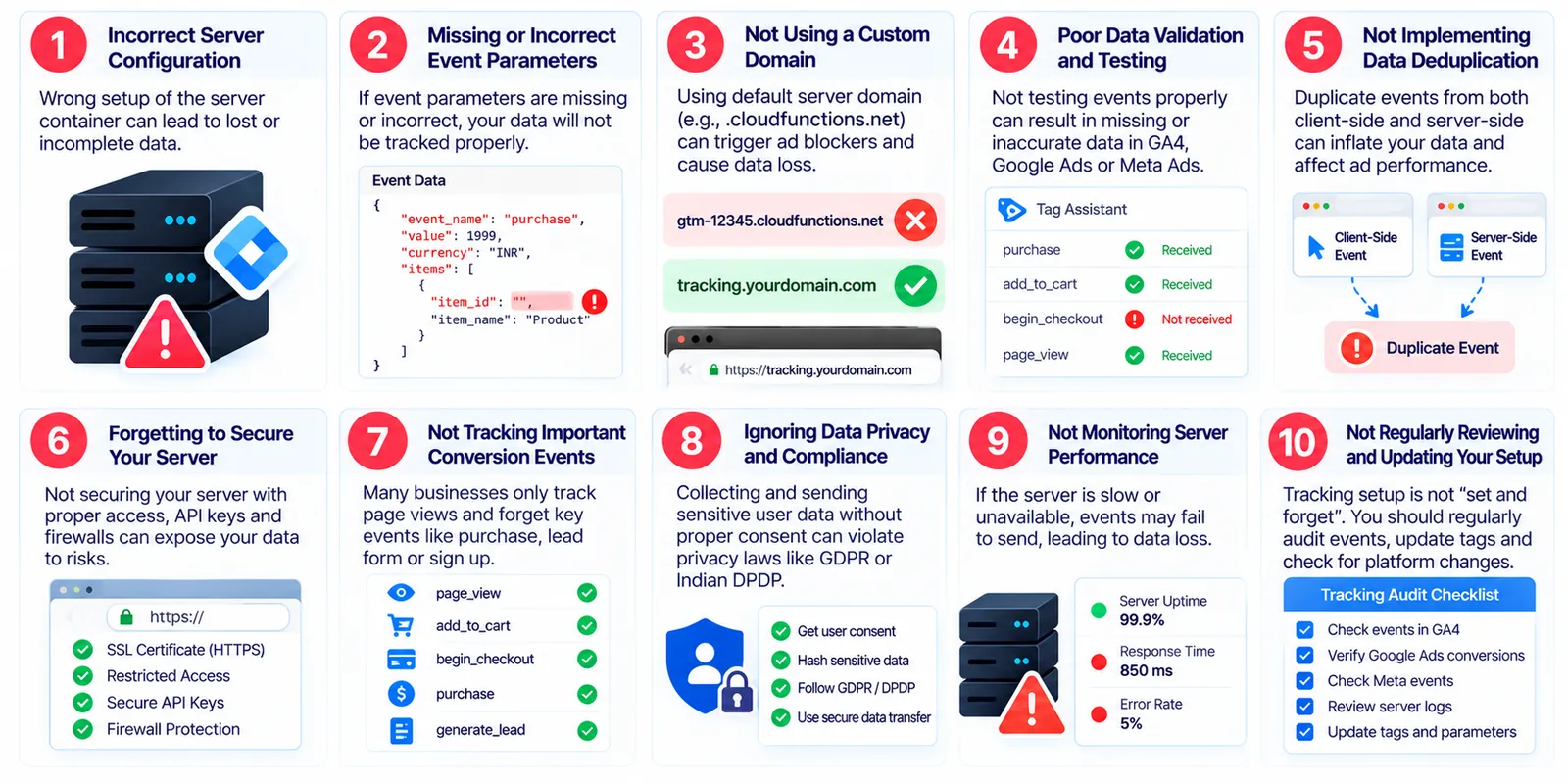
Even advanced tracking technology can produce unreliable data when configured incorrectly.
Mistake 1: Tracking the same conversion multiple times
Duplicate events can inflate conversion totals and mislead advertising optimization.
Use appropriate event IDs, transaction IDs, and deduplication logic.
Mistake 2: Ignoring user consent
Server-side tracking does not remove the obligation to respect applicable privacy laws and consent choices.
Implement consent-aware data collection and forwarding.
Mistake 3: Sending unnecessary personal information
Collect only the information needed for legitimate measurement purposes.
Review platform policies before sharing customer data.
Mistake 4: Incorrect event mapping
Different event names or missing parameters can create reporting inconsistencies.
Maintain clear event documentation.
Mistake 5: Skipping testing
Always test purchase, lead, sign-up, and other important events before deployment.
Mistake 6: Assuming server-side tracking fixes everything
Server-side tracking cannot automatically recover every blocked event, resolve all attribution differences, or guarantee higher conversion counts.
Mistake 7: Ignoring hosting maintenance
Monitor infrastructure availability, performance, security, and operating costs.
12. How to Measure Server-Side Tracking Performance
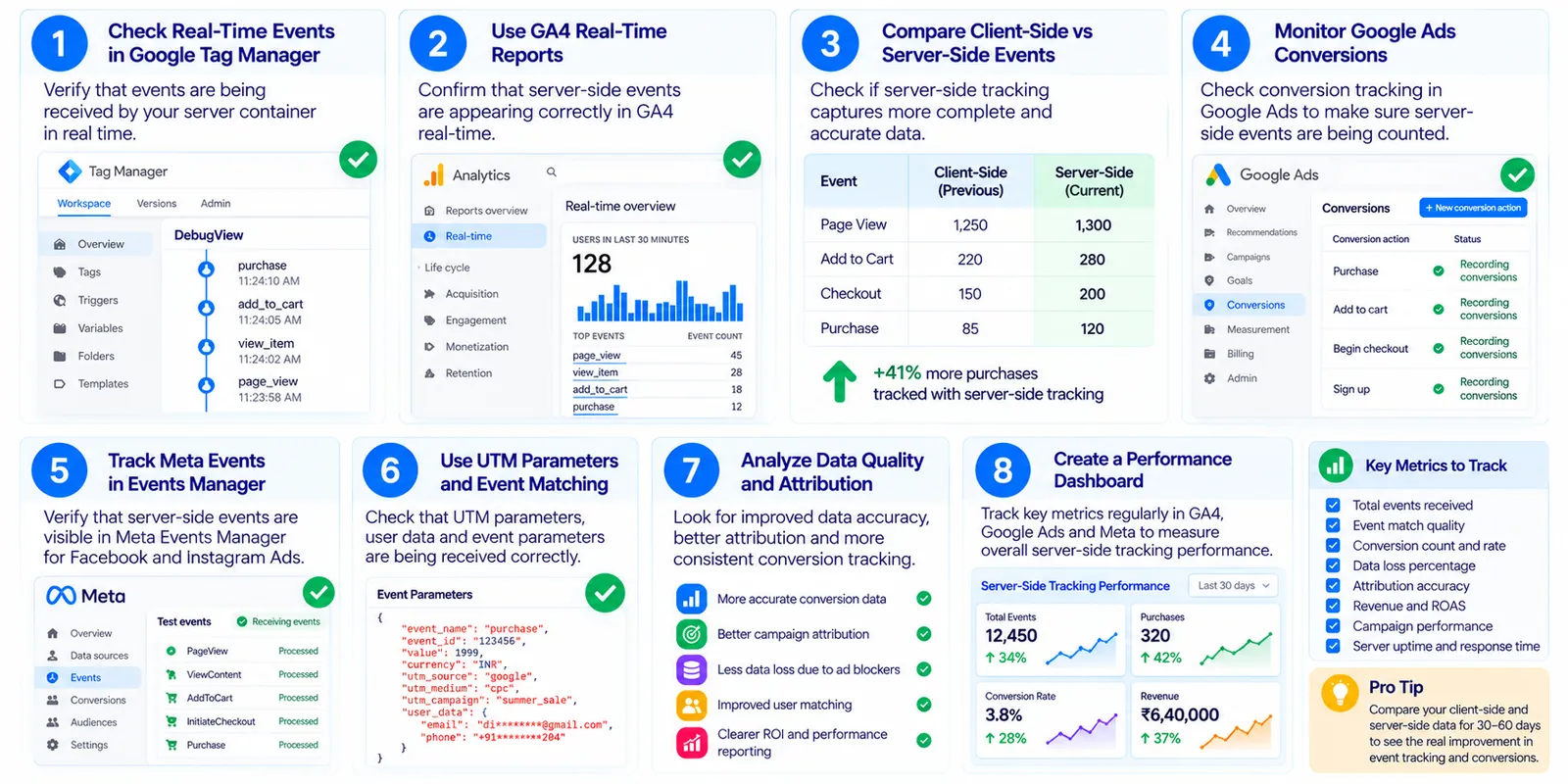
A successful implementation should improve the usefulness of your marketing data—not simply increase the number of recorded events.
Businesses should monitor several indicators.
Event delivery accuracy
Compare events reaching your server with events received by their intended destinations.
Conversion consistency
Compare GA4 purchases or lead events against confirmed transactions and CRM submissions.
Duplicate event rate
Identify repeated transactions or conversions that should only be counted once.
Event parameter completeness
Check whether purchase values, currency, transaction IDs, and other required fields are populated correctly.
Website performance
Use PageSpeed Insights and real-user performance data to determine whether changes to browser-side scripts improve loading performance.
Advertising outcomes
Evaluate lead quality, cost per qualified lead, return on ad spend, and actual revenue where available.
Example
Suppose an ecommerce business records 200 confirmed orders in its backend system during a reporting period.
Its analytics platform records 180 purchase events.
The difference is 20 orders, but it should not automatically be treated as 20 lost tracking events.
Investigate consent exclusions, reporting periods, refunds, duplicate handling, time zones, and technical delivery before identifying the cause.
This approach helps businesses distinguish real tracking problems from normal reporting differences.
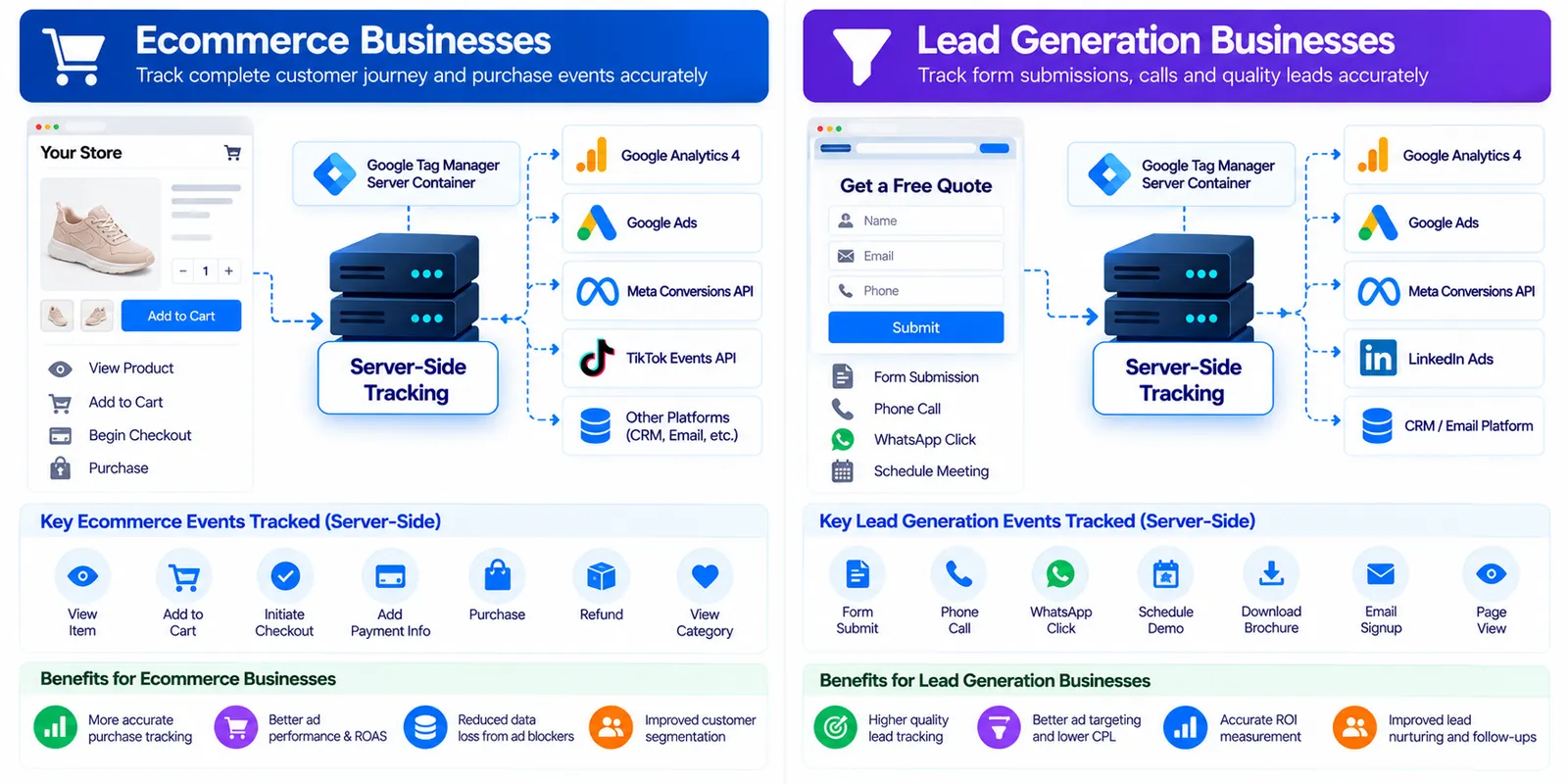
13. Server-Side Tracking for Ecommerce and Lead Generation Businesses
Server-side tracking can support different business models.
Ecommerce websites
Online stores can use server-side measurement to manage purchase events, order identifiers, cart activity, and transaction values.
Consistent ecommerce event tracking can help teams evaluate product campaigns and sales performance.
B2B lead generation
B2B companies can track contact forms, consultation bookings, and other meaningful enquiries.
Connecting CRM information can also help businesses evaluate lead quality instead of relying only on form submission totals.
Service-based businesses
Digital agencies, real estate businesses, consultants, and professional service providers can benefit from consistent enquiry and appointment tracking.
International businesses
Companies operating across multiple markets may need consistent event definitions while complying with different privacy requirements.
Server-side processing can help centralize measurement controls, but regional legal and platform requirements must still be assessed separately.
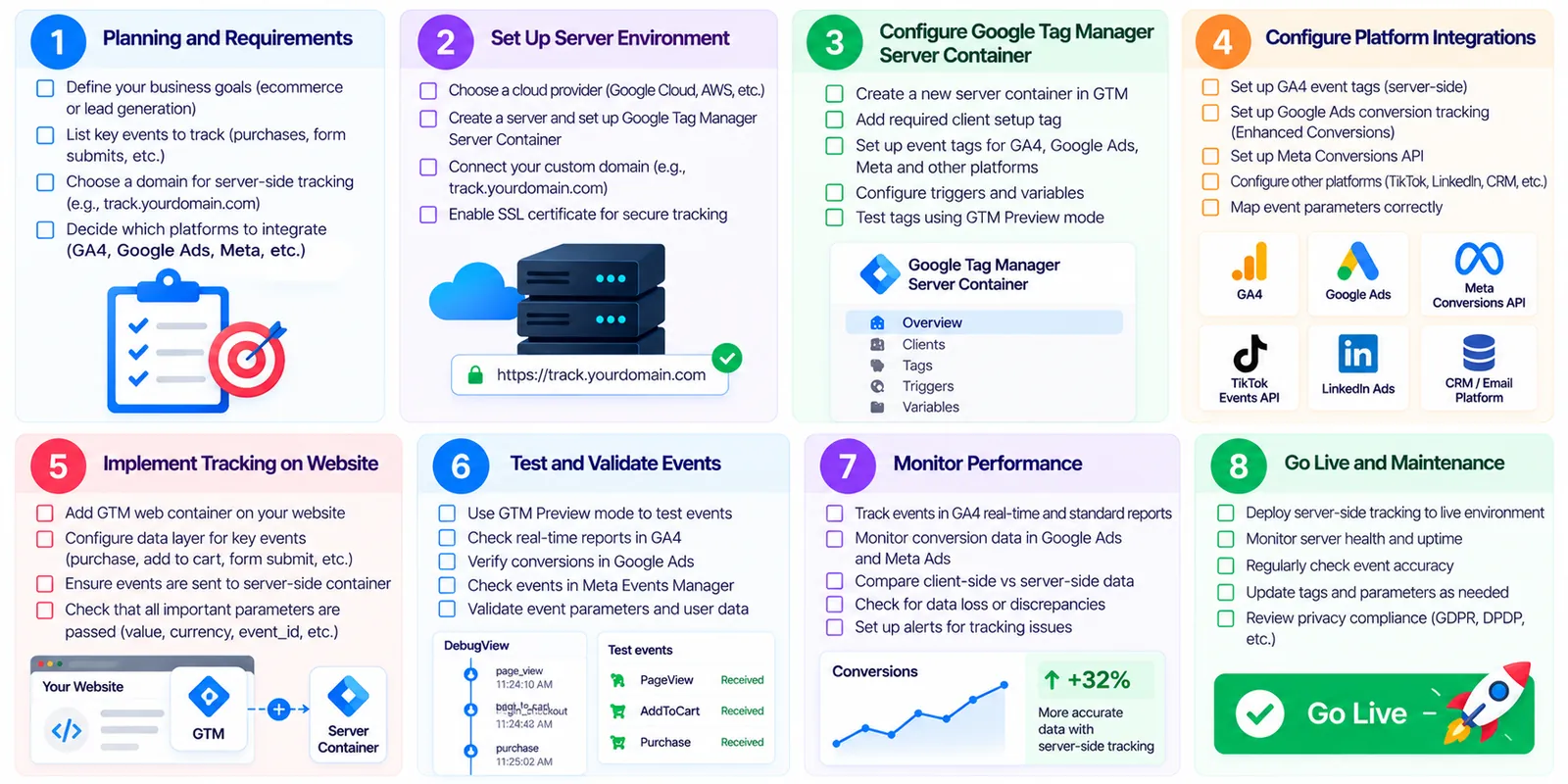
14. A Practical Server-Side Tracking Implementation Checklist
Before launching a server-side tracking setup, businesses should complete the following checks.
Audit existing GA4, Google Ads, and Meta tracking.
Define the conversions that matter to the business.
Document event names and required parameters.
Review consent and privacy requirements.
Create and configure a server-side GTM container.
Deploy suitable hosting infrastructure.
Configure and verify the server domain.
Route eligible website events to the server.
Configure destination tags and integrations.
Implement event deduplication where required.
Test conversions across devices and browsers.
Compare analytics events with business records.
Publish only after successful validation.
Monitor tracking quality and infrastructure regularly.
This checklist can serve as a starting point for a website measurement audit.
15. How Nivya Digital Can Help Businesses Improve Conversion Tracking
Accurate tracking is an important foundation for effective digital marketing.
Businesses need to understand where their leads originate, which campaigns generate valuable customers, and how marketing investments contribute to revenue.
Nivya Digital helps businesses approach digital growth through services such as Google Ads, Meta Ads, SEO, website development, and business automation.
For businesses reviewing their measurement strategy, relevant areas of support can include:
Website and conversion tracking audits
Reviewing website conversion journeys, analytics requirements, and potential measurement gaps.
Google Ads and Meta Ads optimization
Connecting advertising decisions with meaningful business outcomes rather than relying only on clicks and impressions.
Website development and technical improvements
Building websites with clear conversion paths and appropriate technical foundations for measurement.
CRM and business automation
Connecting lead generation activities with follow-up workflows and sales processes.
Data-driven marketing strategies
Using available performance information to make more informed marketing decisions.
Businesses considering server-side tracking should begin with a technical assessment to determine whether advanced implementation is necessary.
Looking to improve your website's conversion measurement and digital marketing performance?
Visit Nivya Digital to explore our digital marketing and website development services.
16. Final Thoughts: Is Server-Side Tracking Worth It in 2026?
Server-side tracking is an important option for businesses that want more control over their marketing measurement infrastructure.
By introducing a server-controlled processing layer, organizations can improve data governance, standardize event handling, and reduce some dependence on third-party browser scripts.
Tools such as Google Tag Manager server-side tagging, GA4, Google Ads enhanced conversions, and Meta Conversions API provide different capabilities that can work together within a well-designed measurement strategy.
However, server-side tracking is not a shortcut to perfect analytics.
Successful implementation requires accurate event configuration, consent management, testing, ongoing maintenance, and a clear understanding of business goals.
For growing businesses, the best approach is to begin with a conversion tracking audit, identify the gaps that matter, and invest in server-side measurement where it provides measurable value.
Ultimately, better digital marketing results come from understanding customer behavior, measuring meaningful outcomes, and making decisions based on reliable information.
Reference Resources
Editorial note: Review technical settings and platform documentation against your actual implementation before publishing. Illustrative examples in this article are not Nivya Digital client results.
Comments (0)
No comments yet
Start the discussion by sharing your perspective