
Your website is receiving visitors. Your Google Analytics reports show traffic, your blog posts are getting impressions, and your SEO efforts appear to be working.
But there is one major problem: your website is getting traffic but no leads.
Visitors arrive, browse a few pages, and leave without contacting your business, requesting a quotation, booking a consultation, or making a purchase.
For businesses investing in SEO, Google Ads, social media marketing, or content creation, this can be frustrating.
However, increasing website traffic and generating qualified leads are two different marketing objectives.
Traffic brings potential customers to your website. Conversion rate optimisation helps turn relevant visitors into meaningful business opportunities.
In 2026, businesses also need to understand how visitors arrive through traditional search engines, AI-powered discovery platforms, paid advertisements, social media, and referral websites.
The important question is no longer simply, "How many people visit my website?"
It is also, "How many of those visitors take an action that contributes to business growth?"
In this guide, we explain 10 common reasons websites receive traffic without generating leads and provide practical solutions that businesses worldwide can apply.
What Does Website Traffic but No Leads Mean?
Website traffic refers to people visiting your website through different online channels.
These channels may include:
Organic search traffic from Google and other search engines
Paid traffic from Google Ads
Social media platforms
Referral websites
Email marketing campaigns
Direct website visits
AI-powered search and discovery platforms
A lead is a potential customer who expresses interest in your products or services.
For example, a visitor becomes a lead when they submit a contact form, request a quotation, schedule a consultation, or make a qualifying enquiry.
A website can attract thousands of visitors without producing meaningful business results if those visitors are not interested in purchasing or cannot find a compelling reason to contact the company.
Example: High Traffic, Low Lead Generation
Consider two hypothetical business websites.
| Metric | Website A | Website B |
|---|---|---|
| Monthly visitors | 10,000 | 2,000 |
| Enquiries | 20 | 60 |
| Visitor-to-lead rate | 0.2% | 3% |
Website A receives five times more traffic, but Website B generates three times more enquiries.
This example illustrates why businesses should measure both traffic volume and conversion performance.
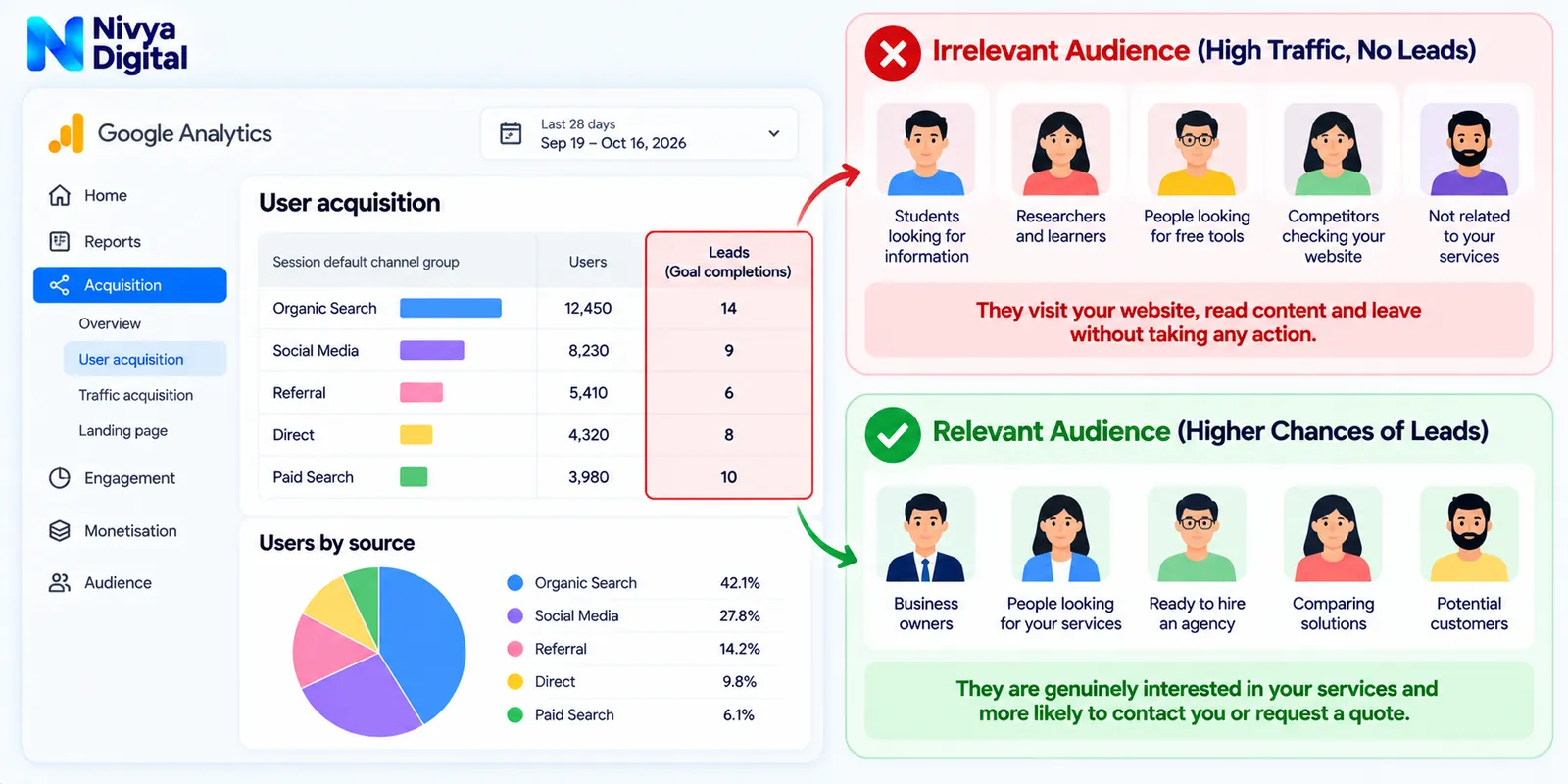
1. Your Website Is Attracting the Wrong Audience
One of the most common reasons for getting website traffic but no leads is attracting visitors who are unlikely to become customers.
A blog may rank for popular informational keywords while failing to attract people searching for products or services.
For example, a digital marketing agency might receive visitors searching for "what is SEO?"
These visitors may be students, researchers, or beginners.
However, someone searching for "SEO services for small businesses" may be closer to hiring an agency.
Both keywords can generate useful traffic, but they serve different purposes.
How to Fix It
Start by reviewing the search intent behind your target keywords.
Focus on a balanced keyword strategy:
Informational keywords: Help people understand a problem or topic.
Commercial keywords: Help potential customers compare available solutions.
Transactional keywords: Target people ready to purchase, book, or enquire.
Use Google Search Console to identify queries bringing visitors to your website.
Then review whether your landing pages match what those searchers actually need.
Practical tip: Connect educational blog posts to relevant service pages through contextual internal links.
2. Your Website Has Weak or Missing Calls to Action
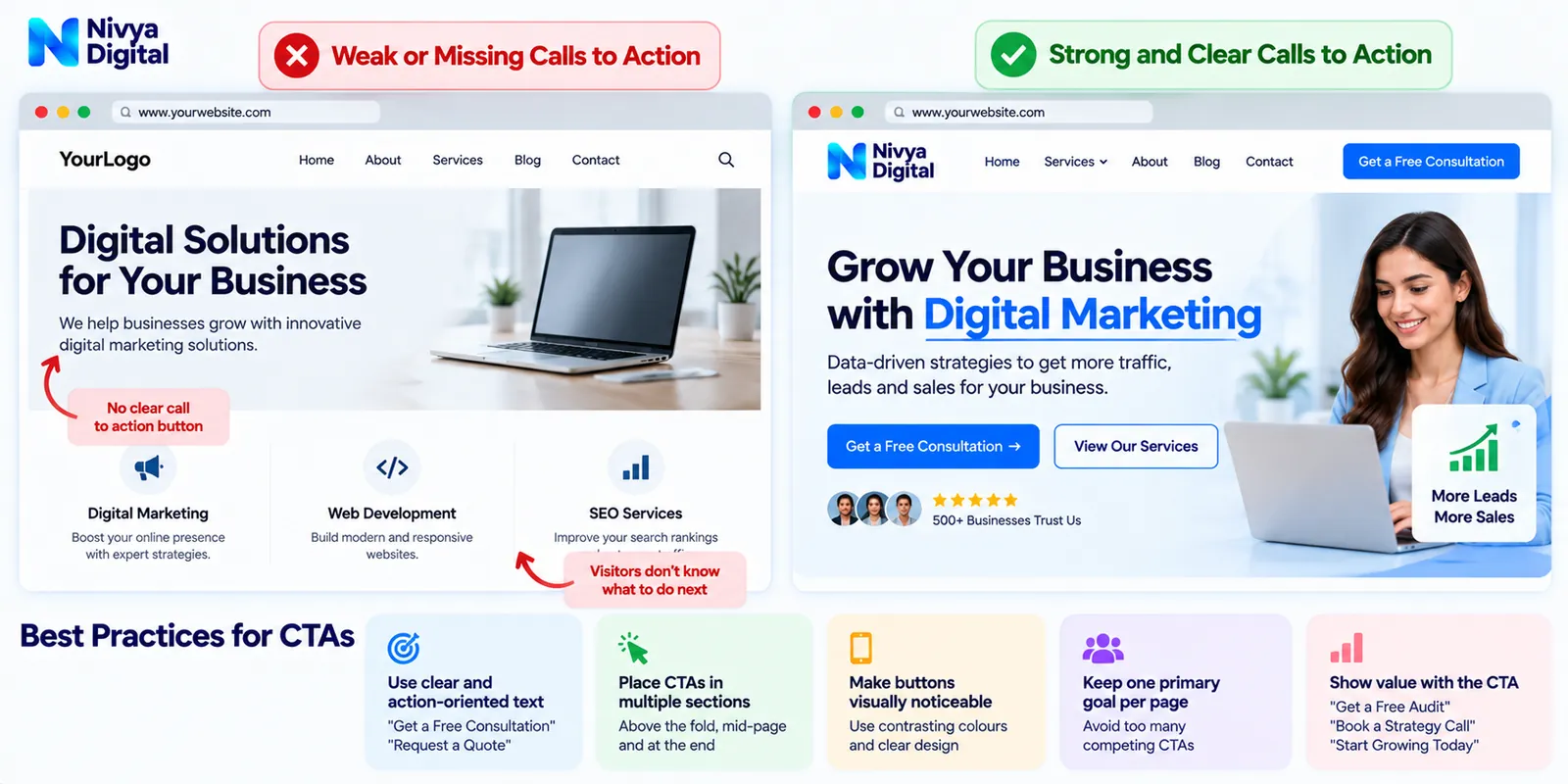
A call to action (CTA) tells visitors what they should do next.
Without a clear CTA, users may read your content and leave without taking further action.
Common examples include:
Get a Free Consultation
Request a Custom Quote
Book a Strategy Call
Contact Our Team
Explore Our Services
Request a Website Audit
However, displaying too many competing CTAs can also confuse visitors.
How to Fix It
Give every important landing page one primary conversion goal.
For example, a Google Ads service page might use:
"Request a Google Ads Strategy Consultation"
Place the primary CTA in relevant locations, such as:
Near the top of the page
After explaining the service benefits
Near testimonials or case studies
At the end of the page
Make buttons visually noticeable and use action-oriented language.
Avoid promising free audits, guaranteed results, or other offers unless your business actually provides them.
3. Your Website Design Does Not Build Trust
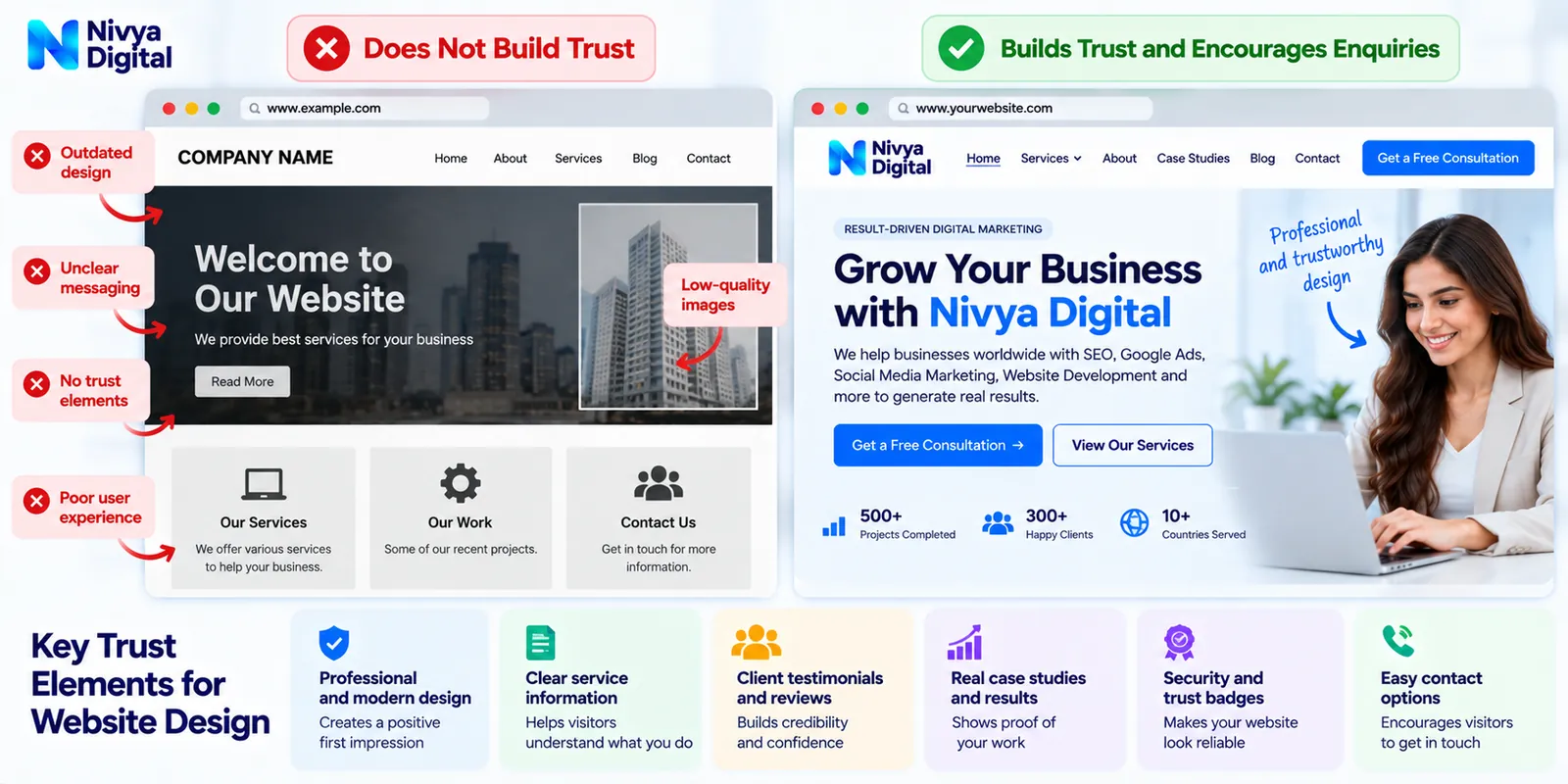
Visitors often evaluate a business before deciding whether to contact it.
An outdated or confusing website may create uncertainty about the company's professionalism.
Potential trust problems include:
Inconsistent branding
Unclear service descriptions
Poor navigation
Low-quality images
Missing company information
Broken links
Unprofessional mobile layouts
Visitors should quickly understand who you are, what you offer, and how your services may help them.
How to Fix It
Improve the overall website experience with:
Consistent branding: Use matching colours, fonts, and design elements.
Clear service pages: Explain what each service includes and who it is suitable for.
Transparent information: Provide accurate contact details and company information.
Relevant proof: Add genuine testimonials, case studies, certifications, or project examples when available.
Simple navigation: Help visitors reach important pages without unnecessary steps.
A professional design cannot guarantee enquiries, but it can remove obstacles that discourage visitors from contacting your business.
4. Your Website Is Slow or Difficult to Use on Mobile
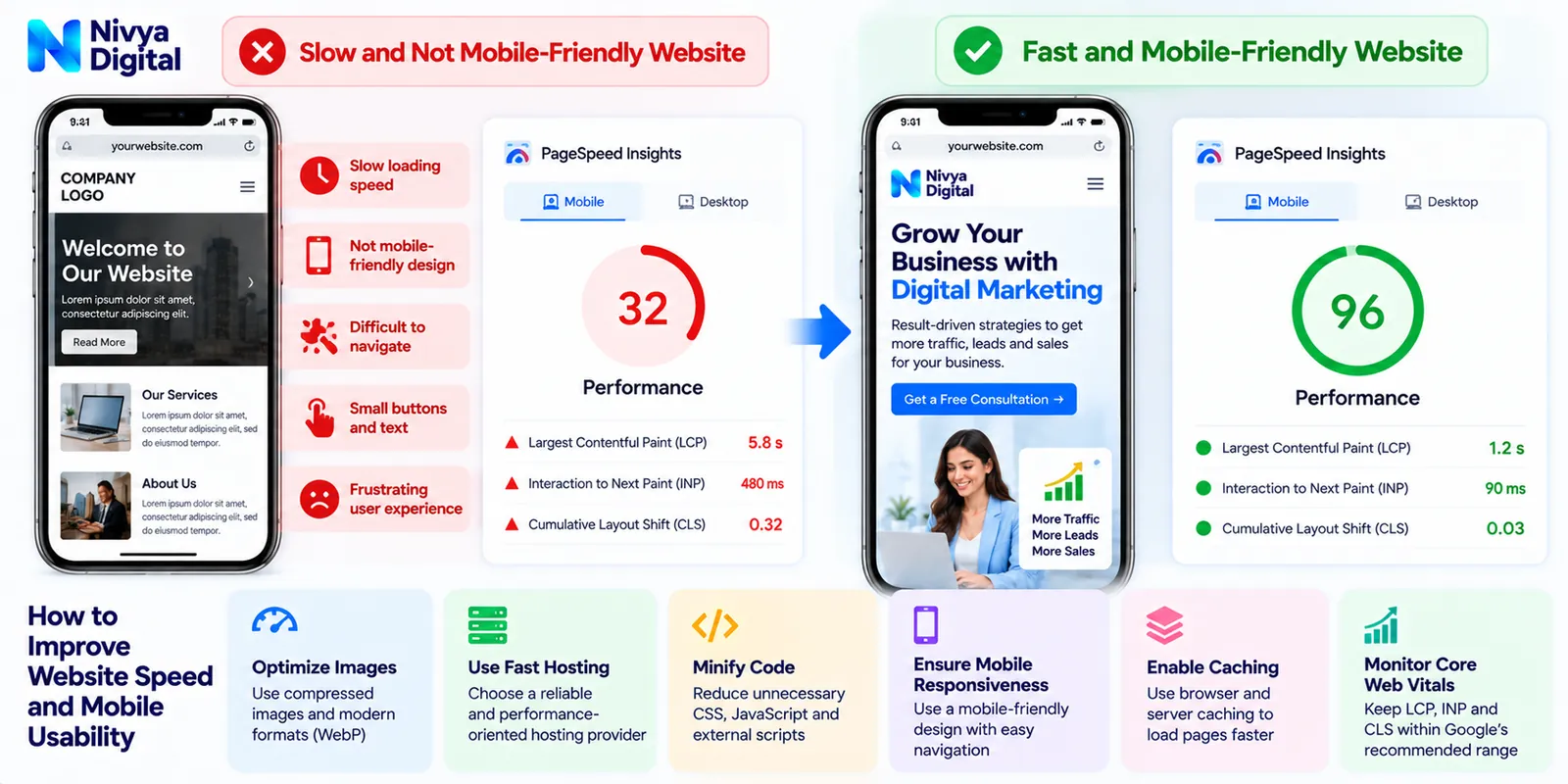
Website performance can affect how comfortably visitors browse and interact with your pages.
A website that loads slowly, shifts unexpectedly, or has buttons that are difficult to tap may discourage users from continuing.
Mobile usability is especially important because visitors may discover your business on their phones.
How to Fix It
Review your website using tools such as Google PageSpeed Insights.
Pay attention to Google's Core Web Vitals:
| Metric | What It Measures | Recommended Threshold |
|---|---|---|
| Largest Contentful Paint (LCP) | Loading performance | 2.5 seconds or less |
| Interaction to Next Paint (INP) | Responsiveness | 200 milliseconds or less |
| Cumulative Layout Shift (CLS) | Visual stability | 0.1 or less |
These thresholds represent Google's recommended good-experience levels, generally evaluated at the 75th percentile of page visits.
You can improve performance by:
Compressing large images
Reducing unnecessary scripts
Using appropriate image formats
Improving hosting and caching
Minimising disruptive pop-ups
Testing forms and buttons on mobile devices
Website speed alone does not determine conversion performance, but usability problems can create unnecessary friction.
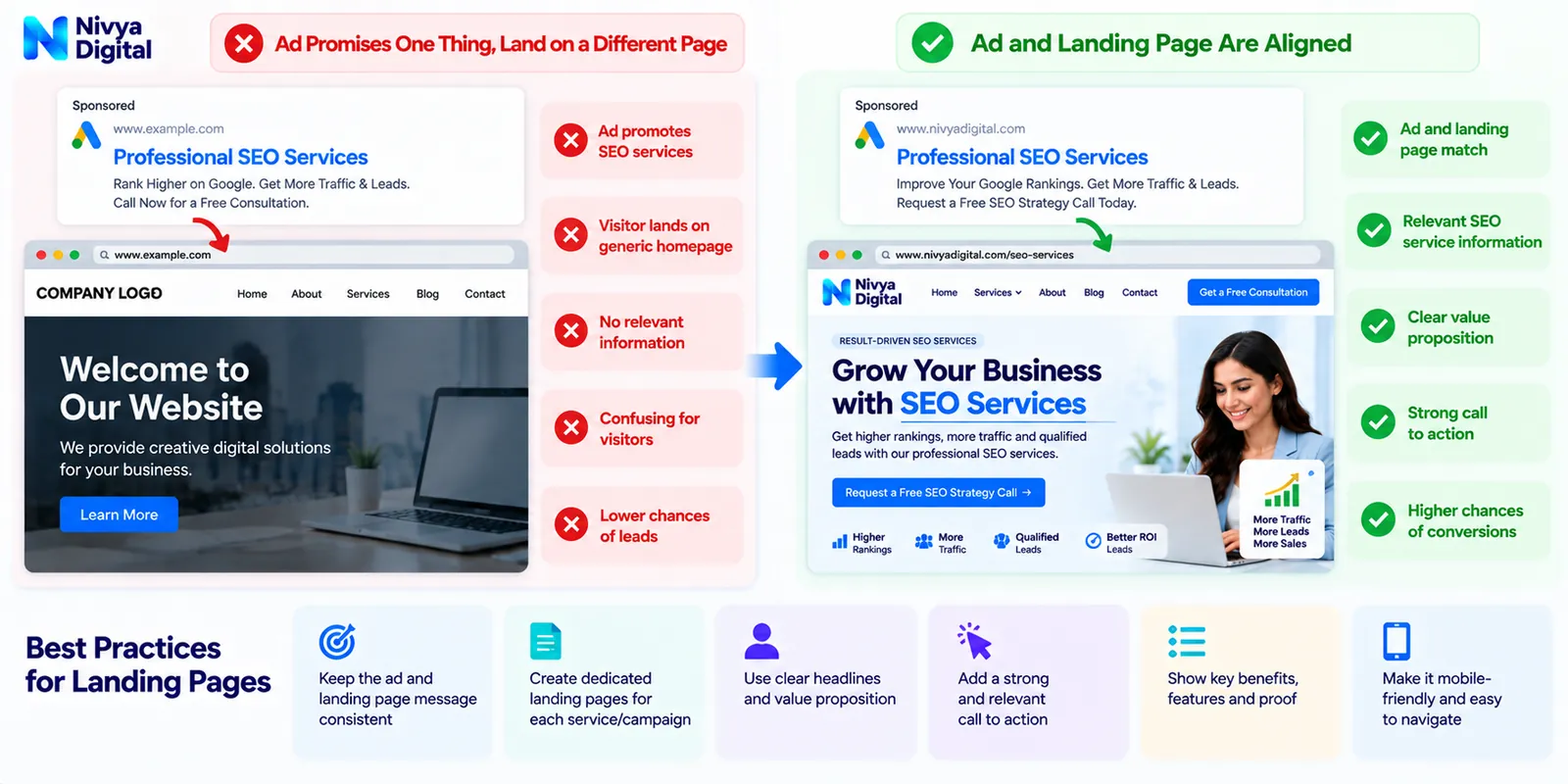
5. Your Landing Pages Do Not Match Visitor Expectations
Imagine clicking an advertisement for affordable website development services.
Instead of reaching a page about website development, you arrive on a generic homepage that lists many unrelated services.
You may leave because the page does not immediately answer your question.
This is a common landing page problem.
How to Fix It
Create focused landing pages for important services and campaigns.
A strong service landing page should explain:
What the service offers
Who it is designed for
Which business problems it addresses
What is included
Why the provider is worth considering
What the visitor should do next
For example, a Google Ads campaign promoting PPC management should ideally direct users to a relevant Google Ads management page.
Keep your advertisement, landing page headline, service description, and CTA aligned.
This creates a more consistent visitor experience.
6. Your Contact Forms Are Too Complicated
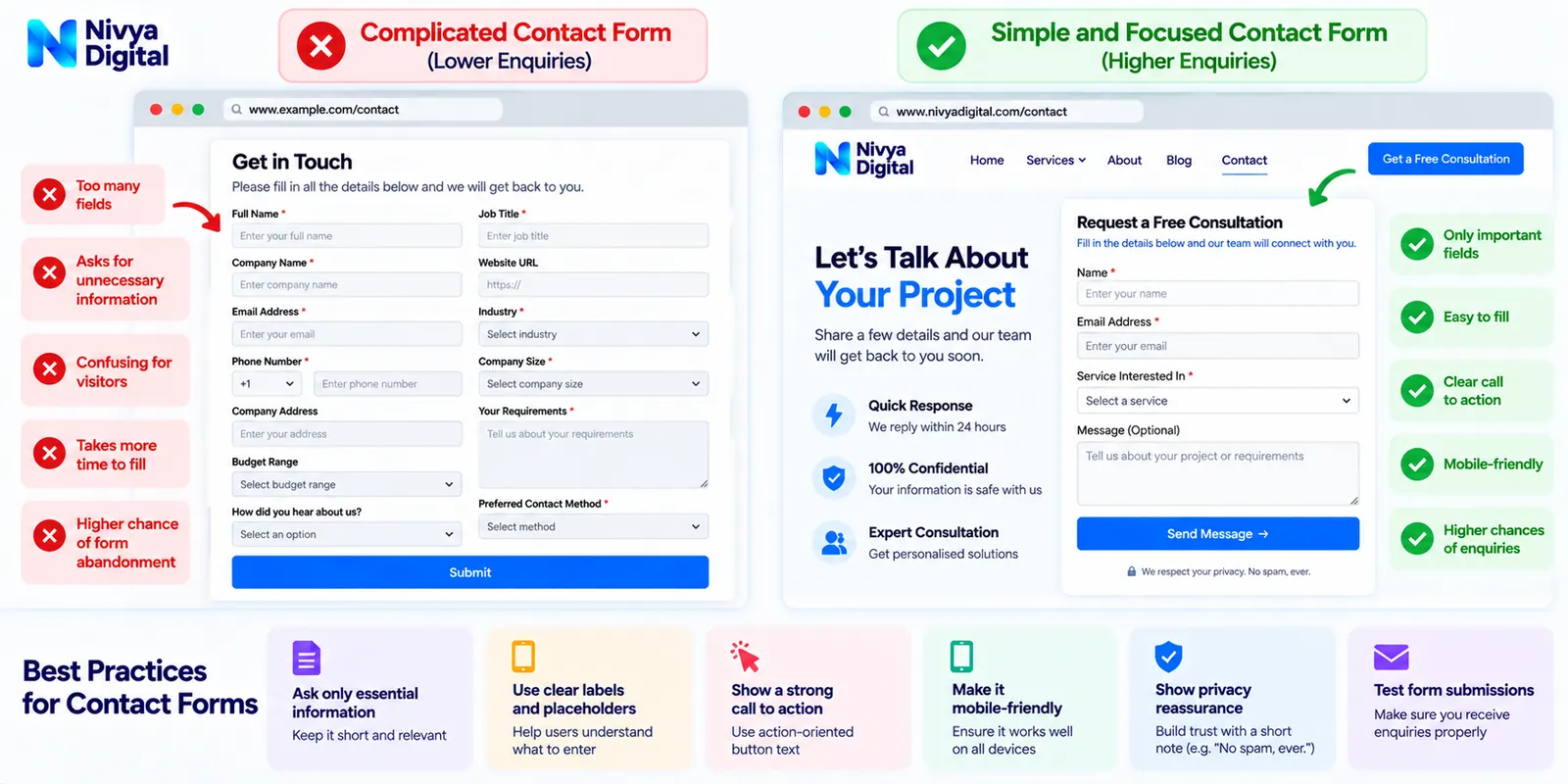
Some businesses unintentionally discourage enquiries by requesting too much information.
A basic consultation form may ask for a company address, detailed budget, industry, phone number, job title, business size, and several other fields.
Not every visitor is ready to provide that much information during the first interaction.
How to Fix It
Request only the information necessary for the next step.
For many service businesses, an initial enquiry form could include:
Name
Email address
Service required
Short message
Additional details can be collected later when appropriate.
Other improvements include:
Clearly identifying required fields
Showing useful validation messages
Making forms mobile-friendly
Confirming successful submission
Testing email notifications
Providing an alternative contact method
Also ensure that your data collection and consent practices comply with applicable privacy laws.
Important: A contact form that looks functional but fails to deliver enquiries can create a serious lead-generation problem.
Test the complete submission process regularly.
7. Your Website Content Does Not Address Buying Questions
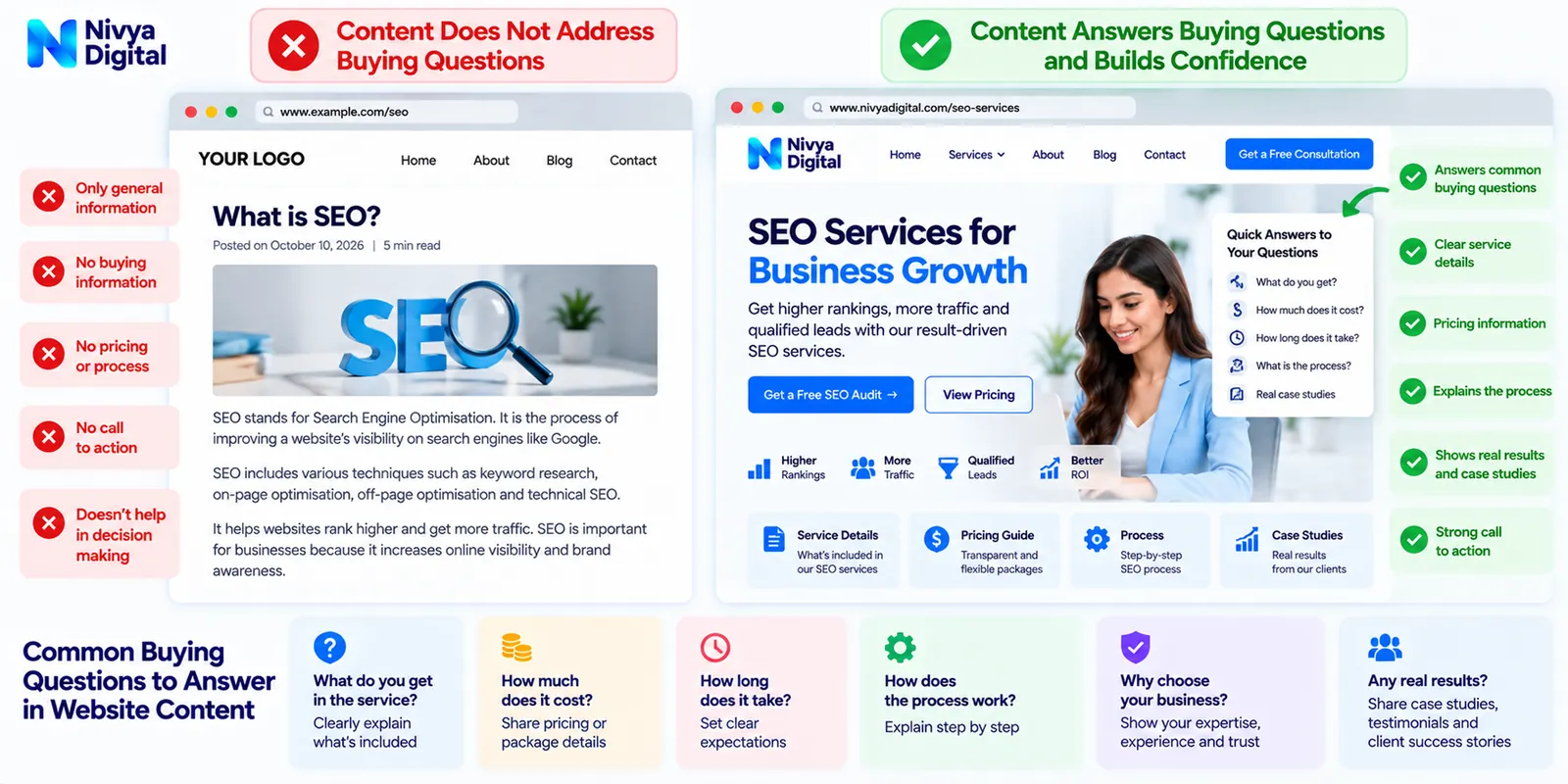
A website may publish dozens of blog posts without helping potential customers make purchasing decisions.
Educational content is valuable, but visitors may also need practical information before contacting a company.
For example, someone considering SEO services may want to know:
What does an SEO agency actually do?
How much do SEO services cost?
How long might SEO improvements take?
What deliverables are included?
How is performance measured?
How should businesses compare agencies?
If your content does not address these questions, visitors may continue researching elsewhere.
How to Fix It
Build content around different stages of the customer journey.
| Customer Stage | Recommended Content |
|---|---|
| Awareness | Educational blogs and problem-solving guides |
| Consideration | Comparisons, pricing guides, and service explanations |
| Decision | Service pages, consultations, genuine case studies, and FAQs |
Include internal links between related content.
For example, a blog about Google Ads costs can link to a Google Ads management service page.
Similarly, an article about poor website conversions can direct interested readers to website development or conversion optimisation services.
The objective is to help visitors move naturally from learning about a problem to evaluating a solution.
8. You Are Not Tracking Website Conversions Correctly
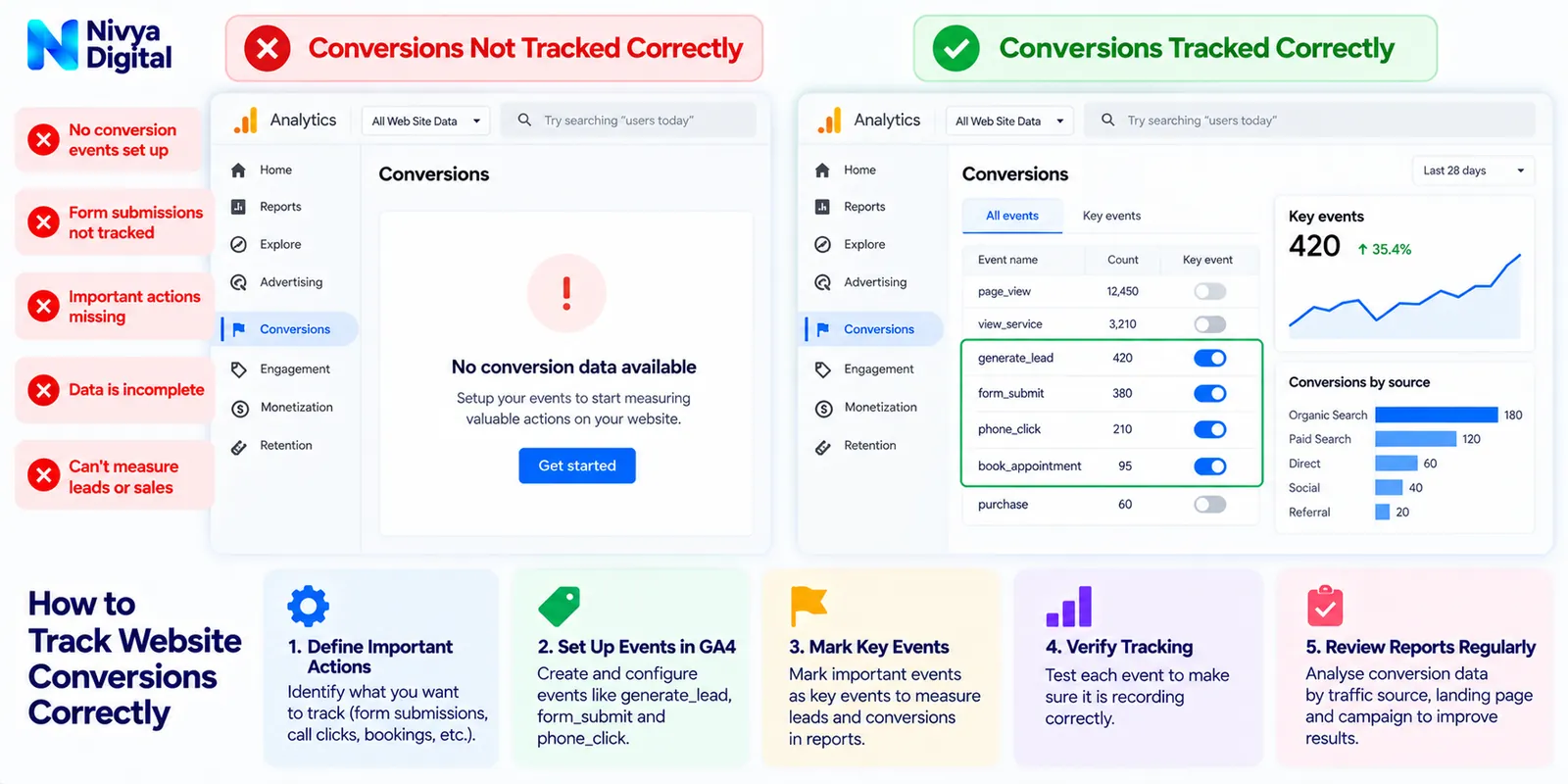
Sometimes a business believes its website generates no leads because its analytics setup does not capture important actions.
For example, visitors may contact the company through forms or other channels, but those actions are not being recorded correctly.
Google Analytics 4 (GA4) can help businesses measure important interactions.
How to Fix It
Define the actions that matter most to your business.
Examples include:
Contact form submissions
Consultation bookings
Quote requests
Relevant phone enquiries
Purchases
Qualified leads
Configure appropriate events in GA4.
Google recommends the generate_lead event for lead submissions and provides additional events such as qualify_lead for measuring later stages of the lead-generation process.
Mark important events as key events where appropriate.
Then verify that the tracking works using suitable testing and debugging tools.
Review traffic acquisition and landing page reports to understand which channels contribute to meaningful business actions.
Avoid counting every button click or page scroll as a genuine sales lead.
The goal is to measure valuable actions accurately, not simply inflate conversion numbers.
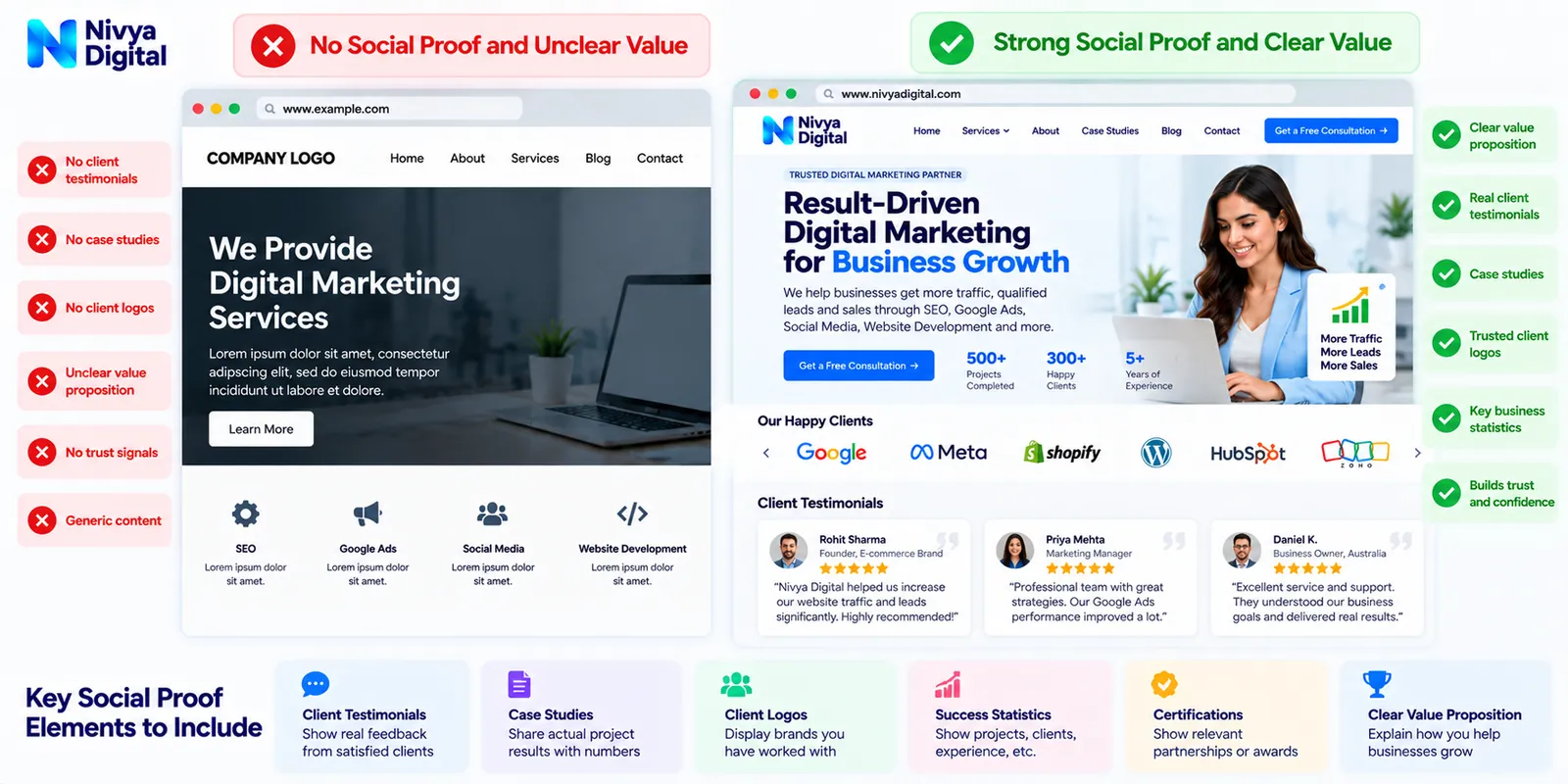
9. Your Business Lacks Social Proof and Clear Value
Visitors may understand your services but still hesitate to contact you.
They might wonder:
"Can this company solve my problem?"
"How is it different from other providers?"
"What exactly will I receive?"
"Can I trust this business?"
If your website does not answer these questions, visitors may postpone their decisions.
How to Fix It
Explain your value proposition clearly.
A useful value proposition communicates:
Who your services help
What problem they address
How your approach works
What makes your offering relevant
Add genuine supporting information wherever available.
This might include:
Verified client testimonials
Real project examples
Documented case studies
Clear service deliverables
Transparent working processes
Relevant professional experience
Avoid fabricated testimonials, invented client logos, or unsupported performance guarantees.
Authentic information is more useful than exaggerated marketing claims.
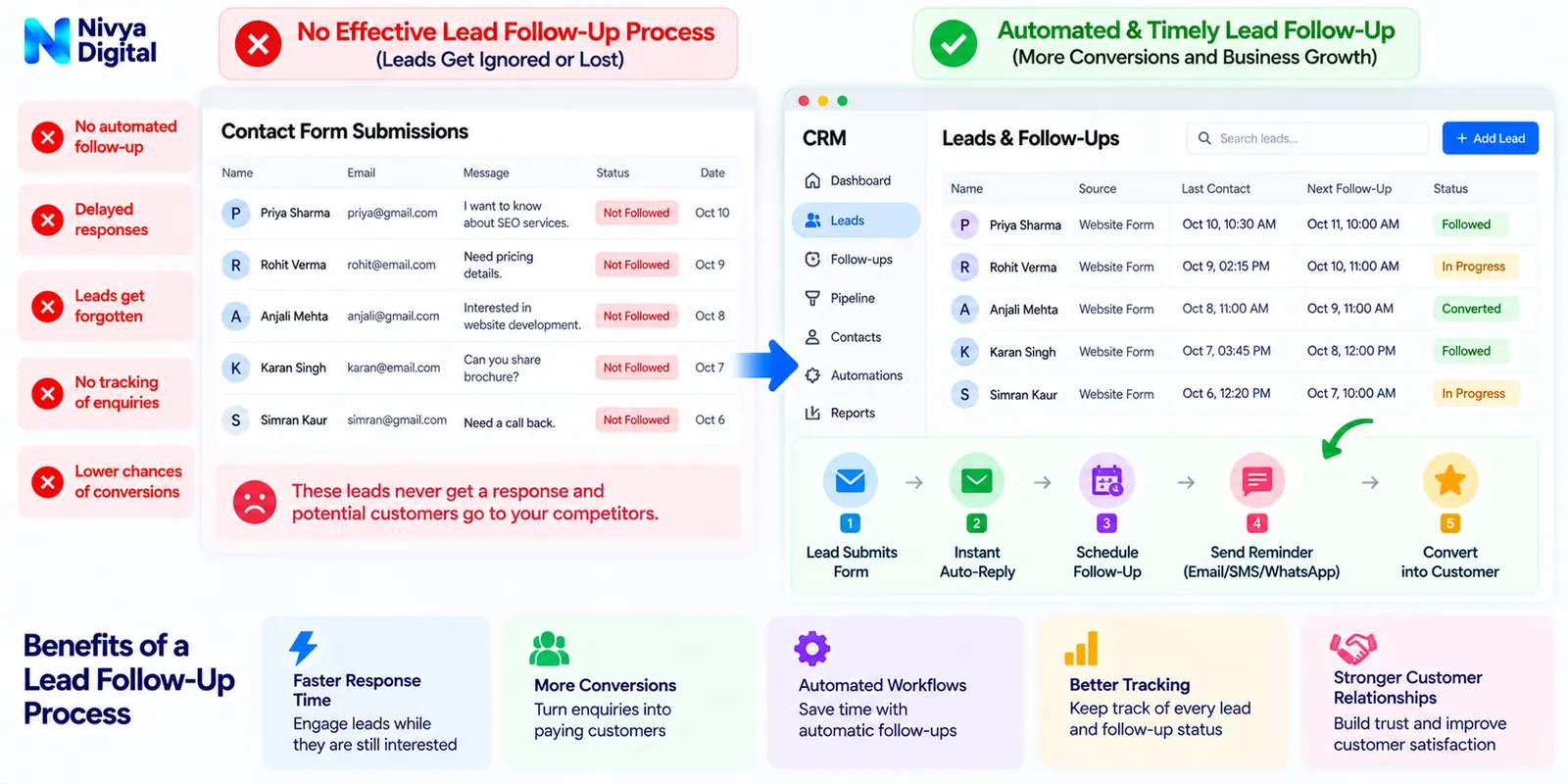
10. You Have No Effective Lead Follow-Up Process
Generating an enquiry is only one part of customer acquisition.
Businesses may lose opportunities when they respond slowly, fail to follow up, or cannot organise incoming leads.
For example, someone may submit a website development enquiry but receive no acknowledgement.
Without an organised process, the business may never know whether the visitor was interested in a consultation.
How to Fix It
Create a clear lead-management workflow.
A practical process could be:
Step 1: A visitor submits an enquiry.
Step 2: The system confirms receipt.
Step 3: The enquiry enters a CRM or lead-management system.
Step 4: The appropriate team member reviews the request.
Step 5: The business responds and records the outcome.
Step 6: Relevant follow-up communication is sent where appropriate and permitted.
CRM tools and business automation can help reduce manual administration.
However, automated communication should remain useful, accurate, and compliant with applicable privacy and marketing rules.
How to Calculate Your Website Lead Conversion Rate
Before improving conversions, you need a baseline.
A simple visitor-to-lead conversion rate can be calculated as:
Lead Conversion Rate = (Number of Leads ÷ Number of Website Visitors) × 100
Example
Suppose your website receives:
5,000 visitors per month
50 recorded leads
Your visitor-to-lead conversion rate is:
(50 ÷ 5,000) × 100 = 1%
Now suppose you improve your landing pages and receive 100 leads from the same number of visitors.
Your new conversion rate becomes:
(100 ÷ 5,000) × 100 = 2%
You have doubled the recorded lead conversion rate without increasing website traffic.
This is a hypothetical illustration, not a promised result.
Also, use consistent measurement definitions. Users, sessions, leads, and unique enquiries are different metrics, and mixing them can produce misleading comparisons.
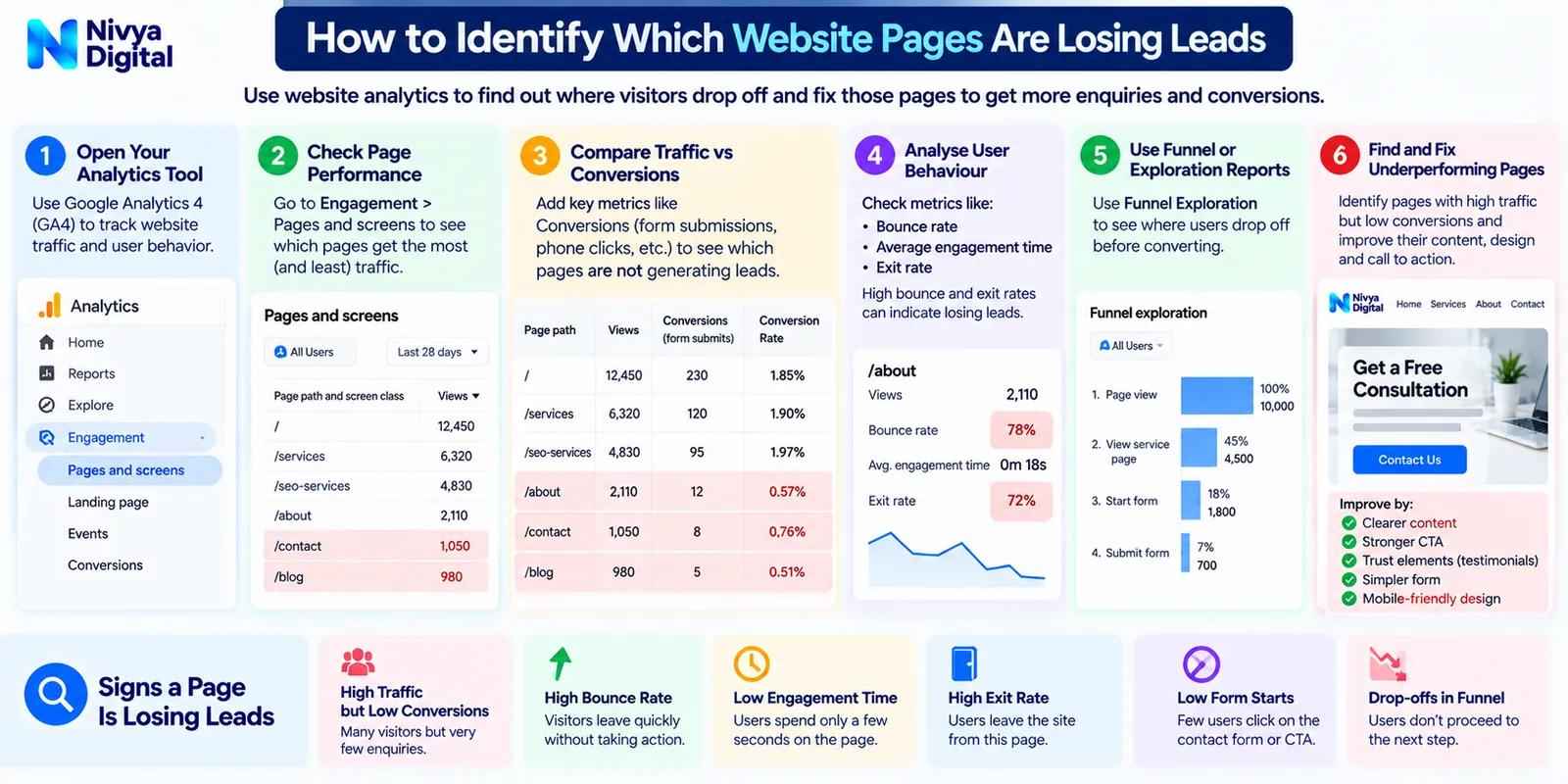
How to Identify Which Website Pages Are Losing Leads
Instead of redesigning your entire website immediately, start with the pages that matter most.
Review your analytics and identify:
Pages attracting substantial traffic
Pages with high commercial intent
Landing pages with few recorded enquiries
Pages receiving paid advertising traffic
Important service pages with weak engagement
Then investigate potential causes.
| Problem | What to Check | Possible Improvement |
|---|---|---|
| High traffic, few enquiries | Search intent | Improve keyword targeting |
| Visitors leave quickly | Page relevance and usability | Improve page content |
| CTA receives little engagement | CTA placement and wording | Test clearer messaging |
| Forms are started but not completed | Form friction | Simplify the form |
| Mobile visitors struggle | Mobile experience | Improve responsive design |
| Leads are missing from reports | Analytics implementation | Fix event tracking |
| Enquiries do not become customers | Lead qualification and follow-up | Improve CRM workflow |
This diagnostic approach helps businesses prioritise changes based on evidence rather than assumptions.
SEO vs CRO: Which Matters More for Lead Generation?
SEO and conversion rate optimisation (CRO) support different parts of the customer journey.
Search Engine Optimisation (SEO) helps relevant audiences discover your website through organic search.
Conversion Rate Optimisation (CRO) focuses on improving the experience so more visitors complete meaningful actions.
| SEO | CRO |
|---|---|
| Improves organic discoverability | Improves visitor-to-lead performance |
| Targets relevant search queries | Reduces conversion friction |
| Develops useful search-focused content | Improves landing pages and forms |
| Supports qualified traffic acquisition | Supports better conversion outcomes |
A business may need both.
If your website attracts very little relevant traffic, SEO and other acquisition channels may be a priority.
If your website already attracts suitable visitors but generates few enquiries, CRO may deserve greater attention.
The strongest approach is to align traffic quality, website usability, and conversion goals.
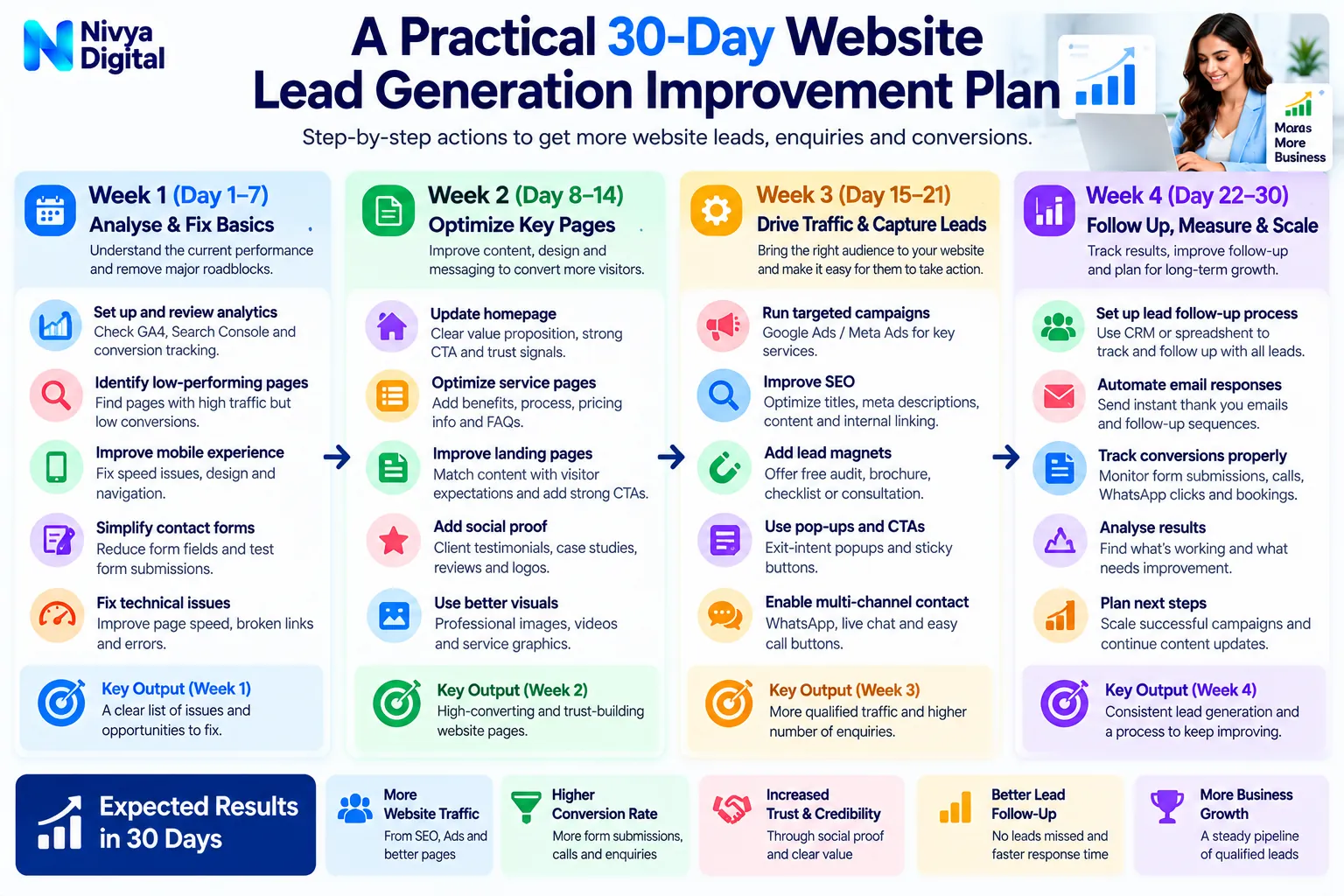
A Practical 30-Day Website Lead Generation Improvement Plan
Businesses do not need to change everything at once.
A structured four-week review can help identify the most important problems.
Week 1: Audit Website Traffic
Review Google Analytics 4 and Google Search Console.
Identify your most visited pages, traffic sources, relevant search queries, and existing conversion events.
Week 2: Improve Important Landing Pages
Update service descriptions, headlines, CTAs, navigation, and enquiry forms.
Prioritise pages that already attract commercially relevant visitors.
Week 3: Fix Technical and Tracking Issues
Test mobile usability, page speed, form submissions, and conversion tracking.
Confirm that enquiries reach the correct destination.
Week 4: Review Results and Plan Tests
Compare results with your baseline.
Review lead quality, form completion, and user behaviour.
Choose the next improvements based on the evidence available.
A 30-day plan can establish better measurement and begin testing, but it does not guarantee measurable improvements within that period.
How Nivya Digital Can Support Your Website Growth Strategy
If your website is attracting visitors but struggling to generate enquiries, the solution may involve more than one digital marketing activity.
At Nivya Digital, our service portfolio includes:
SEO Services: Improve organic visibility and target relevant search intent.
Google Ads Management: Reach audiences searching for suitable products or services.
Website Development: Build and improve websites with usability and business objectives in mind.
Content Marketing: Create useful content for different stages of the customer journey.
Meta Ads: Support audience discovery and paid social campaigns.
CRM Development: Help businesses organise lead information and customer interactions.
Business Automation: Support repeatable workflows and follow-up processes.
Every business has different goals, so the right combination of services depends on its market, website, audience, and resources.
Turn Website Visitors Into Business Opportunities
Your website should do more than attract clicks.
It should help relevant visitors understand your services, build confidence in your business, and take the next step when they are ready.
Explore Nivya Digital's services and discuss your website's lead-generation challenges.
Website: https://nivyadigital.com/
Final Thoughts
If your website is getting traffic but no leads in 2026, increasing visitor numbers is not necessarily the first solution.
Start by understanding who visits your website, why they arrive, what they expect, and what prevents them from taking action.
Review your search intent, landing pages, website design, calls to action, contact forms, tracking, and lead follow-up processes.
Small, carefully tested improvements can help businesses build a more effective customer acquisition journey.
The objective is not simply to attract more visitors.
It is to attract the right visitors and make it easier for them to become qualified leads.
If your business needs support with SEO, website development, paid advertising, or CRM workflows, explore the digital marketing services available at Nivya Digital.
Visit https://nivyadigital.com/ to get started.
Comments (1)
A practical guide explaining why websites attract visitors but fail to generate leads. It highlights common issues with landing pages, user experience, calls to action, and conversion optimization, helping businesses turn website traffic into potential customers in 2026.