
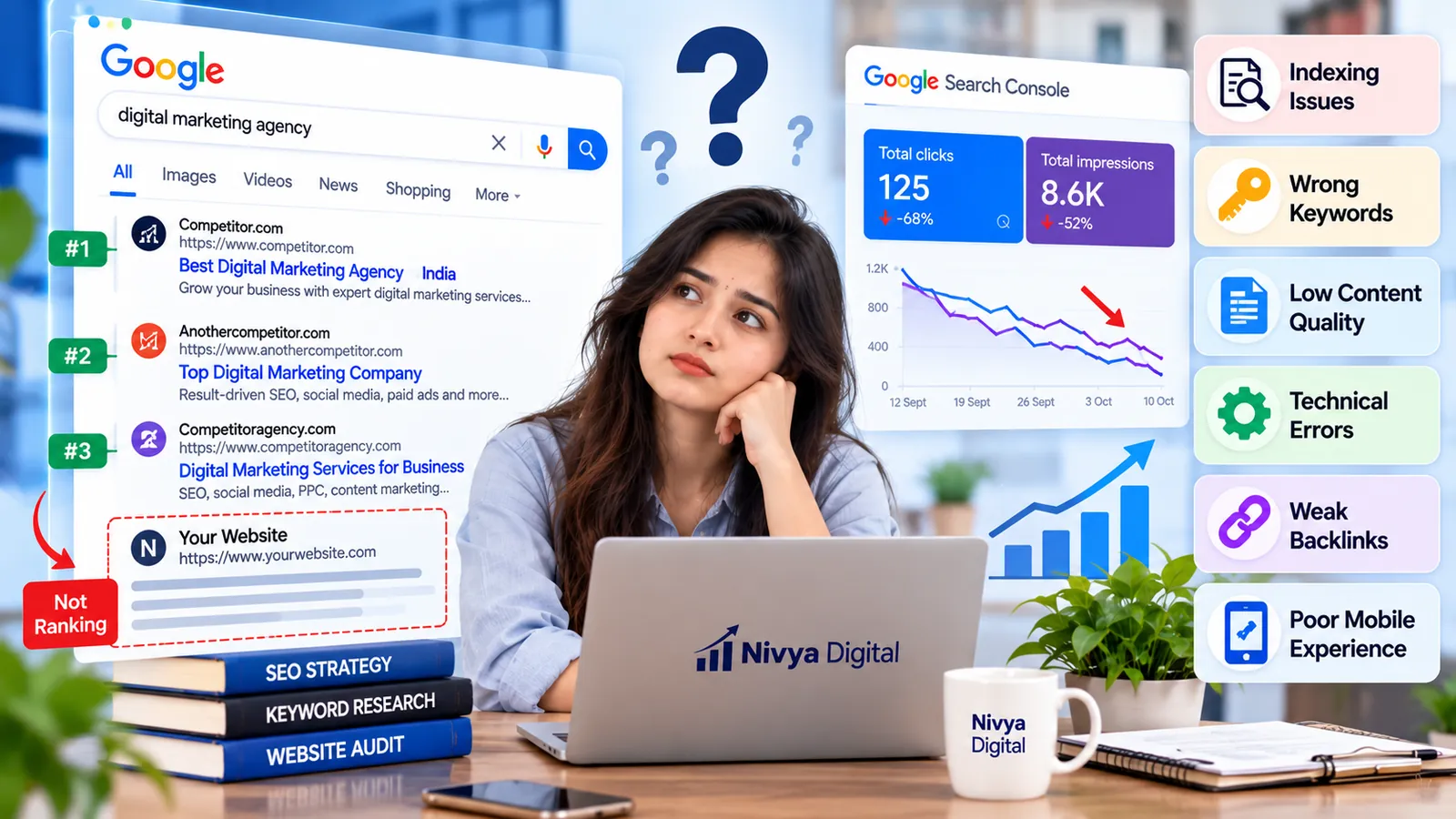
Is your website not ranking on Google despite publishing content, optimizing keywords, and following SEO best practices? You are not alone. Many businesses struggle to achieve consistent search visibility, even after investing time and resources in SEO.
In 2026, Google's search ecosystem includes traditional organic results, AI Overviews, and AI Mode. However, the fundamentals of successful SEO remain essential: accessible pages, helpful content, relevant search intent, and a positive user experience.
If your website is not appearing in search results, the problem could involve indexing, technical errors, content quality, or competition.
In this guide, Nivya Digital explains 10 common SEO issues that may affect your website's Google rankings and provides practical steps to identify and resolve them.
Why Is Your Website Not Ranking on Google?
A website may struggle to rank because Google cannot access its pages, its content does not satisfy search intent, or competing websites provide more relevant information.
Before making changes, identify whether your website has an indexing problem, a ranking problem, or a traffic problem.
These are different situations:
Indexing problem: Google has not indexed an important page.
Ranking problem: The page is indexed but appears too low for relevant searches.
Traffic problem: The page receives fewer visits, potentially because of lower rankings, reduced search demand, or changes in search results.
Understanding the difference helps you avoid unnecessary SEO changes.
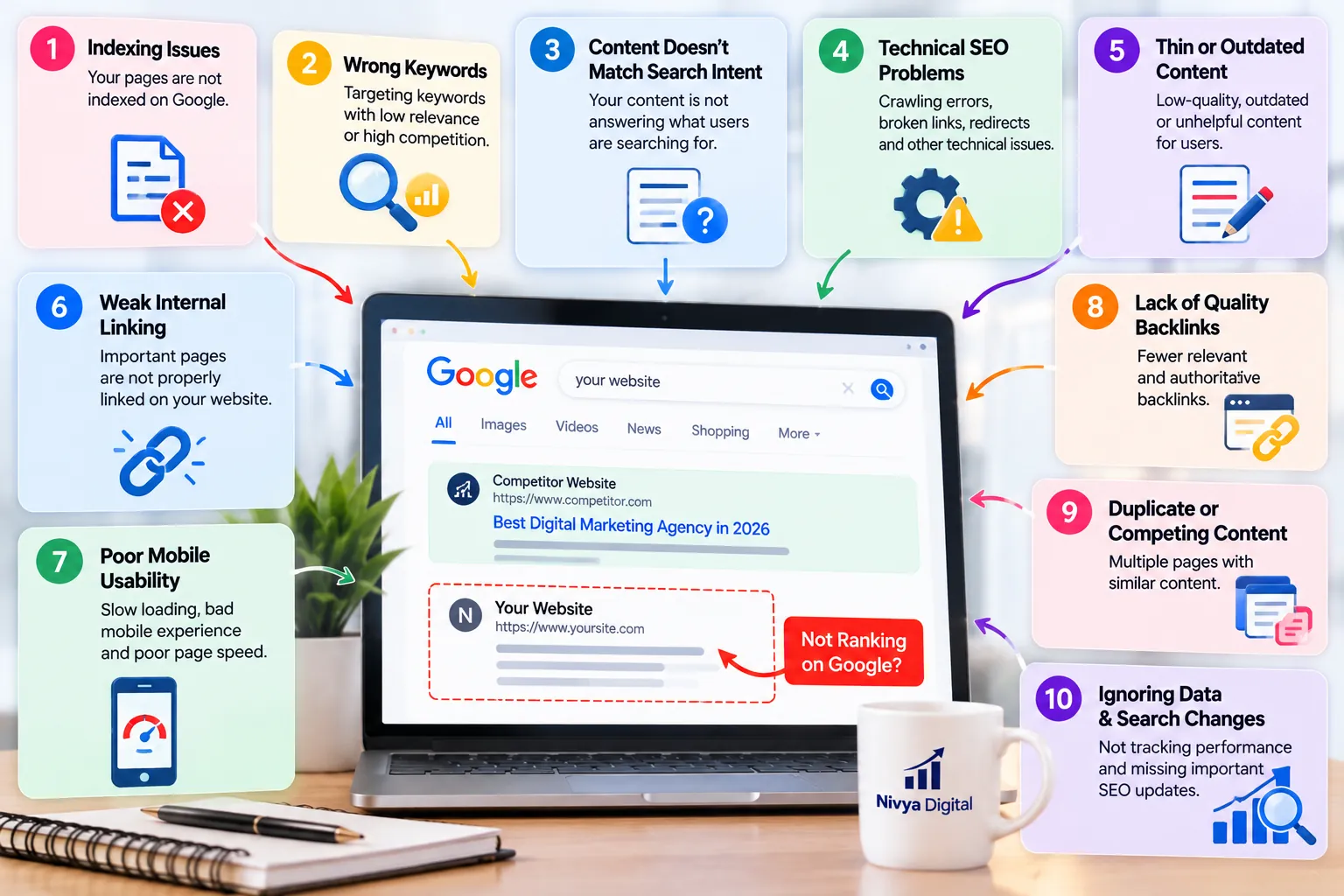
10 SEO Issues That Could Be Hurting Your Google Rankings in 2026
1. Your Website Pages Are Not Indexed
If Google has not indexed a page, it generally cannot appear in Google's organic search results.
Common causes include noindex directives, crawling problems, duplicate pages, and incorrect canonical signals.
How to fix it:
Open Google Search Console and inspect the affected URL. Check its indexing status, crawl information, and declared canonical URL.
Remove accidental indexing restrictions, fix important technical errors, and request indexing when appropriate.
Remember that submitting a URL or sitemap does not guarantee indexing.
2. You Are Targeting the Wrong Keywords
Choosing keywords without understanding user intent can limit your SEO performance.
For example, a business selling SEO services might target the broad keyword "digital marketing" when its potential customers are searching for "SEO services for small businesses."
The second phrase may better match the business's offering.
How to fix it:
Research relevant keywords using Google Search Console, Google Trends, Semrush, or Ahrefs.
Evaluate search intent, competition, and relevance before selecting target keywords.
Prioritize keywords that align with your services and audience rather than focusing only on high search volume.
3. Your Content Does Not Match Search Intent
Search intent describes what users want to accomplish when entering a query.
Some people want information, while others want to compare products, find a business, or complete a purchase.
A promotional service page may struggle to satisfy an informational search if users expect a detailed guide.
How to fix it:
Review the current search results for your target keyword.
Identify whether users expect tutorials, comparisons, product pages, local results, or other formats.
Then create content that genuinely answers their questions.
Avoid copying competitors. Focus on providing clearer explanations and useful original information.
4. Your Website Has Technical SEO Problems
Technical SEO issues can prevent search engines from accessing or understanding important website content.
Examples include broken internal links, incorrect redirects, server errors, accidental crawling restrictions, and inconsistent canonical tags.
How to fix it:
Conduct a technical SEO audit using Google Search Console and a reliable crawling tool.
Check:
HTTP status codes
Internal links
Redirect chains
XML sitemaps
Canonical tags
Robots.txt directives
Fix problems that affect important pages first.
Technical improvements can remove obstacles to discovery, but they do not automatically guarantee higher rankings.
5. Your Content Is Thin, Outdated, or Unhelpful
Google emphasizes creating helpful, reliable, people-first content.
Pages that provide little original value, repeat existing information, or fail to answer important questions may struggle against more useful resources.
For example, a short article about technical SEO that only defines the term may be less helpful than a guide explaining how to identify and fix common technical problems.
How to fix it:
Improve existing pages with accurate explanations, relevant examples, original screenshots, and actionable instructions.
Update outdated information when necessary.
Avoid adding unnecessary words simply to increase article length.
Content quality matters more than reaching a specific word count.
6. Your Website Has Weak Internal Linking
Internal links help visitors navigate related content and allow search engines to discover additional pages.
A useful article that receives no relevant internal links may be harder for users and crawlers to find.
How to fix it:
Connect related pages using descriptive anchor text.
For example, an article about keyword research could link to guides about search intent, on-page SEO, and Google Search Console.
Ensure important pages are accessible through your website's navigation or other relevant links.
Avoid inserting unrelated links simply to increase link counts.
7. Your Website Has Poor Mobile Usability or Page Experience
A difficult mobile experience can frustrate visitors and affect how effectively they use your website.
Slow loading, unstable layouts, intrusive elements, and hard-to-use navigation can reduce usability.
Google uses Core Web Vitals in its ranking systems, but achieving good scores does not guarantee top rankings.
How to fix it:
Test important pages with PageSpeed Insights and review Core Web Vitals in Google Search Console.
Focus on improving:
Largest Contentful Paint (LCP)
Interaction to Next Paint (INP)
Cumulative Layout Shift (CLS)
Compress oversized images, reduce unnecessary scripts, and improve responsive layouts.
Prioritize changes that make the website easier to use.
8. Your Website Lacks Relevant Backlinks and Brand Credibility
Links from relevant websites can help Google discover pages and understand relationships across the web.
However, backlinks are only one part of SEO. A high number of links does not guarantee strong rankings.
Buying manipulative links or participating in link schemes can violate Google's spam policies.
How to fix it:
Earn relevant mentions and links through original research, useful resources, legitimate partnerships, and digital PR.
Publish content that others have a genuine reason to reference.
Avoid paid link schemes, automated link building, and irrelevant link exchanges intended to manipulate rankings.
9. Your Website Has Duplicate or Competing Content
Multiple pages covering nearly identical topics can create confusion for visitors and make content management more difficult.
Google may select one URL as the canonical version when it finds substantially duplicate content.
However, having similar content does not automatically cause a Google penalty.
How to fix it:
Audit pages targeting the same or closely related search intent.
Where appropriate, consolidate overlapping articles into a stronger resource.
Use redirects when permanently replacing URLs, and implement canonical tags correctly for duplicate versions that must remain accessible.
Keep separate pages when they serve genuinely different user needs.
10. You Are Ignoring SEO Performance Data and Search Changes
SEO decisions based only on assumptions can waste time.
A drop in organic traffic does not always mean Google has penalized your website.
Changes in competition, search demand, indexing, rankings, and search result features may influence performance.
In 2026, AI-powered search experiences add another reason to evaluate search visibility carefully.
How to fix it:
Use Google Search Console to review clicks, impressions, queries, pages, and indexing reports.
Use Google Analytics 4 to evaluate organic landing pages, engagement, and conversions.
Compare relevant time periods and investigate changes before rewriting content or making major technical changes.
How to Check Why Your Website Is Not Ranking on Google
Follow this practical troubleshooting process.
| Step | Tool | What to Check |
|---|---|---|
| 1 | Google Search Console | URL indexing status |
| 2 | Google Search Console | Impressions, clicks, and search queries |
| 3 | Google Search | Search intent and competing pages |
| 4 | PageSpeed Insights | Performance and Core Web Vitals |
| 5 | SEO crawling tool | Broken links, redirects, and technical errors |
| 6 | Google Analytics 4 | Organic traffic, engagement, and conversions |
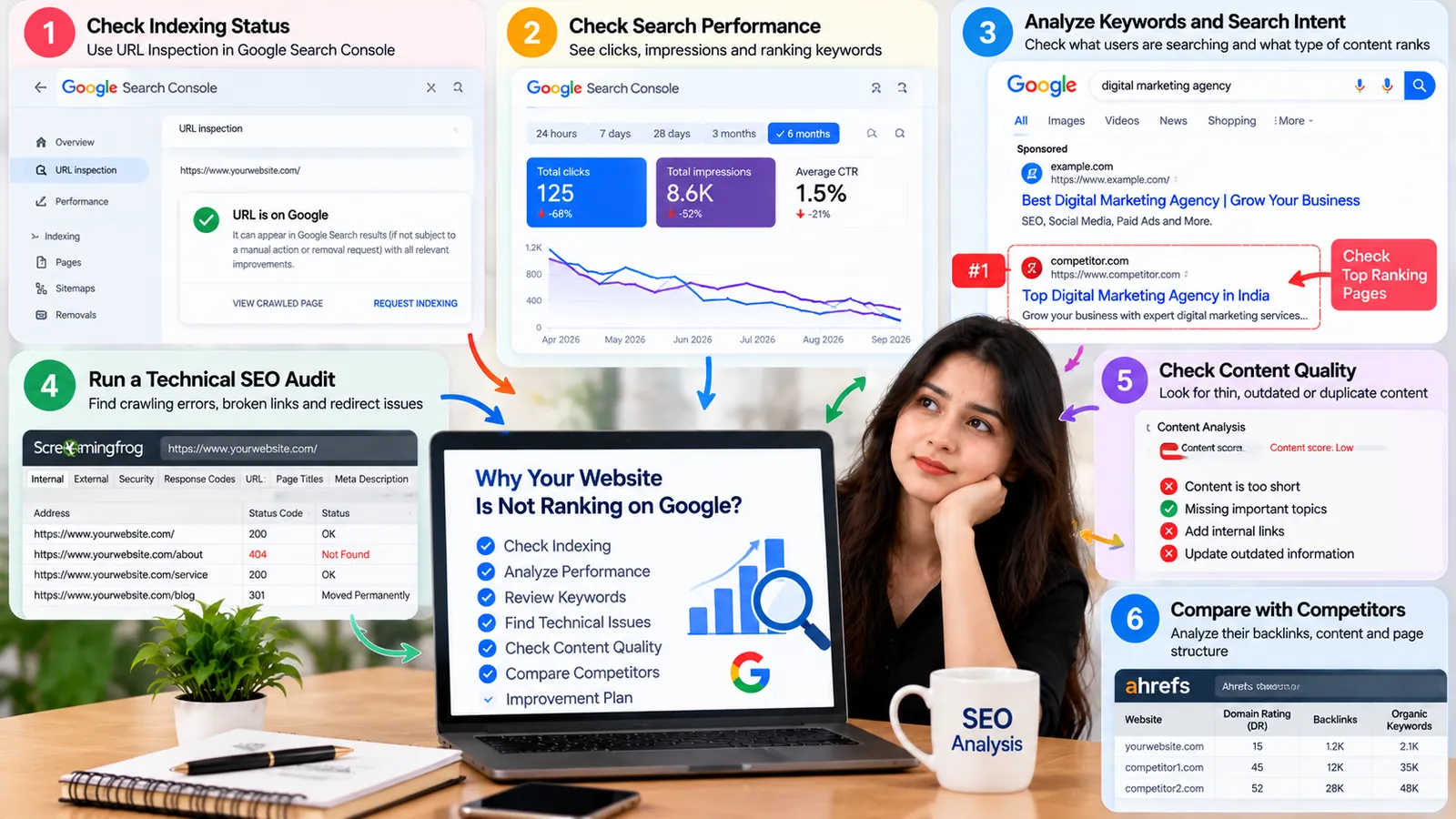
Start with indexing and technical accessibility. Then investigate keyword relevance, content usefulness, and competition.
This approach helps you prioritize problems instead of changing everything at once.
Does Google AI Mode Affect Website Rankings in 2026?
Google AI Mode and AI Overviews introduce additional ways for users to explore information.
These experiences may provide AI-generated answers with links to supporting websites.
However, Google states that existing SEO fundamentals remain relevant to its AI search features.
There is no special AI-specific schema requirement or guaranteed technique for appearing in AI-generated answers.
Businesses should continue publishing accurate, original, accessible content that addresses real customer questions.
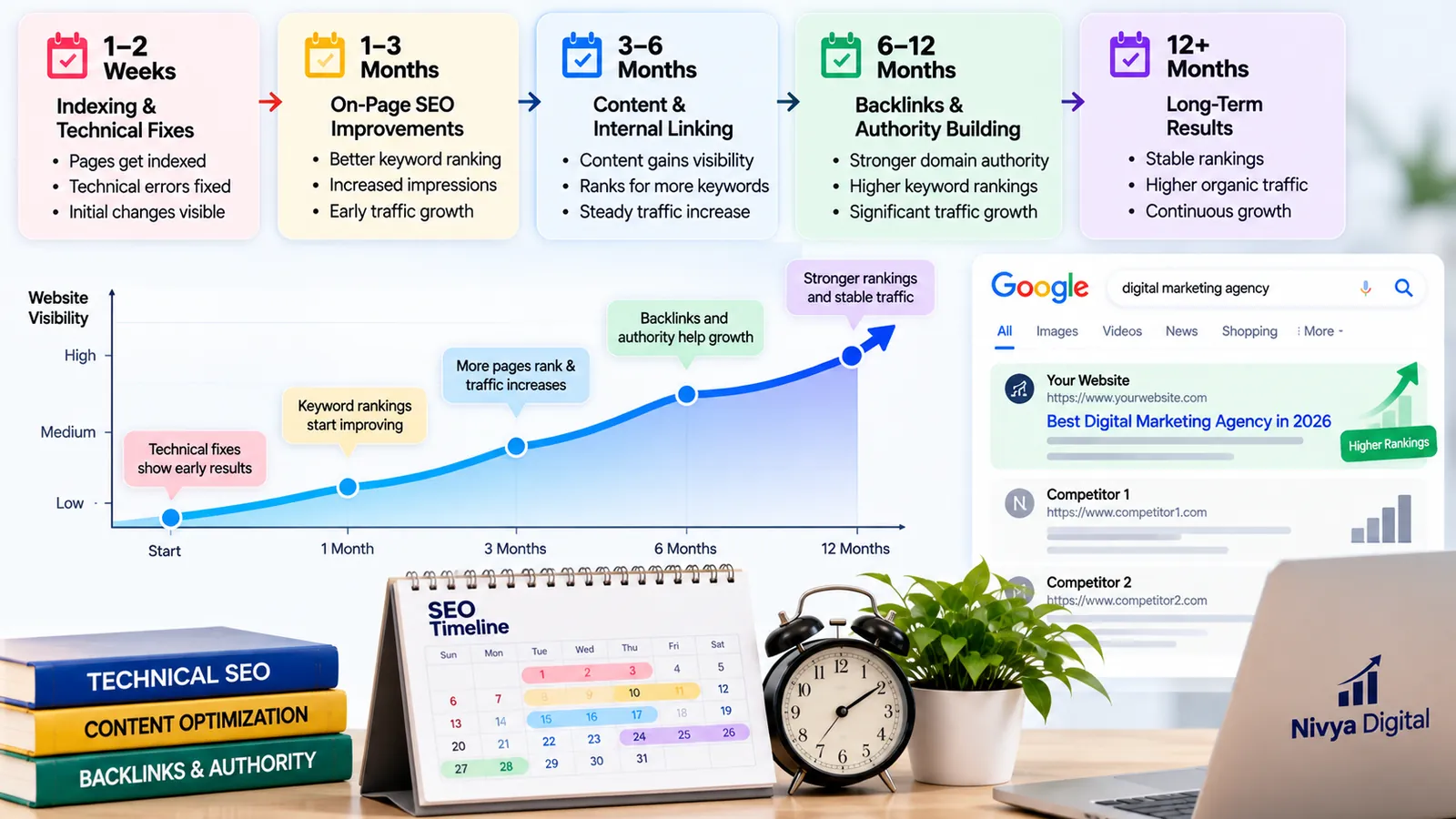
How Long Does It Take to Improve Google Rankings?
SEO improvements do not follow a guaranteed timeline.
Some technical corrections may become visible after Google recrawls affected pages. Content and ranking improvements can take longer, depending on competition, website history, and the nature of the changes.
Monitor performance over meaningful periods and avoid expecting immediate results after every update.
Final Thoughts
If your website is not ranking on Google in 2026, the first step is to identify the actual problem.
Indexing restrictions, irrelevant keywords, weak content, technical errors, and poor internal linking can all limit search performance.
Instead of chasing quick ranking tricks, focus on building a technically accessible website with helpful content that satisfies search intent.
At Nivya Digital, we believe sustainable SEO begins with accurate diagnosis, practical improvements, and ongoing performance measurement.
By addressing these 10 common SEO issues, businesses can strengthen their search foundations and improve their opportunities for organic visibility.
Comments (0)
No comments yet
Start the discussion by sharing your perspective