
Your website is attracting visitors. Google Analytics shows traffic, your SEO efforts are bringing people to your pages, and your business is becoming more visible online.
But there is one frustrating problem: visitors are not contacting you.
Your contact form receives very few submissions. Your phone rarely rings because of your website. Potential customers browse your services but leave without requesting a quote, booking a consultation, or sending an enquiry.
If this sounds familiar, you are not alone.
Getting website traffic is only one part of digital marketing success. The real challenge is turning that traffic into meaningful business opportunities.
A website can attract thousands of visitors and still generate fewer leads than a smaller website with more relevant visitors and a better conversion experience.
The good news is that low enquiry numbers do not always mean you need more advertising or a complete website redesign. Sometimes, relatively small improvements to your messaging, user experience, trust signals, and lead generation process can make a significant difference.
In this guide, we will explore 11 hidden reasons your website gets traffic but no enquiries, explain how to identify each problem, and share practical ways to improve conversions in 2026.
1. Your Website Is Attracting the Wrong Audience
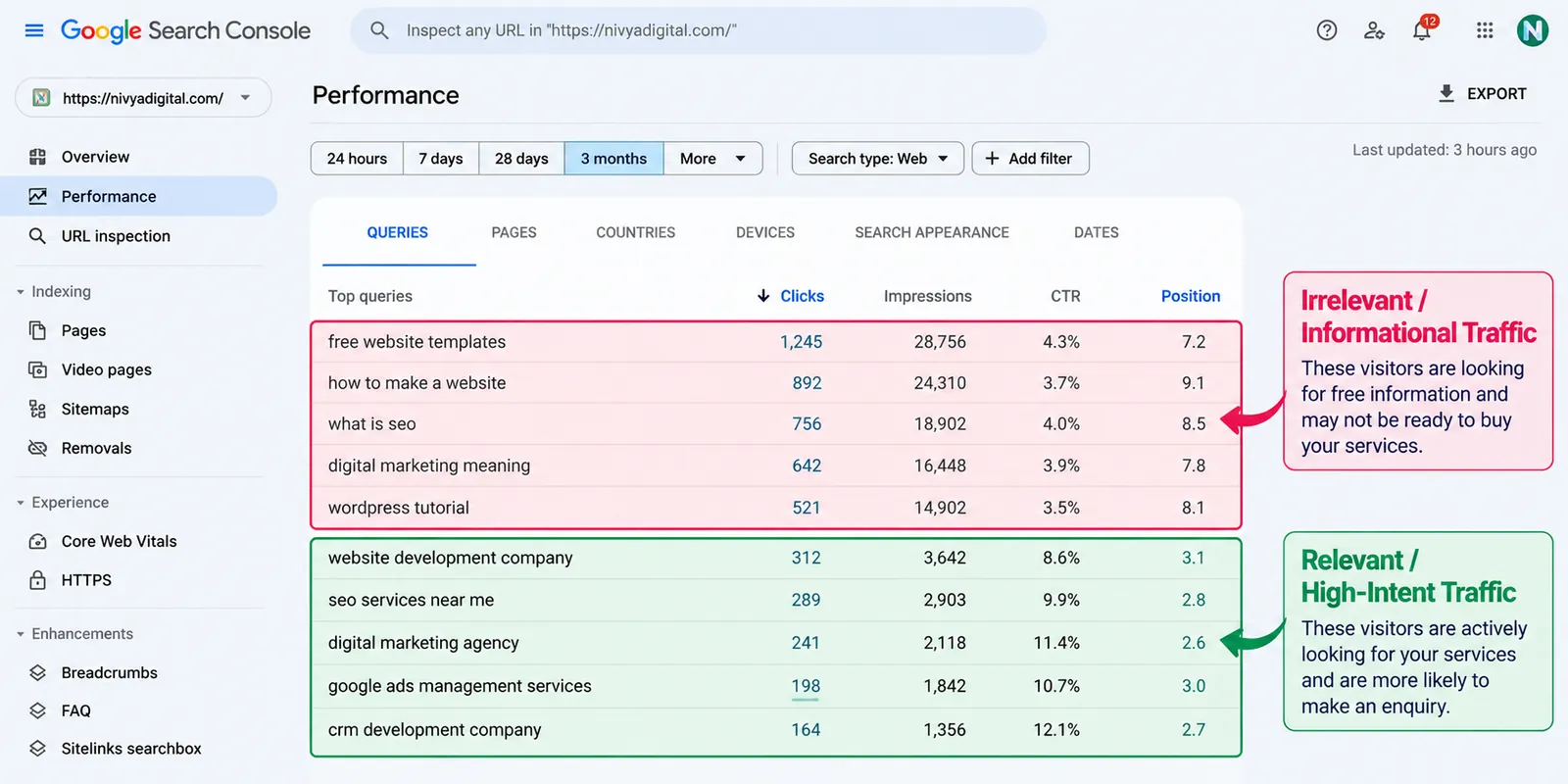
One of the most common reasons for high website traffic and low enquiries is attracting visitors who have no immediate interest in buying your products or services.
For example, imagine a website development agency that receives traffic from people searching for “free website templates” rather than “hire a website development company.”
Both keywords are related to websites, but they represent very different intentions.
Someone looking for a free template may simply want information. Someone searching for a development company may be ready to compare service providers.
How to fix it
Focus your SEO and content strategy on search intent rather than traffic volume alone.
Prioritize relevant commercial and transactional keywords such as:
Website development services for small businesses
Hire an SEO agency
Custom CRM development company
Google Ads management services
Business automation solutions
Use Google Search Console to identify the search queries driving impressions and clicks. Then evaluate whether those queries match the services you offer.
Key takeaway: One hundred relevant visitors can be more valuable than thousands of visitors who are unlikely to become customers.
2. Your Website Does Not Clearly Explain What You Offer
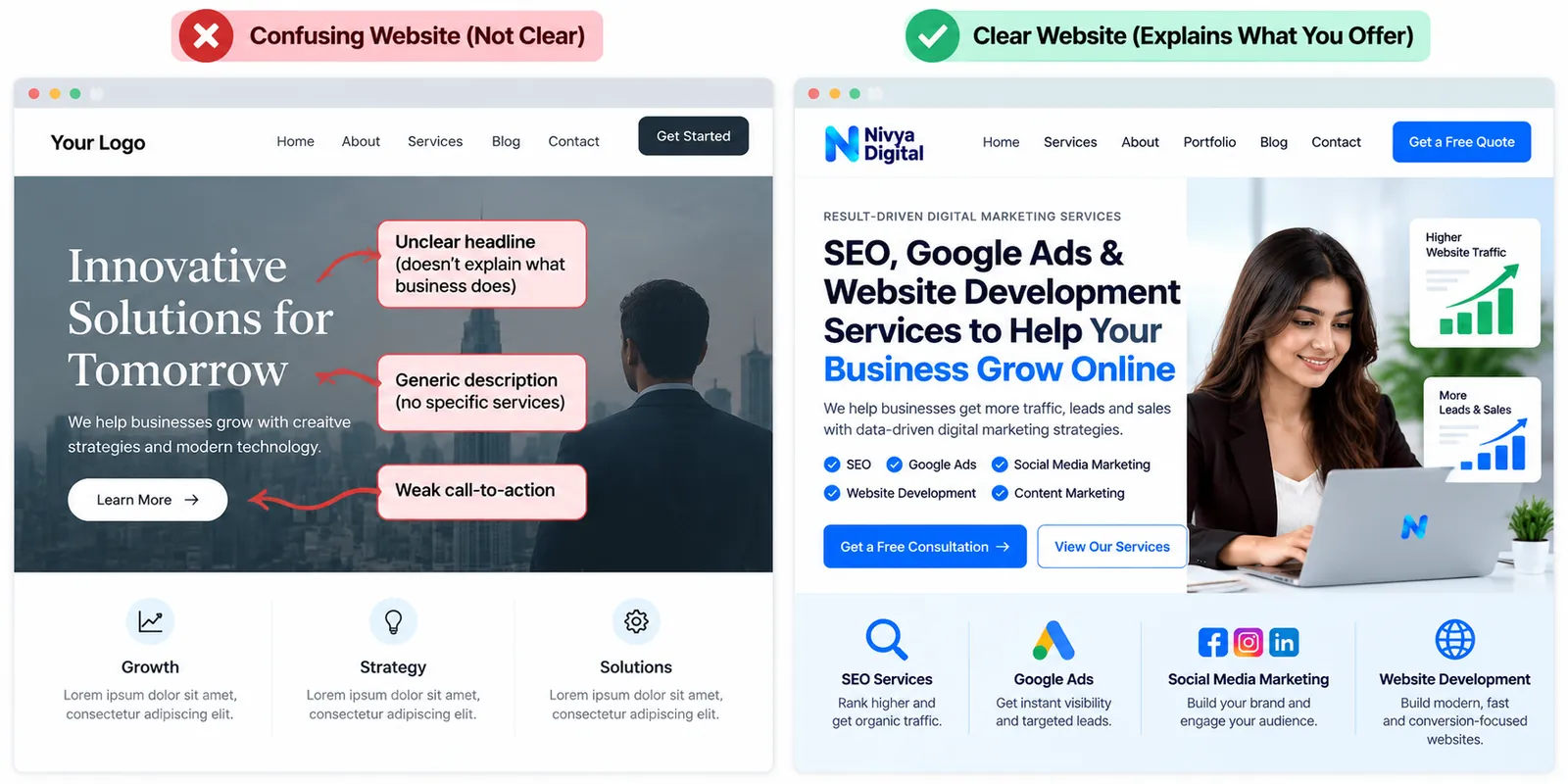
When visitors land on your homepage, they should quickly understand what your business does, who it serves, and why they should choose it.
If your headline is vague, your services are difficult to understand, or your website relies on generic phrases such as “Innovative Solutions for Tomorrow,” visitors may leave without exploring further.
How to fix it
Create a clear value proposition that answers three questions:
What service do you provide?
Who is your ideal customer?
What problem do you help solve?
For example, instead of writing:
“We Deliver Innovative Digital Solutions.”
Try:
“SEO, Paid Advertising and Website Development Services to Help Businesses Generate More Qualified Leads.”
Support your headline with a short description and a relevant call to action.
A clear message helps visitors decide whether your business matches their needs.
3. Your Call-to-Action Buttons Are Weak or Difficult to Find
A call to action (CTA) tells visitors what to do next.
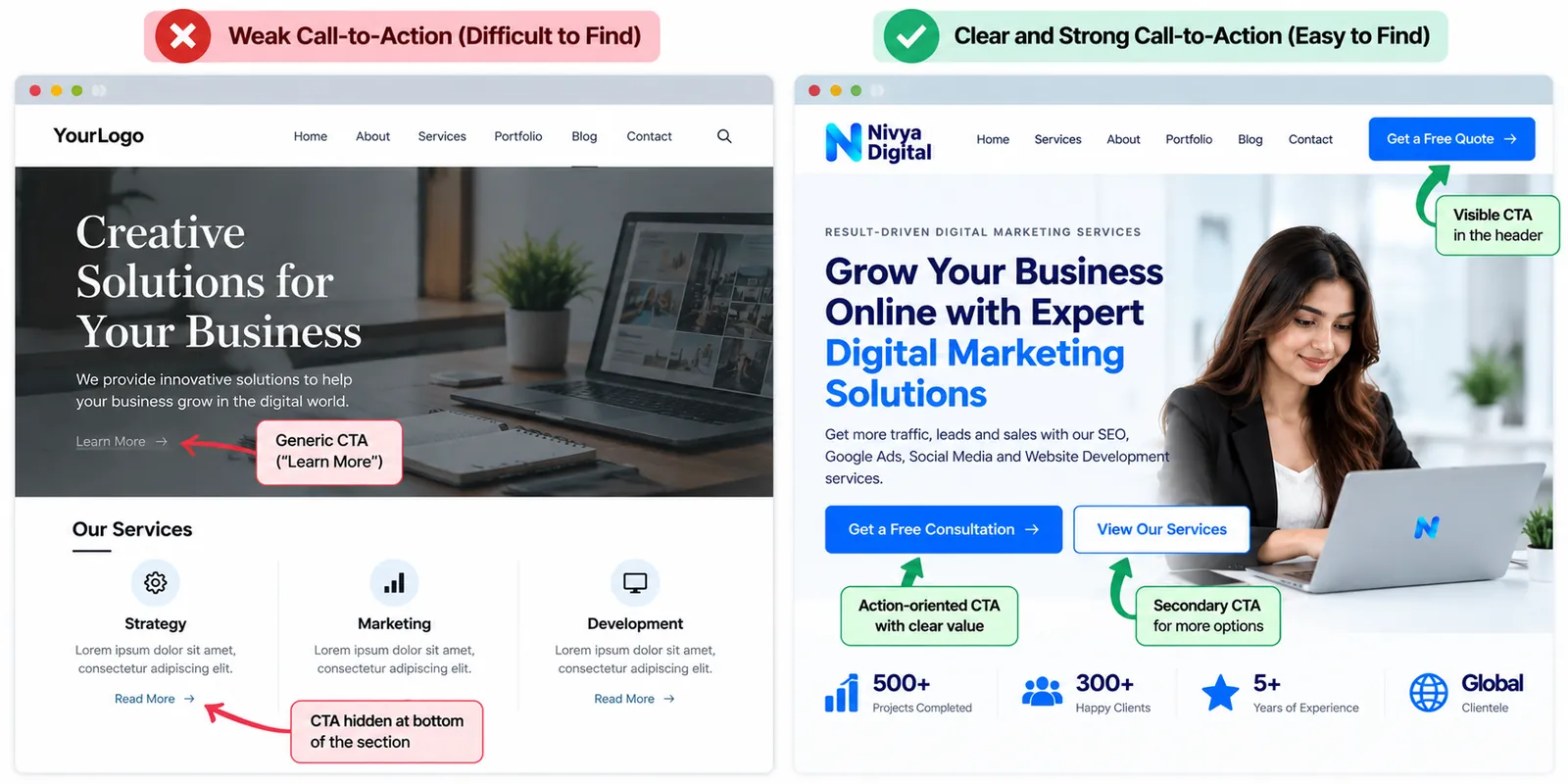
Even an attractive website can lose potential customers when its CTA buttons are hidden, confusing, or too generic.
Buttons such as “Learn More” and “Submit” are not always effective when visitors need more context.
How to fix it
Use action-oriented CTAs that communicate a clear next step.
Examples include:
Request a Free Consultation
Get a Website Development Quote
Discuss Your Marketing Goals
Book a Discovery Call
Request a Custom Proposal
Place your primary CTA near the top of important landing pages and repeat it naturally after key sections.
On mobile devices, make sure the button is easy to tap.
Avoid overwhelming visitors with too many competing actions.
4. Your Website Loads Too Slowly
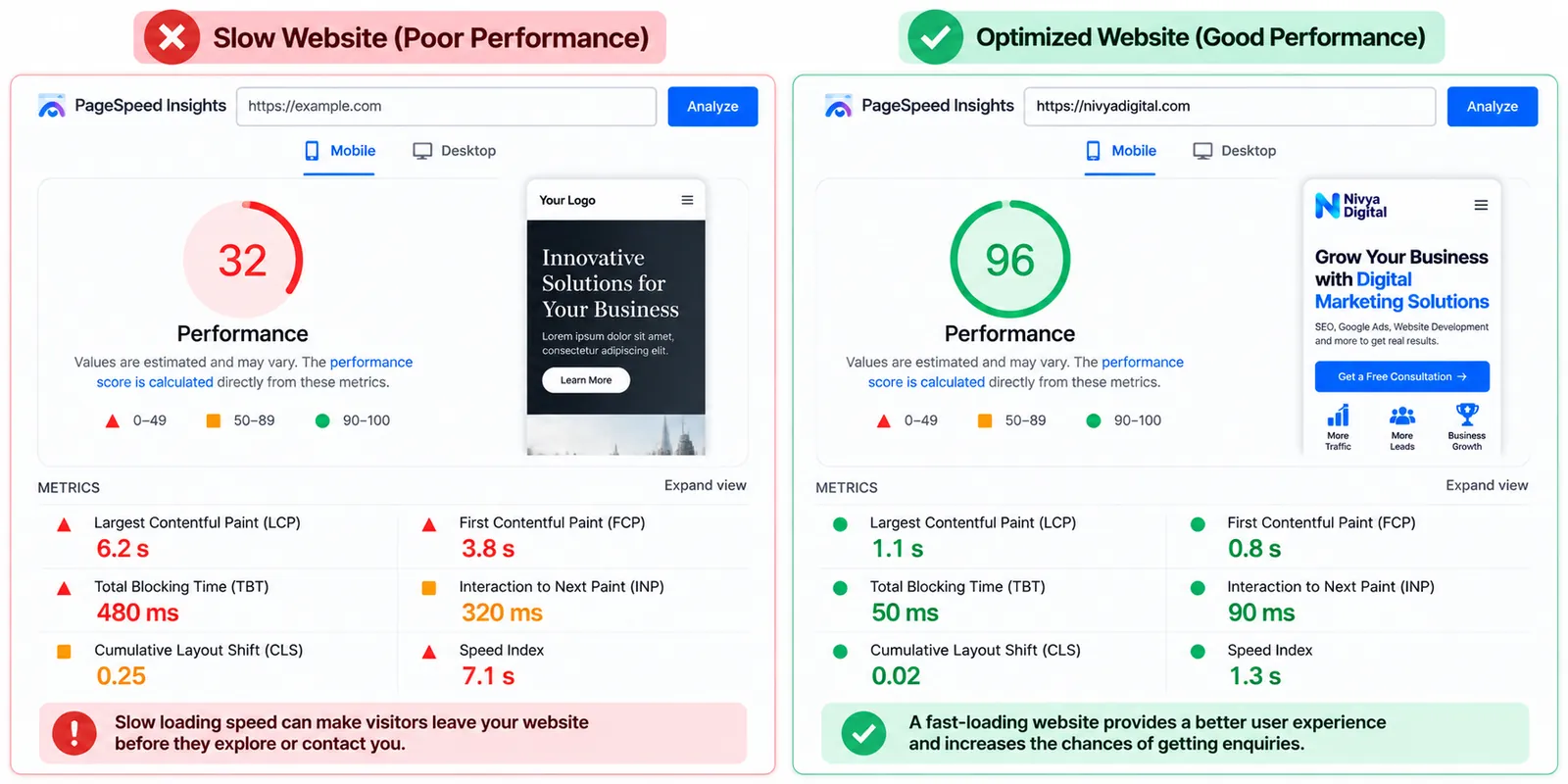
Website speed affects user experience and can contribute to visitors leaving before they interact with your content.
Slow-loading pages are particularly frustrating for mobile users or visitors with weaker internet connections.
Heavy images, unnecessary scripts, poorly configured hosting, and excessive WordPress plugins can all contribute to performance problems.
How to fix it
Use tools such as Google PageSpeed Insights to evaluate your website.
Pay attention to Core Web Vitals, including:
| Metric | Good threshold |
|---|---|
| Largest Contentful Paint (LCP) | 2.5 seconds or less |
| Interaction to Next Paint (INP) | 200 milliseconds or less |
| Cumulative Layout Shift (CLS) | 0.1 or less |
These are Google's commonly used good-experience thresholds, not guarantees of higher conversion rates.
Compress images, remove unnecessary scripts, enable appropriate caching, and review your hosting performance.
Prioritize the pages that attract visitors with the strongest buying intent.
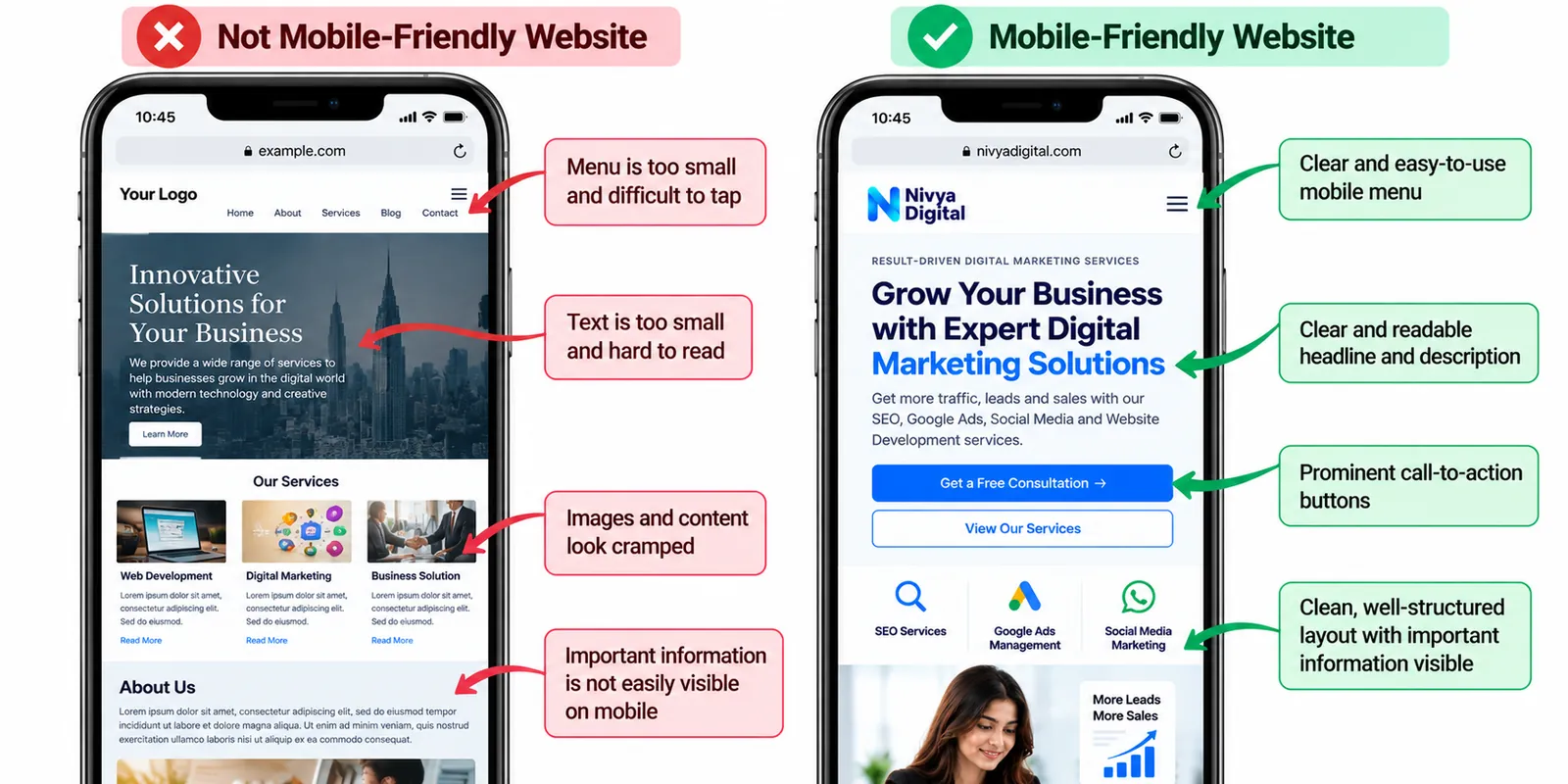
5. Your Website Is Not Mobile-Friendly
Many potential customers discover businesses through smartphones.
If your website looks good on a desktop but performs poorly on mobile, you may lose enquiries.
Common problems include tiny text, difficult navigation, overlapping elements, long forms, and buttons that are hard to tap.
How to fix it
Test your website on different mobile screen sizes.
Check whether visitors can comfortably read service information, find contact details, submit forms, and use the main CTA without zooming.
For businesses that receive enquiries through phone calls or WhatsApp, consider adding accessible click-to-call or messaging options.
A mobile-friendly website should make contacting your business simple.
6. Visitors Do Not Trust Your Business Enough
Visitors may like your services but hesitate to share their personal information or make a purchasing decision.
This is especially important for agencies, consultants, software development companies, and other service businesses where customers cannot fully evaluate the service before buying.
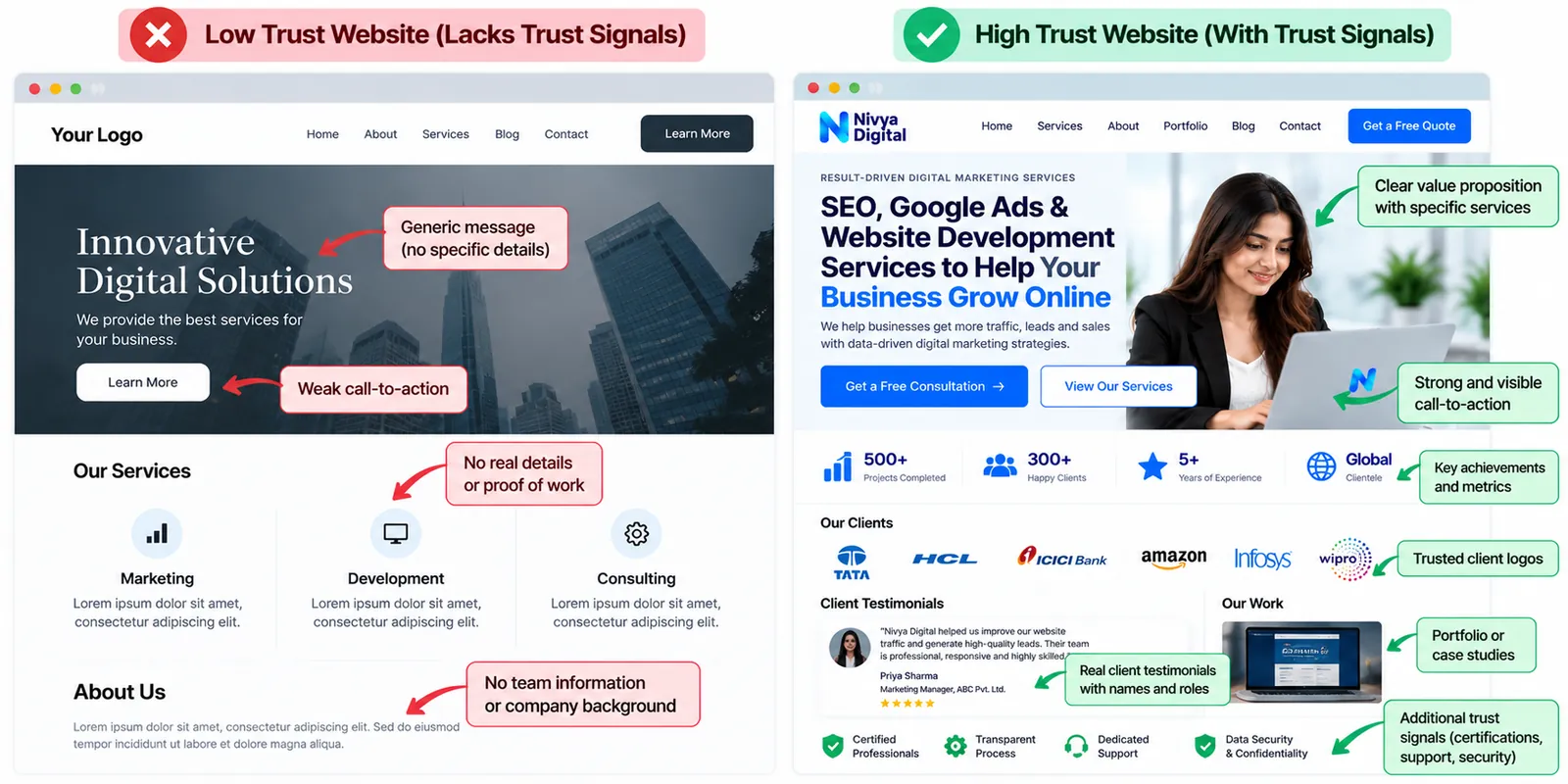
Missing trust signals can increase uncertainty.
How to fix it
Add genuine credibility indicators such as:
Real client testimonials with permission
Detailed case studies
Examples of completed work
Transparent company information
Clear contact details
Relevant professional qualifications
Accurate service descriptions
Avoid fabricated reviews, exaggerated achievements, and unverifiable claims.
If you work with international clients, explain how consultations, communication, project delivery, and support work across locations.
Trust is built through clarity and evidence, not just attractive design.
7. Your Contact Forms Are Too Long or Complicated
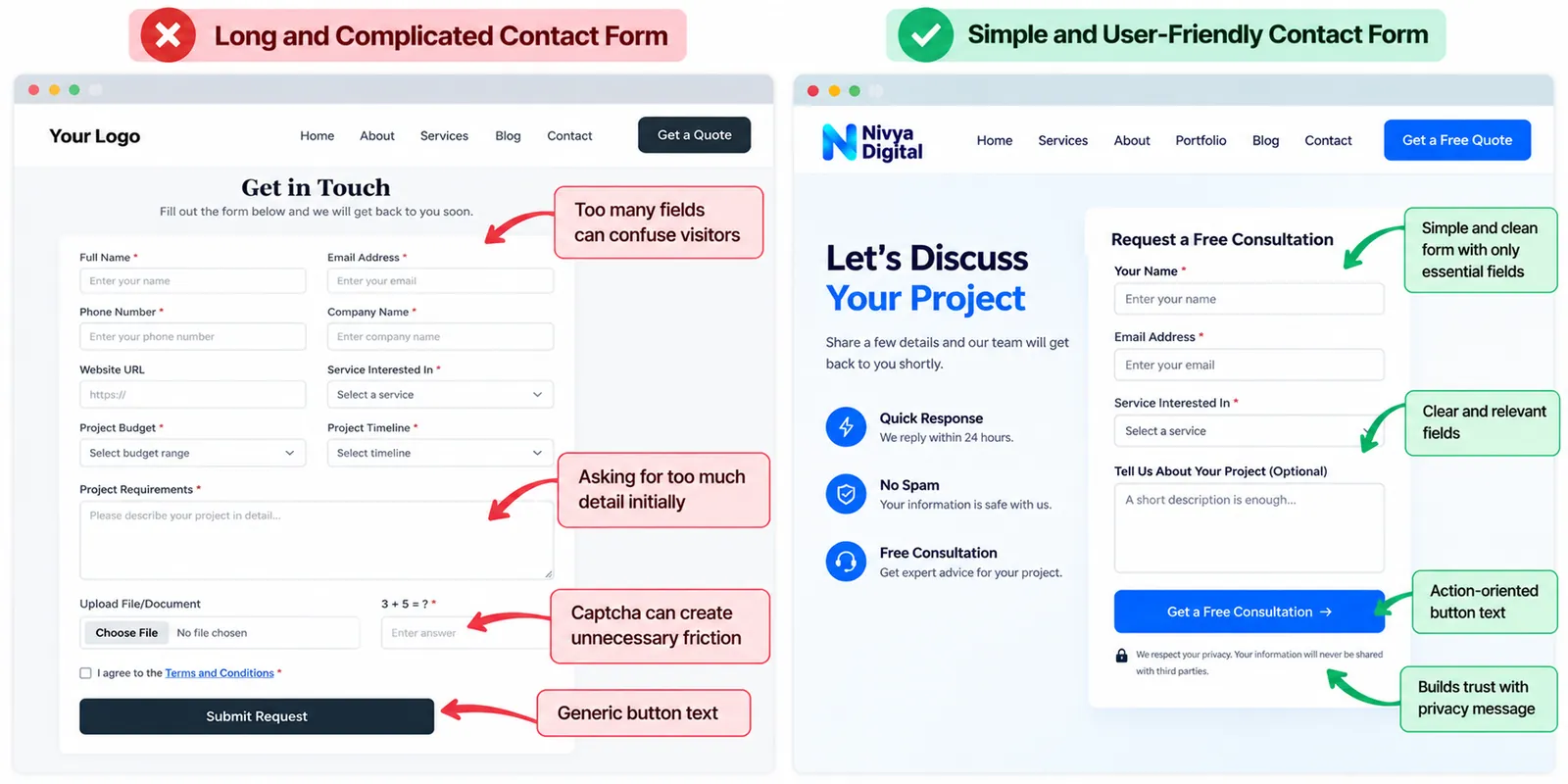
A visitor may be interested in your services but abandon the enquiry process when the contact form requires too much information.
Asking for a company address, detailed project requirements, budget, phone number, and multiple other fields before an initial conversation can create unnecessary friction.
Technical problems can also prevent forms from working correctly.
How to fix it
Start with only the information your sales team genuinely needs.
For example, an initial enquiry form could ask for a name, email address, service of interest, and a short project description.
Make additional information optional where possible.
Test your forms regularly to ensure submissions reach the correct inbox or CRM.
Display a clear confirmation message after successful submission.
8. Your Service Pages Do Not Answer Important Customer Questions
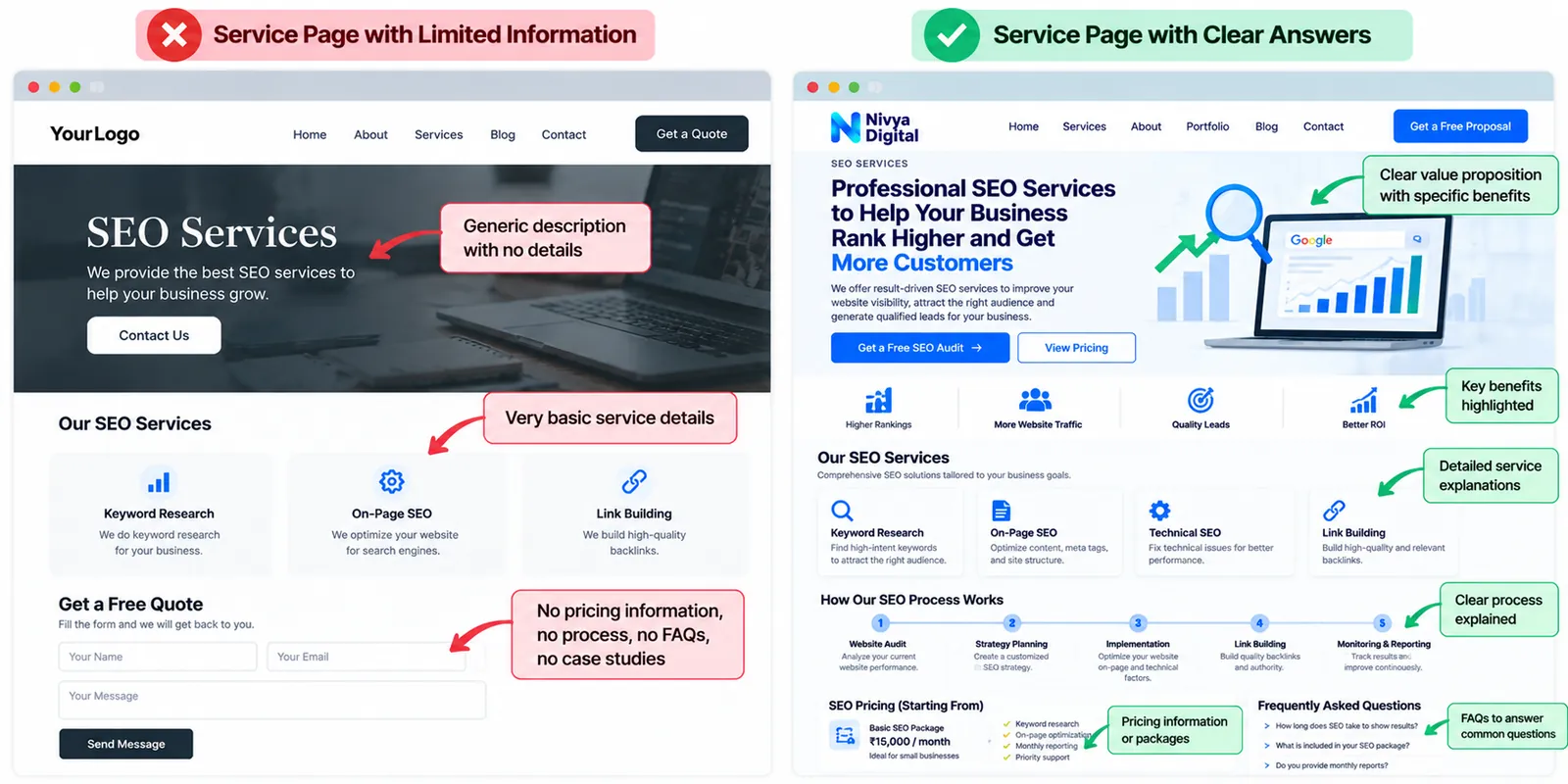
Many business websites explain their services without addressing the concerns customers have before making contact.
Visitors often want to know what is included, how the process works, how long delivery may take, and whether a service fits their business.
If these questions remain unanswered, visitors may continue researching elsewhere.
How to fix it
Build informative service pages that cover the customer's decision-making process.
For each service, explain:
Who the service is designed for
Problems it helps solve
What the service includes
Your typical working process
Factors affecting timelines and pricing
How to request a consultation or proposal
For example, a website development service page could explain the differences between WordPress websites, custom websites, and eCommerce development.
Helpful information reduces uncertainty and encourages more qualified enquiries.
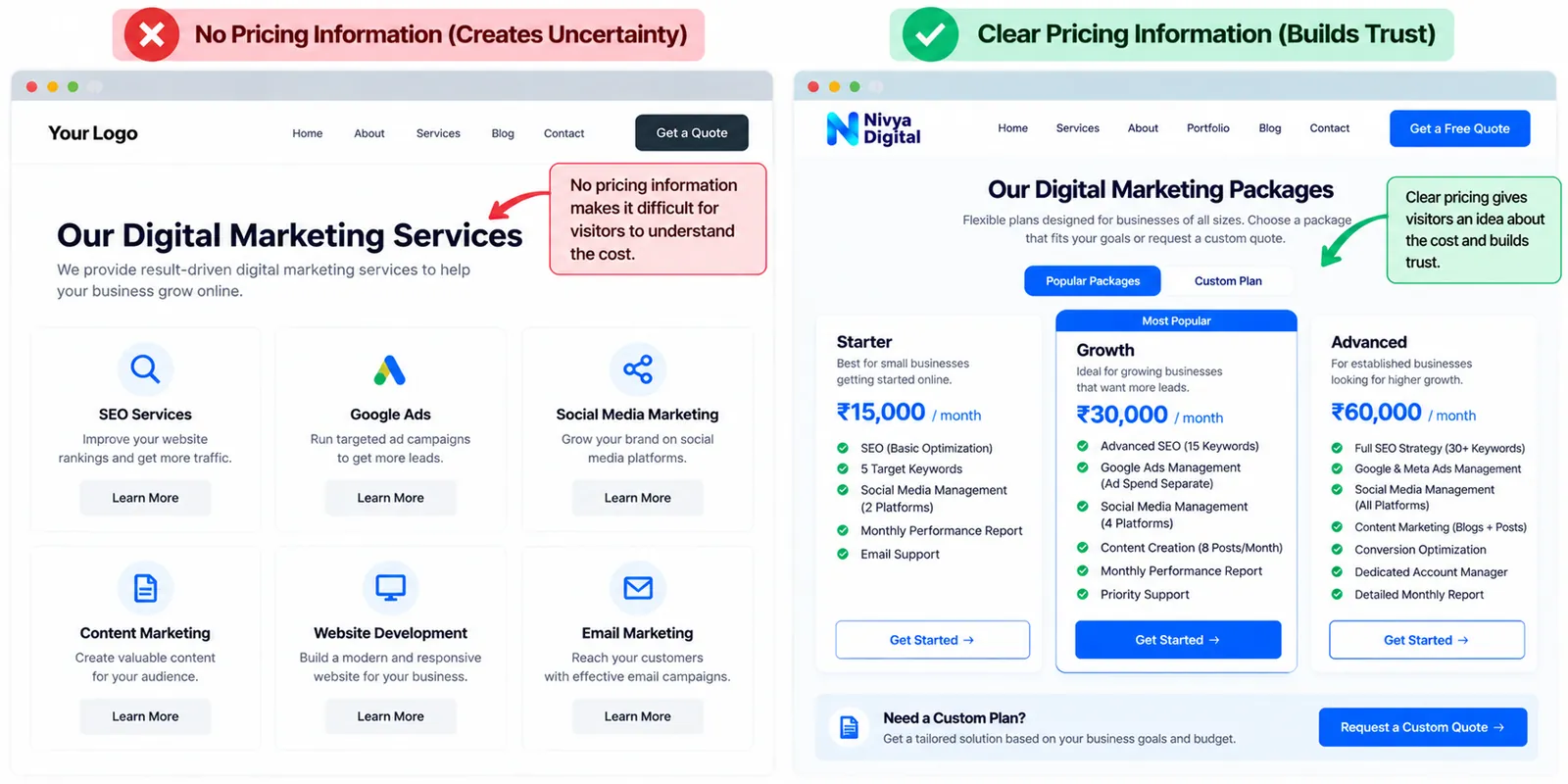
9. Your Pricing Information Creates Uncertainty
Not every business needs to display fixed prices, especially when services are customized.
However, providing no pricing guidance can make it difficult for potential customers to understand whether your services fit their budget.
Visitors may assume the service is too expensive or hesitate to contact you.
How to fix it
Consider offering starting prices, indicative price ranges, or an explanation of the factors that influence project costs.
For customized services, explain that the final quote depends on scope, features, complexity, and ongoing support.
You can also provide a simple “Request a Custom Quote” option.
The goal is not necessarily to publish every price. It is to make the purchasing process more transparent.
10. You Are Not Tracking Website Enquiries Correctly
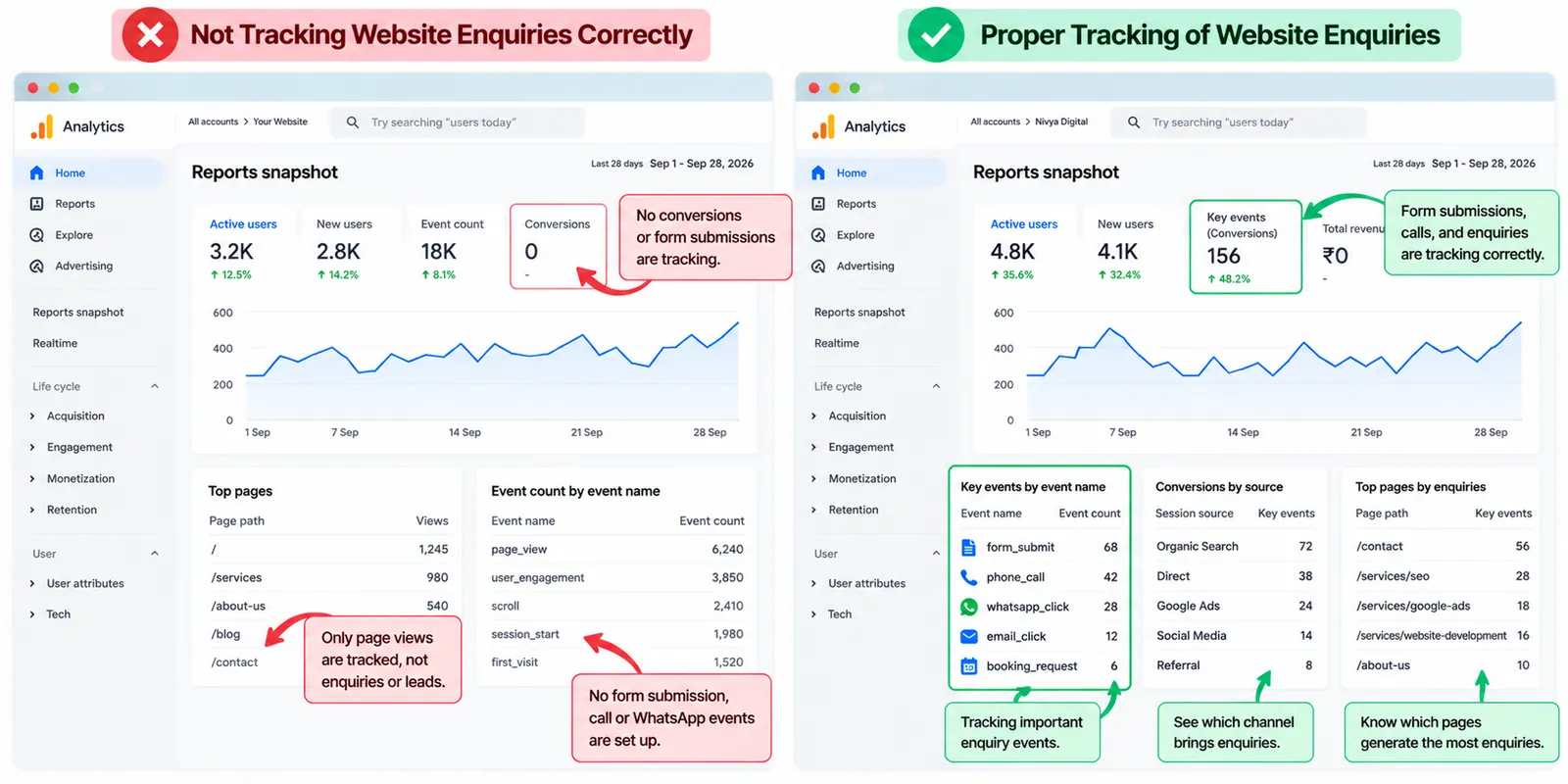
Sometimes, the problem is not that your website generates no enquiries. The problem is that your analytics setup does not measure them accurately.
For example, a visitor might click your phone number or start a WhatsApp conversation without completing a website form.
If you only measure form submissions, you may underestimate how many leads your website contributes.
How to fix it
Configure Google Analytics 4 to measure meaningful lead-generation actions.
Google recommends the generate_lead event for submitted lead forms and information requests. It also supports events for lead qualification and later sales stages.
Analytics Help
Track relevant actions such as contact form submissions, consultation requests, phone-link clicks, and WhatsApp-link clicks.
Remember that a click does not necessarily mean a completed conversation or qualified lead.
Test your tracking setup and compare analytics data with actual enquiries received.
11. You Are Not Testing and Improving Your Website
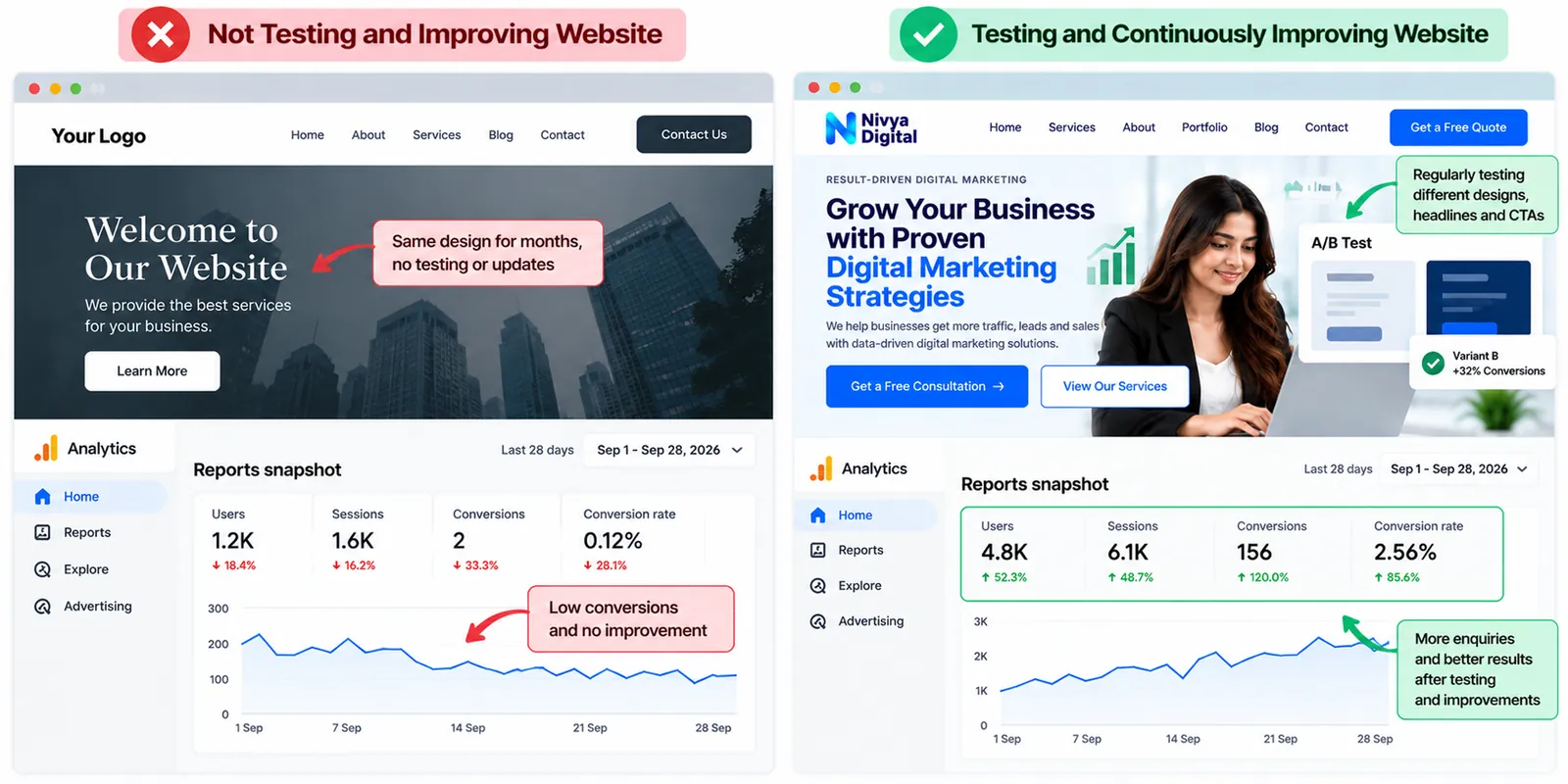
A website should not remain unchanged simply because it is attracting traffic.
Customer expectations, competing offers, devices, and acquisition channels can change over time.
Without regularly reviewing website performance, businesses may continue losing potential customers through problems they have never identified.
How to fix it
Use a continuous conversion rate optimization (CRO) process.
Start by identifying pages with substantial relevant traffic but relatively few enquiries.
Review visitor behaviour, test different calls to action, improve page content, and simplify the contact process.
Where traffic volume permits, use controlled A/B tests rather than assuming a design change will improve results.
Measure performance before and after each meaningful change.
The objective is to build a website that consistently improves its ability to turn relevant visitors into business opportunities.
How to Calculate Your Website Enquiry Conversion Rate
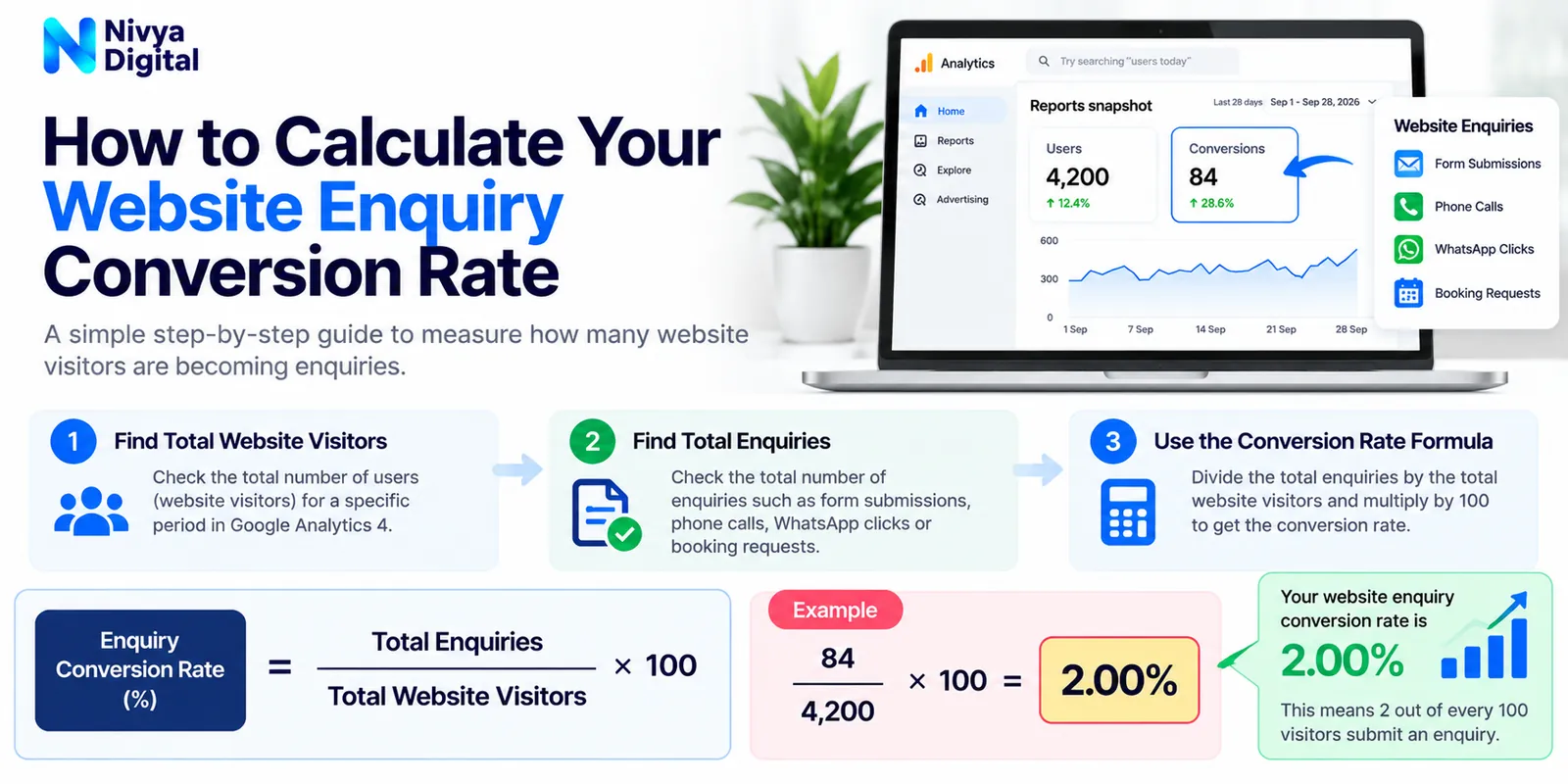
Your website enquiry conversion rate shows the percentage of visits that result in an enquiry.
For a session-based measurement, use:
[ \text{Enquiry Conversion Rate}=\frac{\text{Sessions with an Enquiry}}{\text{Total Sessions}}\times100 ]
For example, consider a website that receives 5,000 sessions and generates 50 enquiry-producing sessions in one month.
Illustrative example
Website sessions
5,000
Enquiry sessions
50
Enquiry conversion rate
1.0%
An enquiry conversion rate should be evaluated in context. The right benchmark depends on your industry, traffic source, offer, and definition of an enquiry.
For GA4 reporting, make sure the numerator and denominator use consistent measurement units.
A Practical 30-Day Plan to Turn Website Traffic Into Enquiries
| Timeline | Action plan |
|---|---|
| Days 1–7 | Audit traffic sources, landing pages, enquiry forms, mobile experience, and conversion tracking. |
| Days 8–14 | Improve website messaging, CTAs, contact forms, page speed, and service-page clarity. |
| Days 15–21 | Add genuine trust signals, answer customer questions, and improve high-intent landing pages. |
| Days 22–30 | Review enquiry data, test priority changes, and develop an ongoing optimization plan. |
The first month should focus on identifying and addressing the biggest obstacles. It does not guarantee a particular number of new leads.
How Nivya Digital Can Help Turn Website Visitors Into Potential Customers
At Nivya Digital, we understand that attracting website visitors is only one part of building a successful online business.
A strong digital marketing strategy should also help the right audience understand your services, trust your business, and take the next step.
Our digital marketing and development services can support businesses through search engine optimization, website development, Google Ads, content marketing, social media marketing, CRM development, and business automation.
By combining relevant traffic acquisition with clearer website experiences and effective lead-management processes, businesses can create more opportunities to turn online interest into customer enquiries.
Whether you serve local customers or target international markets, the priority should be attracting qualified visitors and making it easier for them to connect with your business.
Ready to improve your website's lead generation?
Visit Nivya Digital to explore our services and discuss your business goals.
Conclusion
Getting website traffic but no enquiries does not automatically mean your SEO or marketing strategy has failed.
It may mean your website is attracting the wrong audience, creating uncertainty, or making it difficult for interested visitors to take action.
By addressing these 11 hidden problems, businesses can improve the experience they offer potential customers and build a more effective lead-generation process.
Instead of focusing exclusively on traffic growth, focus on the complete journey—from the first website visit to a genuine customer enquiry.
The goal is not simply more visitors. It is more relevant visitors, stronger trust, and better opportunities to win customers.
Comments (1)
This article helped me understand why a website can get traffic without generating enquiries. The practical insights on user experience, trust signals, calls to action, and conversion optimization were especially useful. A helpful read for businesses looking to turn more visitors into potential customers!