
When you finish writing an SEO article, it is easy to lose track of how many times you have used your main keyword.
You may think a phrase appears only a few times, but after writing 1,000 or 2,000 words, you might discover that you have repeated it much more than expected. The opposite can happen too: you may write a detailed article and barely mention the phrase you are actually targeting.
This is where a keyword count checker can help.
The Zuhio Keyword Count Checker is discussed online as a simple tool for checking keyword usage in written content. Recent descriptions generally focus on counting keyword occurrences and, depending on the version/workflow being discussed, reviewing keyword density or target ranges.
But keyword counting is only one part of SEO.
In this guide, we'll explain what the Zuhio Keyword Count Checker is, how keyword counting works, how to review your content, and how you can use Nivya Digital's free Keyword Density Checker as an alternative for checking keyword frequency and density.
What Is the Zuhio Keyword Count Checker?
The Zuhio Keyword Count Checker is a keyword-analysis utility designed around a simple content question:
“How often does my target keyword appear in this article?”
Recent independent coverage describes workflows where users provide their content and target keyword information and then review keyword counts. Some sources describe a simple keyword-and-density workflow, while a more recent hands-on review describes a keyword-list and target-range workflow.
That difference is worth keeping in mind because online descriptions of the tool are not completely consistent.
The basic SEO concept, however, is straightforward: counting keyword occurrences helps you understand how frequently a term appears in your content.
It can be useful for:
Blog writers
SEO professionals
Content marketers
Website owners
Freelance writers
Bloggers
Editors
A keyword counter is especially useful during the final editing stage, when your article is already written and you want to review how naturally your target terms are distributed.
What Does a Keyword Count Checker Actually Measure?
At its simplest level, keyword counting measures frequency.
Suppose your article contains 1,000 words and your target keyword appears 8 times.
Your raw keyword count is:
8 occurrences
If you want to express those occurrences as a percentage of the total word count, you can calculate keyword density:
Keyword Density = (Keyword Occurrences ÷ Total Words) × 100
So:
8 ÷ 1,000 × 100 = 0.8%
This gives you two different pieces of information:
| Metric | What it tells you |
|---|---|
| Keyword count | How many times the keyword appears |
| Keyword density | How frequently it appears relative to total words |
The distinction matters because the same keyword count can represent very different levels of repetition depending on the article length.
For example:
5 mentions in 300 words = relatively frequent
5 mentions in 3,000 words = relatively low frequency
That's why looking at the raw count and the context is more useful than focusing on a single percentage.
How Does the Zuhio Keyword Count Checker Work?
Recent descriptions of Zuhio generally place the tool around keyword-frequency checking. Some sources describe entering a keyword and checking a pasted article, while one recent hands-on review describes a batch workflow where keywords can be supplied with target ranges.
Because third-party descriptions differ, the safest approach is to verify the interface you are actually using before relying on any specific feature.
The general workflow is:
Prepare your content → Enter the keyword information → Run the check → Review the count → Edit if necessary
The important part isn't simply getting a number.
You need to understand where the keyword appears and whether those mentions make sense.
How to Check Keyword Usage in an Article
Whether you're using Zuhio or another keyword-counting tool, the process is quite simple.
Step 1: Finish Your Article First
Don't start your article by trying to hit a particular keyword count.
Write the article around the reader's search intent first.
Your draft should contain:
A useful introduction
Clear headings
Helpful information
Examples
Relevant supporting topics
A conclusion
FAQs when appropriate
Once the article is almost finished, check your keyword usage.
This approach makes it less likely that your writing will sound forced.
Step 2: Choose Your Primary Keyword
Identify the main search phrase you are targeting.
For this article, the primary keyword is:
Zuhio Keyword Count Checker
You can also identify related terms such as:
Zuhio keyword checker
keyword count checker
keyword frequency checker
keyword density checker
keyword usage checker
Don't try to insert all of these phrases everywhere.
Use them only when they make sense.
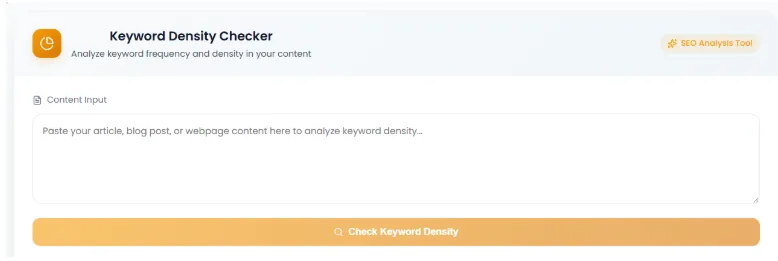
Step 3: Add Your Content to the Checker
Copy the article you want to analyze and add it to the relevant content field.
Try to check the actual article text, rather than adding navigation, unrelated footer content, or other text that isn't part of the article.
This gives you a more meaningful picture of the content you're optimizing.
For your Nivya Digital article, use a screenshot showing a sample article pasted into your Keyword Density Checker.
Suggested caption:
Paste your article into Nivya Digital's Keyword Density Checker to review keyword usage.
ALT text:
Article content pasted into Nivya Digital Keyword Density Checker
Step 4: Check Your Keyword
Run the keyword check.
If you are using a tool that shows keyword frequency, review the number of occurrences.
If it also provides density, look at that number as additional context.
But don't immediately decide:
“My percentage is too low, so I need to add the keyword 10 more times.”
That's where keyword optimization can turn into keyword stuffing.
Instead, read the sentences containing the keyword.
Ask yourself:
Does this phrase genuinely belong here?
If yes, keep it.
If the sentence sounds repetitive or unnatural, rewrite it.
Step 5: Review the Results
A keyword count is useful because it gives you something concrete to inspect.
For example:
Target keyword: SEO tools
Occurrences: 12
Article length: 1,500 words
The number itself doesn't tell you whether the article is good or bad.
You still need to ask:
Are the mentions spread naturally?
Are several mentions close together?
Is the phrase repeated unnecessarily?
Does the keyword appear in useful sections?
Does the content answer the user's actual question?
A number should start your review—not replace it.
Try Nivya Digital's Free Keyword Density Checker
If your goal is simply to check keyword frequency and density, you don't necessarily need a complicated SEO platform.
Nivya Digital's Keyword Density Checker lets you paste your content, run the check, and review keyword frequency and density percentage directly in the browser. The tool's current page specifically describes this workflow: paste your article, click “Check Keyword Density,” and view the resulting frequency and density information.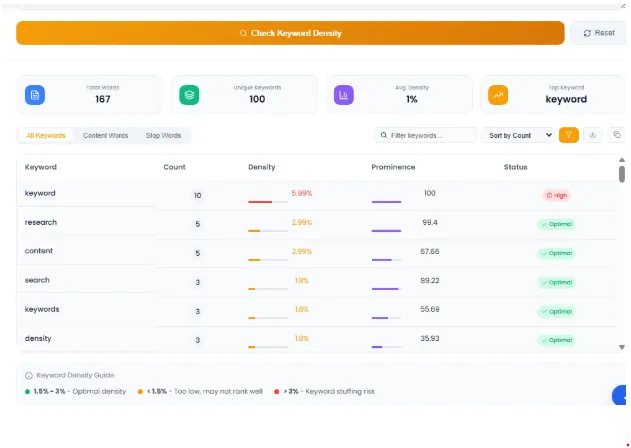
Ideally, show:
Content inside the input area
The Check Keyword Density button
The resulting analysis, if visible
Suggested caption:
Analyze keyword frequency and density with Nivya Digital's free SEO tool.
ALT text:
Nivya Digital free keyword density checker showing keyword analysis
Internal link:
Link this section directly to:
Nivya Digital → Keyword Density Checker
Keyword Count vs Keyword Density
These terms sound similar, but they describe different measurements.
Keyword Count
Keyword count is simply the number of times a keyword appears.
Example:
Keyword: content marketing
Occurrences: 7
The keyword count is 7.
Keyword Density
Keyword density compares the keyword occurrences with the total number of words.
For example:
7 occurrences
1,000 total words
7 ÷ 1,000 × 100 = 0.7%
So the density is 0.7%.
Why Both Can Be Useful
Keyword count gives you the raw number.
Keyword density gives you context based on article length.
Neither number, by itself, tells you whether your content will rank.
Is There an Ideal Keyword Density for SEO?
This is one of the most common questions about keyword checkers.
The short answer is:
There is no universal keyword-density percentage that guarantees higher Google rankings.
You may find SEO tools and articles recommending a particular percentage range, but Google's Search Essentials focus on helpful, reliable, people-first content and warn against keyword stuffing.
Google defines keyword stuffing as filling a page with keywords or numbers in an attempt to manipulate rankings, including repeating words or phrases so often that the writing becomes unnatural.
So don't write an article around a formula such as:
“I need exactly 1% keyword density.”
Instead, use keyword data as a quality-control check.
Why Keyword Stuffing Is a Problem
Imagine you are writing about SEO tools.
This sentence feels unnatural:
This keyword density checker is a keyword density checker that helps you check keyword density because the keyword density checker checks keyword density.
The phrase has been repeated so much that the reader has to work through the repetition to understand the sentence.
A better version would be:
A keyword density checker can help you review how frequently important terms appear in your content before you publish it.
The second sentence communicates the same idea without forcing the exact phrase into every possible position.
Google's current spam policies explicitly address this kind of unnatural repetition as keyword stuffing.
Where Should You Use Your Primary Keyword?
Your main keyword can appear in important parts of the page when it fits naturally.
Title
Tell the reader exactly what the page covers.
H1
Your main heading should clearly describe the topic.
Introduction
Mention the main subject naturally near the beginning.
Main Content
Use the term when it helps explain the topic.
Image Alt Text
Describe images accurately. Don't stuff keywords into alt text just for SEO.
Google's Search Essentials recommends using words people would use to search for your content in prominent and descriptive places, including titles, headings, alt text, and link text.
How to Use a Keyword Checker Without Over-Optimizing
Here's a simple workflow that works well for content writers.
1. Research the topic
Understand what the reader actually wants.
2. Choose the primary keyword
Select the main phrase that represents the topic.
3. Build the outline
Create sections around the questions your audience needs answered.
4. Write naturally
Don't stop after every paragraph to count keywords.
5. Check keyword usage
Use a keyword counter or density checker during editing.
6. Review repetitive mentions
Look at the actual sentences, not just the number.
7. Improve readability
Replace unnecessary repetition with natural wording.
8. Check the complete page
Review headings, title, links, images, FAQs, and overall usefulness.
This makes keyword checking part of a content workflow, rather than turning it into the entire SEO strategy.
Example: Checking a 1,000-Word Article
Let's say you've written a 1,000-word blog post.
Your target keyword appears:
10 times
The basic density calculation is:
10 ÷ 1,000 × 100 = 1%
At first glance, that number may look perfectly neat.
But now imagine all 10 mentions are concentrated in the introduction and first three paragraphs.
The article could still sound repetitive.
Now imagine those 10 mentions are naturally distributed throughout the article where they are genuinely relevant.
The writing may feel completely normal.
This is why context matters more than chasing a specific percentage.
What a Keyword Count Checker Cannot Tell You
A keyword counter is useful, but it is not a complete SEO audit.
It cannot tell you whether:
Your search intent is correct
Your article is better than competing pages
Your title will attract clicks
Your page has strong internal linking
Your website has technical SEO problems
Your backlinks are strong
Your page loads quickly
Your content is genuinely useful
Your keyword has enough search demand
In other words:
Keyword count is one small part of SEO.
Use it alongside a broader content and SEO strategy.
Who Can Benefit From a Keyword Count Checker?
Bloggers
Bloggers can use keyword checking during their final editing pass to spot unnecessary repetition.
SEO Professionals
SEO specialists can use frequency data as one small part of on-page content analysis.
Content Writers
Writers can use a checker before submitting an article to make sure important terms haven't been accidentally overused or omitted.
Website Owners
If you write your own website content, a keyword checker can provide a quick final review before publishing.
Digital Marketers
Content teams can use keyword checks as part of their editorial workflow.
Common Keyword Counting Mistakes
Mistake 1: Trying to Hit an Exact Percentage
A specific percentage isn't a guarantee of better rankings.
Mistake 2: Adding the Keyword Everywhere
More mentions aren't automatically better.
Mistake 3: Ignoring Related Language
Natural content uses variations and related concepts rather than repeating one exact phrase endlessly.
Mistake 4: Looking Only at the Number
Always inspect the actual sentences.
Mistake 5: Forgetting Search Intent
A perfectly measured keyword count cannot fix an article that doesn't answer the user's question.
Mistake 6: Checking Too Early
Write your draft first. Then check it.
Zuhio Keyord Count Checker vs a Keyword Density Checker
These tools can address related problems, but they don't necessarily have the same workflow.
| Feature | Keyword Count Checker | Keyword Density Checker |
|---|---|---|
| Keyword frequency | ✓ | ✓ |
| Keyword occurrence review | ✓ | ✓ |
| Density calculation | Depends on the tool/version | ✓ |
| Full SEO audit | ✗ | ✗ |
| Search volume research | ✗ | ✗ |
| Technical SEO audit | ✗ | ✗ |
| Content quality judgment | ✗ | ✗ |
The important thing is to choose a tool based on what you actually want to measure.
If you specifically want to check keyword frequency and density, you can use the free Nivya Digital Keyword Density Checker as part of your content-editing workflow.
A Practical SEO Workflow for Your Next Article
Here is a simple process you can repeat every time you publish an SEO blog:
Keyword research
↓
Search intent
↓
Content outline
↓
Write naturally
↓
Add relevant internal links
↓
Check keyword usage
↓
Edit repetitive sentences
↓
Proofread
↓
Publish
The keyword checker belongs near the editing stage.
That's important because you don't want the tool controlling how you write the article.
You want the tool helping you review what you've already written.
Final Thoughts
The Zuhio Keyword Count Checker is useful to understand in the context of one simple SEO task: checking how frequently keywords are used in written content.
But don't make the mistake of turning keyword count into the goal of your article.
Write the content for the reader first. Then check your keyword usage, identify obvious repetition, and make changes where they improve the article.
If you want a straightforward way to check keyword frequency and keyword density, you can also try Nivya Digital's free Keyword Density Checker. It lets you paste your content, run the analysis, and review keyword frequency and density directly in your browser.
Check your content before you publish—not to chase a magic percentage, but to make sure your keywords support the content instead of taking it over.
Comments (0)
No comments yet
Start the discussion by sharing your perspective